

Vuzix M400
More actions
| Vuzix M400 | |
|---|---|

| |
| Basic Info | |
| VR/AR | Augmented Reality |
| Type | Smart Glasses |
| Subtype | Enterprise AR |
| Platform | Android |
| Creator | Vuzix |
| Developer | Vuzix |
| Manufacturer | Vuzix |
| Announcement Date | February 25, 2019 (MWC)[1] |
| Release Date | September 17, 2019 (early-adopter shipments)[2] |
| Price | US$1,799.99 (2019 early-adopter bundle)[3]; US$1,499.99 (Xtreme listing, October 2026)[4] |
| Website | https://www.vuzix.com/products/m400-smart-glasses |
| Versions | M400 (model 472); Xtreme and Extended Wear kits[5][4] |
| Requires | External USB power for normal operation[6] |
| Predecessor | Vuzix M300XL[3] |
| System | |
| Operating System | Android 13; launched with Android 8.1[7][2] |
| Chipset | Qualcomm Snapdragon XR1[8] |
| CPU | 8 cores, 2.52 GHz (manufacturer specification)[9] |
| Storage | |
| Storage | 64 GB internal flash[8] |
| Memory | 6 GB RAM[8] |
| Display | |
| Display | Occluded OLED; monocular[8] |
| Peak Brightness | > 2000 nits (manufacturer specification)[9] |
| Resolution | 640 × 360[8] |
| Image | |
| Field of View | 16.8° diagonal (manufacturer specification)[9] |
| Optics | |
| Optics | Occluded near-eye display[8] |
| Ocularity | Monocular; left or right eye[9] |
| Tracking | |
| Tracking | 3DoF orientation sensing[9] |
| Rotational Tracking | Gyroscope, accelerometer and magnetometer[8] |
| Audio | |
| Audio | Integrated speaker; Bluetooth audio[9] |
| Microphone | Three noise-cancelling microphones[8] |
| Camera | Up to 12.8 MP; autofocus and OIS; 4K30 video in developer documentation[8][10] |
| Connectivity | |
| Connectivity | Wi-Fi a/b/g/n/ac, Bluetooth 5.0, USB-C[9] |
| Ports | USB Type-C (USB 3.1 Gen 2)[9] |
| Wireless Video | Application-dependent remote video calls[4] |
| WiFi | 2.4/5 GHz 802.11 a/b/g/n/ac[9] |
| Bluetooth | 5.0 BR/EDR/LE[9] |
| Power | External USB power; internal hot-swap reserve[6] |
| Battery Capacity | 135 mAh internal; 3200 mAh Xtreme external pack (2025 sheet)[9] |
| Battery Life | Depends on battery and workload; older sheet estimates 2-12 hours[11] |
| Charge Time | Up to two hours for the USB-A battery in the 2019 manual[5] |
| Device | |
| Weight | Less than 3 oz (older manufacturer sheet; configuration unspecified)[11] |
| Headstrap | Rail mounts for frames, headbands and hard hats[5] |
| Sensors | GPS/GLONASS; gyroscope, accelerometer, magnetometer[9] |
| Input | Three navigation buttons, power button, multi-finger touchpad, voice[5] |
| Compliance | IP67 and 2 m drop rating (manufacturer); ISO Class 2 cleanroom certification announced in 2022[2][12] |
The Vuzix M400 is an enterprise-focused monocular smart glasses device developed by Vuzix. It is a wearable Android computer with an occluded OLED display, a camera and voice, touchpad and button controls. It supports hands-free instructions, documentation and remote assistance in manufacturing, field service, healthcare, and warehouse logistics environments. The viewer can be mounted for either eye. Vuzix announced the M400 at Mobile World Congress in February 2019 and began shipping early-adopter orders in September 2019.[8][5][1][2]
The M400 uses the Qualcomm Snapdragon XR1 platform and runs applications on the device, while an external battery normally supplies power. Its internal battery provides a short reserve for exchanging the external supply. The M400's occluded display differs from the see-through waveguide display of the related Vuzix M4000.[8][6]
History and development
Vuzix, founded in 1997, developed the M400 within its M-Series wearable-computer line. Earlier products included the M100, M300 and M300XL.[13][3] The announcement described collaboration with Qualcomm that had been announced in May 2018. Vuzix presented the M400 as an XR1-based upgrade to its existing M-Series products, with more memory, improved microphones, a multi-finger touchpad and built-in GPS. Vuzix described the collaboration as developing the first XR1-based enterprise smart glasses. That positioning and its claims of markedly faster performance were manufacturer statements.[1]
| Date | Event |
|---|---|
| February 25, 2019 | M400 announced for the February 25-28 Mobile World Congress in Barcelona; volume production was then forecast for summer 2019.[1] |
| May 30, 2019 | Early Adopter Program opened at US$1,799.99. The bundle included an M300XL for immediate delivery and an M400 to ship later.[3] |
| September 17, 2019 | Vuzix reported US, EU, Japanese and Canadian regulatory approvals, began shipping early-adopter M400 orders, and offered purchases through its US, EU and Japanese stores.[2] |
| November 3, 2022 | The separate M400C became available for orders. It is a USB-C peripheral requiring an external host, rather than the M400 wearable Android computer.[14] |
| October 14, 2024 | Android 13 released for general availability on the M400.[7] |
Both the M400 and M400C include cameras. Vuzix's November 2022 announcement distinguishes the M400C by its dependence on a computer or compatible smartphone supporting USB-C DisplayPort Alt Mode. The manufacturer's October 2026 support page lists M400C among discontinued products.[14][15]
Design philosophy and physical design
The M400 is intended for assisted reality workflows: looking at work instructions or reference material and sharing a first-person camera view while keeping the hands available for a task. Its display provides a small information window for one eye. The other eye and the surrounding view remain available; the OLED itself is occluded. Vuzix's developer documentation explicitly distinguishes this from the M4000's transparent display.[4][8]
The viewer attaches to a mounting rail. The original manual describes mounting the viewer on the dominant-eye side of the frames and attaching the external battery to the other side. The viewer can slide forward and backward, and its position and eyepiece can be adjusted. The manual lists lensless frames, prescription frames, safety frames, hard-hat mounts and headbands; its standard frames can be worn over many prescription glasses. These fit options are distinct from a specified optical diopter adjustment.[5]
Vuzix describes the design as intended for all-day comfort.[9] An older Vuzix product sheet lists weight as less than 3 oz, without clearly defining the battery and mounting configuration included in that figure. The 2025 sheet and October 2026 store list the Xtreme kit with a 3200 mAh weather-rated external pack and a headband. Different frames and battery arrangements therefore need to be identified when comparing a complete worn system with another device's quoted weight.[11][9][4]
Display technology
The M400 uses an occluded, full-color 640 × 360 OLED display with a 16:9 aspect ratio. Vuzix's May 2025 product sheet specifies a 16.8° diagonal field of view, brightness greater than 2000 nits, contrast greater than 10,000:1 and 24-bit color. These are manufacturer specifications. The sheet compares the apparent image size with a 5-inch mobile-device screen viewed from 17 inches.[8][9]
The preliminary May 24, 2019 sheet instead rounded the diagonal field of view to 17° and listed brightness greater than 1600 nits and contrast greater than 100,000:1. It explicitly marked its specifications preliminary and certifications targeted. Those earlier figures should not be combined with the later product sheet as one measured specification set.[16]
The original user manual advises adjusting the eyepiece until the full image is visible. It also notes that first-time users may need time to become accustomed to focusing on the near-eye display. Android 11 release notes added automatic screen shutoff when the device is not worn, with a setting controlling this OLED burn-in protection behavior.[5][17]
Processing power and sensors
The M400 contains a Snapdragon XR1, 6 GB RAM and 64 GB internal flash storage. Vuzix's documentation and 2025 product sheet describe an eight-core 2.52 GHz processor; this is the manufacturer's specification, rather than an independent performance measurement. The launch materials describe the XR1's heterogeneous architecture, including an ARM-based CPU, GPU, vector processor and AI engine. Vuzix described the dedicated XR platform as offering improvements in power consumption and thermal efficiency. Such platform capabilities do not establish that every M400 application uses machine learning or spatial tracking.[8][9][1]
The listed sensors include GPS/GLONASS and a three-axis gyroscope, accelerometer and magnetometer/compass. Vuzix describes three degrees of freedom of head tracking. This is orientation sensing; the specification does not establish room-scale positional tracking or an automatically world-registered display.[9]
Camera system
The developer overview lists up to 12.8-megapixel still images and 4K video. The Camera documentation, updated December 9, 2025, lists 4032 × 3024 among supported still-image modes and 3840 × 2160 at 30 fps for 4K UHD video. Its other listed video modes, including 1920 × 1080 and 1280 × 720, are also shown at 30 fps. The document supports both the older Android Camera API and Camera2.[8][10]
The camera has autofocus from 10 cm to infinity, an LED flash/scene light and an optical image stabilization motor. The OIS setting affects applications using the camera. A 1408 × 792 center-crop mode discards pixels around the sensor edges and is described as useful for small, centered barcode targets.[10]
Vuzix's May 2025 product sheet advertises up to 13-megapixel stills and 1080p streaming at 60 fps. That differs from the 30 fps modes listed in the developer page; the two documents are retained as dated manufacturer descriptions, rather than a universal frame-rate guarantee. Remote-call resolution and latency also depend on the application and connection.[9][10][18]
Connectivity and audio
The manufacturer lists USB 3.1 Gen 2 through USB Type-C, dual-band 2.4/5 GHz Wi-Fi supporting 802.11 a/b/g/n/ac, and Bluetooth 5.0 BR/EDR/LE. The integrated speaker is rated by Vuzix at up to 97 dB output, and the glasses have three noise-cancelling microphones. Bluetooth audio profiles include HSP and A2DP.[9]
The original manual uses USB-C for power and development/data connections. It warns that the supplied battery does not provide data pass-through, and that a development computer's USB supply must provide sufficient power. The developer battery guide specifies a supply capable of delivering 1.5 A for reliable operation. A charge-only connection through a battery is therefore different from a direct USB data connection to a computer.[5][6]
Vuzix's current product page lists Zoom, Microsoft Teams and WebEx integration and mobile device management partners. It also describes the Android/iOS companion app for setup, notifications, remote control and device configuration. Collaboration features are provided by the relevant software and deployment; the M400 has its own Android applications and is not limited to displaying content from a paired phone. Vuzix announced TeamViewer Pilot support for M400 in May 2020, including live video, audio and remote annotations.[19][4][5]
Input methods
The original M400 manual distinguishes three navigation buttons and a separate power button. Short presses on the front, center and rear navigation buttons move forward, move back and select. Long presses open a menu, return home or go back a step. The touchpad accepts directional swipes and one-, two- and three-finger gestures.[5]
| Input in the original manual | Example behavior |
|---|---|
| One-finger tap / hold | Select or wake the screen / open a menu[5] |
| One-finger directional swipe | Move the current selection[5] |
| Two-finger tap / hold | Go back / return home[5] |
| Two-finger swipe up or down | Raise or lower volume[5] |
| Three-finger tap | Turn the screen off[5] |
Voice interaction uses the activation phrase "Hello Vuzix" when speech recognition is configured. The original manual gives a default 15-second command-listening period. Version 3.0.2 added numbered on-screen bubbles for applications without custom speech vocabularies, allowing the user to speak a number to activate a control. Command recognition in a noisy workplace remains dependent on the environment and user; the agricultural study below tested those limits.[5][17][18]
Battery system
Normal operation requires an external USB battery or another suitable USB power source. The small internal battery supports exchanging the external battery while the device stays on. The developer guide describes a limited exchange period after an external battery is depleted. The original manual says that disconnecting USB causes poweroff after about five minutes, or sooner if the internal battery is discharged; this is a reserve period, not a full standalone runtime.[6][5]
| Document/configuration | Documented battery details | Qualification |
|---|---|---|
| May 2019 preliminary sheet | 94 mAh internal and 1184 mAh external USB-C battery | Pre-production specifications explicitly subject to change.[16] |
| Older product sheet dated 01-02-2020 | 135 mAh internal; 750 mAh Longevity or 3350 mAh Extended external battery | The sheet estimates 2-12 hours, depending on external battery choice. Its footer date is reproduced without inferring an unambiguous month/day convention.[11] |
| May 2025 product sheet and October 2026 Xtreme kit | 135 mAh internal reserve and 3200 mAh Xtreme Weather pack | The Xtreme external pack is separately described as IP67-rated; other batteries are not automatically covered by that rating.[9] |
The original manual gives up to two hours to charge a fully depleted USB-A battery. That timing belongs to the battery described in that manual, and does not specify a universal recharge time for later packs. The older 2-12 hour runtime range is a manufacturer estimate. It cannot establish fixed 2-3 hour or 8+ hour runtimes for all workloads.[5][11]
A Vuzix case study labeled 2020 reports that surgeon Bor-Chih Cheng at Chi Mei Medical Center used M400 glasses to stream during a 16-hour operation. This is an attributed account of prolonged use; the case study does not identify a single-charge battery capacity or test method for a 16-hour battery-life claim.[20]
Enterprise applications and research
The manufacturer targets remote expert assistance, maintenance, inspection, image/video documentation and guided work. Its product materials also describe warehousing and medical uses. These are application areas, rather than guaranteed efficiency gains. Published device-specific work includes agricultural maintenance tests, surgical telementoring and custom prehospital communication software.[4][9]
In a July 2026 warehousing article, Vuzix describes M400 workflows for hands-free order picking, visual item confirmations and integration with inventory systems. These functions depend on the deployed application; the manufacturer account does not establish universal improvements in picking speed or accuracy.[21]
Milking-machine maintenance
A 2022 University of Sassari study tested M400 glasses in laboratory conditions modeled on milking facilities. It used Vuzix Remote Assist and Brochesia B View over a university Wi-Fi connection averaging 20 Mbps, with VGA or 720p streams at 30 fps. The authors also built a QR-linked pulsation-check workflow with Brochesia BStep. In their transmission tests, mean video delay was about 0.9 seconds and audio delay generally under 0.5 seconds. Those are results of that network/application setup.[18]
Four operators tested 39 voice commands under increasing noise. Mean recognition was 89% at 70 dB, with substantial operator variation at 75 dB and unusable voice interaction at 80 dB or more in the reported tests. The study collected 2254 QR scanning records across two charge cycles and reported about 3 hours 28 minutes for scanning and 3 hours 50 minutes or 4 hours for the two video-call apps. It identified display size, battery duration and prolonged-wear comfort as limitations. This was a laboratory functionality study and maintenance demonstration, not a large trial of farm productivity.[18]
Surgical telementoring
A randomized study published online in 2023 and in a 2024 issue of Military Medicine assigned 36 NATO special operations combat medics to remote support or an unguided control, 18 per group. Participants performed a two-incision lower-leg fasciotomy on embalmed human specimens in a controlled operating-room training setting. The remote group used M400 glasses, Gemvision software and a MacBook Air on Wi-Fi, with an iPhone used to establish the connection. Remote support improved the reported overall operative-performance score, while mean procedure time increased from 10 minutes 50 seconds in controls to 19 minutes 39 seconds with support. Setup time was excluded. The authors noted that the sample was smaller than the calculated target of 106, blinding was impossible, and the setting did not reproduce battlefield conditions.[22]
A separate pilot study published in 2026 examined 45 open inguinal-hernia repairs performed by three residents at one Italian hospital during January-June 2024. Fifteen operations per group compared passive on-site assistance, active on-site mentoring and M400-based remote mentoring. A passive attending surgeon remained at the operating table in the remote group. The custom setup streamed the resident's camera view and two-way audio to a laptop; it did not provide telestration or recording. Remote mentoring had higher accuracy than passive assistance for selected steps, but longer mean operating time: 60.66 minutes, versus 45.33 and 44.00 minutes. No statistically significant postoperative differences were found, but the trial was not powered to demonstrate safety equivalence, educational non-inferiority or rare-complication differences. It used repeated observations from only three residents and an unblinded assessor.[23]
Prehospital application design
A 2024 Journal of Medical Internet Research study developed an M400 application with 43 distinct US emergency medical service providers between November 2021 and April 2023. Its prototypes used the Zoom API for calls, Vuzix speech tools and third-party CrunchFish gesture software. Participants helped refine hospital-contact, call-priority, multimedia-sharing and touchless-input features. Mean scores from a modified System Usability Scale were 74.3 (SD 11.3) in the first phase and 80.3 (SD 13.1) in the second. These are ratings of successive custom application designs, rather than a hardware comparison. Testing took place in offices or simulation laboratories, with no assessment of clinical outcomes in normal field work. Providers raised network, battery, noise and hospital-workflow integration concerns.[24]
Compliance and care
Vuzix's September 2019 shipping announcement reports IP67 dust and water protection, resistance to 2-meter drops onto concrete, and regulatory approvals in the US, EU, Japan and Canada. The IP67 description covers immersion to 1 meter for up to 30 minutes. Ratings describe specified conditions and components; the external battery must be checked separately.[2][4]
The May 2025 product sheet specifies operation from -20°C to 45°C and 0-95% relative humidity, and storage from -30°C to 70°C with reference to MIL-STD-810H. That is narrower than a blanket assertion that the entire product is MIL-STD-810G-certified. Its earlier sheet instead gave a 10-45°C storage range. These are dated manufacturer specifications.[9][11]
Vuzix announced ISO Class 2 certification under DIN EN ISO 14644-1 in May 2022 following airborne-particle testing. Its product FAQ also describes IEC60601-1-2:2014 certification and calls the M400 HIPAA-compliant. These are attributed manufacturer statements; the cleanroom claim concerns particle emissions and does not describe sterilization, while the cited product page does not document a clinical approval for every medical workflow.[12][4]
For cleaning, the original manual specifies a damp cloth and mild detergent when needed, warns that all-purpose cleaners can damage seals, and requires avoiding standing water in the USB connector before connecting a cable. These instructions do not establish unrestricted alcohol disinfection or sterility.[5]
Software platform and support
The original M400 shipped with Android 8.1. Its manual describes preinstalled Camera, Gallery and QR/barcode Scanner applications, the Application Carousel, the Vuzix App Store's over-the-air installation system and ADB as an alternative for advanced users. Developer documentation supports ordinary Android APIs alongside device-specific capabilities. Enterprise deployments may use custom software and mobile device management.[2][5][8][9]
| Date | Release/development | Documented scope |
|---|---|---|
| February 22, 2023 | M400 version 3.0.2 | Android 11 upgrade, WPA3 Wi-Fi, MDM integration changes, numeric voice-control bubbles and OLED burn-in protection.[17] |
| October 14, 2024 | Android 13 general availability | Updated Android API 30 to 33, networking, permissions and enterprise management.[7] |
| August 12, 2026 | M400 version 4.1.0 | GPS assistance downloads, DHCP-supplied location/time information and security patches through the January 2025 bulletin.[25] |
The manufacturer's support commitment checked in October 2026 says M400 product and technical support is planned through December 31, 2028, with Android remaining at version 13. Routine OS security updates are no longer planned; Vuzix says it will assess critical or severe issues with customers during the support period. It also plans to maintain Zoom, Microsoft Teams and Mobilium functionality as needed through that date. This later policy qualifies the ongoing-security-support wording in the 2024 Android 13 announcement.[4][7]
Comparison with competitors
The following is a comparison of documented historical specifications and dated prices. It does not indicate present availability. Weight figures have different stated scopes; the M400 sheet does not define a comparable complete worn configuration. The prices describe different offers and dates.[11][26][27]
| Feature | Vuzix M400 | Google Glass Enterprise Edition 2 | RealWear HMT-1 |
|---|---|---|---|
| Historical price | US$1,799.99 early-adopter bundle, May 2019[3] | US$999 reported launch price, May 2019[28] | US$2,500 in Cisco FAQ, June 2020[29] |
| Processor | Snapdragon XR1[8] | Qualcomm XR1[26] | Snapdragon 625[27] |
| Display | Monocular, occluded OLED[8] | Monocular display above the right eye[26] | Monocular LCD[27] |
| Resolution | 640 × 360[8] | 640 × 360 RGB[26] | 854 × 480[27] |
| Camera / video | Up to 12.8 MP; 4K30 in developer documentation[8][10] | 8 MP; up to 1080p30[26] | 16 MP; up to 1080p30[27] |
| Quoted weight | Less than 3 oz; configuration unspecified[11] | 46 g without frame[26] | 380 g in the 2018 datasheet[27] |
| Ingress rating | IP67 (manufacturer description)[2] | IP53[26] | IP66[27] |
Strengths and limitations
The M400 combines on-device Android applications, multiple input methods, an autofocus stabilized camera, ruggedness claims and hot-swappable external power in a monocular form factor. Its small occluded information window serves assisted-reality tasks. Published studies show that application design, network quality, ambient noise and mounting affect practical use. The documented 3DoF sensors and remote video features should not be treated as a guarantee of immersive, world-registered AR.[8][10][6][18]
Technical specifications summary
| Specification | Details |
|---|---|
| Display | Occluded OLED, 640 × 360, monocular, either-eye mounting[8] |
| Field of view | 16.8° diagonal (manufacturer, 2025)[9] |
| Processor | Snapdragon XR1; Vuzix lists 8 cores at 2.52 GHz[9] |
| Memory/storage | 6 GB RAM, 64 GB internal flash[8] |
| Camera | Up to 12.8 MP, autofocus and OIS; developer page lists 4K30[8][10] |
| Connectivity | Dual-band Wi-Fi a/b/g/n/ac; Bluetooth 5.0; USB 3.1 Gen 2 Type-C[9] |
| Environment | IP67 and 2-meter concrete drop rating in 2019 announcement[2] |
| Weight | Less than 3 oz in older sheet; configuration not defined[11] |
| Battery | 2025 sheet: 135 mAh internal reserve, 3200 mAh Xtreme pack; older 750/3350 mAh configurations documented separately[9][11] |
| Price | US$1,499.99 Xtreme listing checked October 14, 2026, with sold-out/unavailable labels[4] |
See Also
Gallery
-
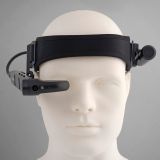 M400 mounted on a headband.

References
- ↑ 1.0 1.1 1.2 1.3 1.4 "Vuzix Announces Qualcomm Snapdragon XR1 Based Enterprise Smart Glasses". Vuzix via PR Newswire. 2019-02-25. https://www.prnewswire.com/news-releases/vuzix-announces-qualcomm-snapdragon-xr1-based-enterprise-smart-glasses-300800950.html. Retrieved 2026-10-14.
- ↑ 2.0 2.1 2.2 2.3 2.4 2.5 2.6 2.7 2.8 "Vuzix Receives Regulatory Approval and Begins Shipping M400 Smart Glasses". Vuzix via PR Newswire. 2019-09-17. https://www.prnewswire.com/news-releases/vuzix-receives-regulatory-approval-and-begins-shipping-m400-smart-glasses-300919660.html. Retrieved 2026-10-14.
- ↑ 3.0 3.1 3.2 3.3 3.4 "Vuzix Announces Early Adopters Program for the 'Best in Class' Enterprise M400 Smart Glasses". Vuzix via PR Newswire. 2019-05-30. https://www.prnewswire.com/news-releases/vuzix-announces-early-adopters-program-for-the-best-in-class-enterprise-m400-smart-glasses-300859054.html. Retrieved 2026-10-14.
- ↑ 4.00 4.01 4.02 4.03 4.04 4.05 4.06 4.07 4.08 4.09 4.10 "Vuzix M400 Smart Glasses". Vuzix. https://www.vuzix.com/products/m400-smart-glasses. Retrieved 2026-10-14.
- ↑ 5.00 5.01 5.02 5.03 5.04 5.05 5.06 5.07 5.08 5.09 5.10 5.11 5.12 5.13 5.14 5.15 5.16 5.17 5.18 5.19 "M400 User Manual: Model 472, 472PB0002(0002)". Vuzix. 2019. https://files.vuzix.com/Content/pdfs/M400-User-Guide-v1.1.pdf. Retrieved 2026-10-14.
- ↑ 6.0 6.1 6.2 6.3 6.4 6.5 "External Battery: M400 and M4000". Vuzix developer documentation. 2023-12-19. https://support.vuzix.com/docs/external-battery. Retrieved 2026-10-14.
- ↑ 7.0 7.1 7.2 7.3 "Vuzix Announces Android 13 Upgrade and Support for Its Industry-Leading M400 Enterprise Smart Glasses". Vuzix. 2024-10-14. https://d1io3yog0oux5.cloudfront.net/_b960a0dfacfb4bbefe70494855d231ba/vuzix/news/2024-10-14_Vuzix_Announces_Android_13_Upgrade_and_Support_2099.pdf. Retrieved 2026-10-14.
- ↑ 8.00 8.01 8.02 8.03 8.04 8.05 8.06 8.07 8.08 8.09 8.10 8.11 8.12 8.13 8.14 8.15 8.16 8.17 8.18 8.19 8.20 8.21 8.22 8.23 "Overview: M400 and M4000". Vuzix developer documentation. 2023-12-12. https://support.vuzix.com/docs/overview-22. Retrieved 2026-10-14.
- ↑ 9.00 9.01 9.02 9.03 9.04 9.05 9.06 9.07 9.08 9.09 9.10 9.11 9.12 9.13 9.14 9.15 9.16 9.17 9.18 9.19 9.20 9.21 9.22 9.23 9.24 9.25 9.26 "Vuzix M400 product sheet, v7.5". Vuzix. 2025-05. https://files.vuzix.com/Content/product-sheets/Vuzix-M400-Smart-Glasses.pdf. Retrieved 2026-10-14.
- ↑ 10.0 10.1 10.2 10.3 10.4 10.5 10.6 "Camera: M400 and M4000". Vuzix developer documentation. 2025-12-09. https://support.vuzix.com/docs/camera. Retrieved 2026-10-14.
- ↑ 11.00 11.01 11.02 11.03 11.04 11.05 11.06 11.07 11.08 11.09 "Vuzix M400 product sheet, dated 01-02-2020". Vuzix, copy hosted by Aleger. 2020. https://alegerglobal.com/wp-content/uploads/2022/01/Vuzix_M400_Smart_Glasses_Sept_21_1c29223c-5b58-4e8a-95ec-3c8a88192b8b.pdf. Retrieved 2026-10-14.
- ↑ 12.0 12.1 "Vuzix M400 Smart Glasses Receive ISO Class 2 Certification to Run in Clean Room Environments". Vuzix. 2022-05-13. https://ir.vuzix.com/news-events/press-releases/detail/1970/vuzix-m400-smart-glasses-receive-iso-class-2-certification. Retrieved 2026-10-14.
- ↑ "Vuzix Next Generation M300 Smart Glasses Nears Final Regulatory Approvals to Allow Volume Shipments to Commence in November". Vuzix via PR Newswire. 2016-11-07. https://www.prnewswire.com/news-releases/vuzix-next-generation-m300-smart-glasses-nears-final-regulatory-approvals-to-allow-volume-shipments-to-commence-in-november-300358577.html. Retrieved 2026-10-14.
- ↑ 14.0 14.1 "Vuzix Announces General Availability of M400C Smart Glasses". Vuzix. 2022-11-03. https://ir.vuzix.com/news-events/press-releases/detail/1999/vuzix-announces-general-availability-of-m400c-smart-glasses. Retrieved 2026-10-14.
- ↑ "Support". Vuzix. https://www.vuzix.com/pages/support. Retrieved 2026-10-14.
- ↑ 16.0 16.1 "Vuzix M400 preliminary product sheet". Vuzix. 2019-05-24. https://files.vuzix.com/Content/docs/north-american/web/Vuzix-M400-Smart-Glasses-d01.pdf. Retrieved 2026-10-14.
- ↑ 17.0 17.1 17.2 "M400 Version 3.0.2 Available". Vuzix release notes. 2023-02-22. https://www.vuzix.com/blogs/release-notes/m400-version-3-0-2-available. Retrieved 2026-10-14.
- ↑ 18.0 18.1 18.2 18.3 18.4 Gabriele Sara; Giuseppe Todde; Maria Caria (2022-09-21). "Assessment of video see-through smart glasses for augmented reality to support technicians during milking machine maintenance". Scientific Reports 12: 15729. doi:10.1038/s41598-022-20154-2. Retrieved 2026-10-14.
- ↑ "TeamViewer's Pilot Application Now Supports Vuzix' M400 Smart Glasses". Vuzix via PR Newswire. 2020-05-08. https://www.prnewswire.com/news-releases/teamviewers-pilot-application-now-supports-vuzix-m400-smart-glasses-301055969.html. Retrieved 2026-10-14.
- ↑ "Vuzix & Chi Mei Medical Center: 2020 Case Study, Taiwan". Vuzix. https://www.vuzix.com/blogs/case-studies/vuzix-chi-mei-medical-center. Retrieved 2026-10-14.
- ↑ "Why Visual Displays Are Becoming the Most Effective Tool for Picking in Smart Warehouses". Vuzix. 2026-07-14. https://www.vuzix.com/blogs/vuzix-blog/why-visual-displays-are-becoming-the-most-effective-tool-for-picking-in-smart-warehouses. Retrieved 2026-10-14.
- ↑ Pieter W Stark; Boudewijn L S Borger van der Burg; Thijs T C F van Dongen; Marnalg Casper; 1 Wouter; Rigo Hoencamp (2023-12-22). "Telemedicine Improves Performance of a Two-Incision Lower Leg Fasciotomy by Combat Medics: A Randomized Controlled Trial". Military Medicine 189: e1668-e1674. doi:10.1093/milmed/usad486. Retrieved 2026-10-14.
- ↑ Cristina Carruezzo; Marta Goglia; Chiara D’Alterio; Roberto Santoro; Angelo Goglia; Antonio Bovino; Manuela Brighi; Domenico Giannotti (2026-08-24). "Smart glasses-assisted telementoring in inguinal hernia repair: a new frontier in surgical training?". Surgical Endoscopy 40: 8128-8138. doi:10.1007/s00464-026-13255-w. Retrieved 2026-10-14.
- ↑ Zhan Zhang; Enze Bai; Yincao Xu; Aram Stepanian; Jared M Kutzin; Kathleen Adelgais; Mustafa Ozkaynak (2024-11-29). "A Smart Glass Telemedicine Application for Prehospital Communication: User-Centered Design Study". Journal of Medical Internet Research 26: e53157. doi:10.2196/53157. Retrieved 2026-10-14.
- ↑ "M400 Version 4.1.0 Available". Vuzix release notes. 2026-08-12. https://www.vuzix.com/blogs/release-notes/m400-version-4-1-0-available. Retrieved 2026-10-14.
- ↑ 26.0 26.1 26.2 26.3 26.4 26.5 26.6 "About Glass Enterprise Edition 2". Google Glass Enterprise Edition Help. https://support.google.com/glass-enterprise/customer/answer/9220200?hl=en. Retrieved 2026-10-14.
- ↑ 27.0 27.1 27.2 27.3 27.4 27.5 27.6 "HMT-1 Datasheet, version 22.1". RealWear. 2018-07-10. https://realwear.setupmyhmt.com/HMT-1_Datasheet_FINAL_EN_US.pdf. Retrieved 2026-10-14.
- ↑ "Glass Enterprise Edition 2 launches at $999, graduates from X to Google AR/VR". 9to5Google. 2019-05-20. https://9to5google.com/2019/05/20/glass-enterprise-edition-2-launch/. Retrieved 2026-10-14.
- ↑ "Cisco Webex Expert on Demand: FAQ, C67-743891-00". Cisco. 2020-06. https://www.cisco.com/c/dam/en/us/solutions/collateral/collaboration/webex-teams/q-and-a-c67-743891.pdf. Retrieved 2026-10-14.