

Vuzix Blade
More actions
| Vuzix Blade | |
|---|---|

| |
| Basic Info | |
| VR/AR | Augmented Reality |
| Type | AR Glasses |
| Subtype | Enterprise AR |
| Platform | Vuzix App Store; Android applications[1] |
| Creator | Vuzix |
| Developer | Vuzix |
| Manufacturer | Vuzix |
| Announcement Date | January 2018 (CES)[2] |
| Release Date | 2018 (developer/enterprise shipments); January 8, 2019 (consumer ordering opened)[3][1] |
| Price | US$999.99 (consumer launch, January 2019)[1] |
| Website | https://www.vuzix.com/ |
| Versions | Original Blade (model 447), including a documented safety-glasses configuration[4][5] |
| Requires | Charging; network or paired phone for connected services[6][7] |
| Successor | Vuzix Blade Upgraded (2020)[8] |
| System | |
| Operating System | Android 5.1.1 (API 22), customized as BladeOS[9][10] |
| CPU | Quad-core ARM; Cortex-A53 in a February 2019 review[6][11] |
| Storage | |
| Storage | 8 GB internal flash[12] |
| Memory | 1 GB RAM[12] |
| SD Card Slot | microSD; 32 GB in original manual, 512 GB FAT32 in November 2020 guide[7][10] |
| Display | |
| Display | Full-color Cobra II display engine with see-through waveguide[1] |
| Peak Brightness | Over 4,000 nits at maximum setting (Vuzix figure in February 2019 review, not measured by reviewer)[11] |
| Resolution | 480 x 480 configured image[13] |
| Image | |
| Field of View | 19° image; placement within a 28° vertical waveguide region[13] |
| Optics | |
| Optics | Vuzix see-through waveguide[6] |
| Ocularity | Monocular, right eye[12] |
| Passthrough | Direct optical see-through[12] |
| Tracking | |
| Tracking | Orientation sensors; application-dependent head-motion input[12][6] |
| Rotational Tracking | Gyroscope, accelerometer and magnetometer[12] |
| Audio | |
| Audio | External Bluetooth audio or wired headphones through a micro-USB adapter[7] |
| Microphone | Two built-in noise-cancelling microphones[12] |
| 3.5mm Audio Jack | Via wired headset adapter; no microphone input through adapter[7] |
| Camera | 8 MP fixed focus; 720p video in original product sheet[6][9] |
| Connectivity | |
| Connectivity | Wi-Fi, Bluetooth and Bluetooth Low Energy[10] |
| Ports | Micro-USB; microSD[7] |
| WiFi | 2.4 GHz band[10] |
| Bluetooth | Bluetooth and BLE[10] |
| Power | Internal rechargeable lithium-polymer batteries[6] |
| Battery Capacity | 470 mAh (February 2019 review specification)[11] |
| Battery Life | 2 h 28 min in one reviewer's mixed-use test[11] |
| Device | |
| Weight | 93.6 g (February 2019 review specification)[11] |
| Material | Plastic frame (February 2019 review)[11] |
| Haptics | Dual vibration motors on original model 447[10] |
| Color | Black frame shown in original product material[6] |
| Sensors | Gyroscope, accelerometer, magnetometer, inner/outer proximity and ambient light sensors[12] |
| Input | Right-temple touchpad, power button, voice control; app-dependent head motion[7][6] |
| Compliance | Safety-glasses model 447: EN 166:2001, EN 170:2002 and ANSI/ISEA Z87.1:2015 in 2019 manual[4] |
The Vuzix Blade is a pair of self-contained augmented reality smart glasses made by Vuzix. The original model, numbered 447, displays information to the right eye through a full-color see-through waveguide. It runs Android applications on the glasses, with a temple touchpad, microphones and vibration feedback. Its original camera is fixed focus, and audio playback requires an external device. Built-in stereo speakers and autofocus belong to the later Vuzix Blade Upgraded, rather than this model.[12][5][9][7]
Vuzix marketed the Blade to enterprise users, developers and consumers for notifications, work information, photography and connected applications. Developer and enterprise shipments were documented in 2018; consumer ordering opened on January 8, 2019 at US$999.99. That announcement forecast consumer shipments for the first week of February, so its January ordering date is not an independently established delivery date.[14][3][1]
Vuzix's support page checked in October 2026 lists the original Blade and Blade Upgraded as discontinued legacy products. Their retained documentation describes historical functionality and does not guarantee that every third-party app or cloud service remains available.[15][7]
History and development
Vuzix background and product position
Vuzix was founded in 1997 and developed wearable displays before the Blade. Its 2018 annual report discusses the earlier M100 and M300 enterprise glasses and the Blade as a separate monocular product shown at CES 2018. The Blade's design goal was a sunglasses-like frame for both workplace and consumer use; the M300 is related company history, rather than a documented earlier generation of the Blade.[3][2][6]
Announcement and availability
| Date | Documented event |
|---|---|
| January 2018 | Vuzix introduced the monocular Blade at CES, according to its annual report.[2] |
| Third quarter / November 2018 | Vuzix reported growing Blade shipments to enterprise customers and developers. Its November 8 results release said the Commercial Edge edition had launched that week, alongside the companion apps.[3] |
| January 8, 2019 | Consumer ordering opened at US$999.99. Alexa was a developer beta awaiting certification; AccuWeather was planned for the first quarter. Consumer shipments were forecast for the first week of February.[1] |
| July 22, 2019 | Vuzix announced Amazon retail availability and completed Alexa Built-in certification for the original Blade.[16] |
| September 29, 2020 | Vuzix announced shipment of the distinct Blade Upgraded, adding stereo speakers, autofocus and standard safety certification.[8] |
The original Blade's 2018 prosumer and January 2019 business sheets describe the same basic right-eye waveguide, quad-core ARM processing, 8 MP camera and internal batteries. Their consumer and workplace examples indicate intended uses; they do not establish separate hardware specifications for every sales package.[6][14]
Design philosophy
The Blade places its computer, display, camera and rechargeable batteries in an eyeglass frame. Its own applications can run without a phone, while notification forwarding and some connected services use a companion phone or network. Vuzix's business material promoted hands-free work instructions and information access. Its advertised all-day wearability was a design aim, rather than a measured all-day battery runtime.[14][2]
The display is suited to brief information rather than a large virtual workspace. BladeOS organizes applications in a horizontal rail, with one app or action in focus. The manufacturer recommends uncluttered layouts that can be read at a glance.[10]
Display technology
Waveguide, image size and field of view
The Cobra II display engine produces a full-color image that the see-through waveguide presents to the right eye. The manufacturer's display FAQ describes a configured 480 x 480 pixel square occupying 19 degrees of the right-eye field of view. It can be positioned within a 28-degree vertical waveguide region. Moving the square is distinct from enlarging the image to 28 degrees. That FAQ does not identify the 19-degree value as a horizontal, vertical or diagonal measurement.[1][13]
Brightness and backgrounds
In February 2019, Tom's Hardware attributed 700-1,000 nits at minimum and over 4,000 nits at maximum to Vuzix. The reviewer did not measure brightness.[11]
The November 2020 design guide explains that black display areas are transparent because the system projects light. Bright surroundings therefore affect contrast. It documents separate light and dark themes and advises high-contrast text; the light theme is intended for outdoor viewing. [10]
Optical system and eyewear
The original product sheet lists prescription inserts, photochromic lens options and standard UV protection. Prescription inserts correct the wearer's vision; they are separate from changing display position. The glasses provide a monocular overlay, rather than a stereoscopic image to both eyes.[6][12]
Original safety-glasses configuration
Vuzix also published a 2019 Safety Glasses User's Manual explicitly labeled model 447. It records testing against EN 166:2001, EN 170:2002 and ANSI/ISEA Z87.1:2015, with EN166 S and Z87 frame markings. This evidence applies to that documented safety configuration, rather than every original Blade package.[4]
The manual describes protection against specified physical hazards and warns that the product is unsuitable for grinding or welding. It also states that the Blade is not water resistant. The later Upgraded's standard safety certification should not be used to infer that every original Blade was certified identically.[4][8]
Processing and storage
Vuzix documents a quad-core ARM CPU, 1 GB RAM and 8 GB internal flash. Its original-camera developer guide identifies Android 5.1.1, API level 22; the customized interface is called BladeOS. These historical specifications are distinct from the operating system and processor of Vuzix Blade 2.[12][9][10]
The microSD slot is present on the original glasses. The 2018 user manual gives a maximum of 32 GB, whereas the November 13, 2020 UX guide lists 512 GB in FAT32 format. The latter guide explicitly distinguishes original model 447 from Upgraded model 494 in its feedback section. The documents do not establish which firmware introduced the higher storage limit.[7][10]
The original manual cautions that application design and high CPU/RAM usage affect performance and battery life, and that some Android applications may not work as expected on this display and interface. General Android compatibility is therefore not a guarantee for every phone application.[7]
Camera
The original Blade has an 8 MP fixed-focus camera; its early product sheets specify 720p video. Vuzix's camera guide recommends Android Camera API 1 for its HAL 1.0 implementation and states that developers need not access autofocus parameters. This separates the original hardware from the autofocus camera advertised for Blade Upgraded.[6][9][8]
The user manual describes photo capture, video recording and a camera preview that can be enabled or disabled. With preview disabled, a reticle marks the approximate frame center. A camera-access LED lights when the camera application is launched. The Photos application displays locally recorded media; USB media-transfer modes provide another way to access files.[7]
Audio and microphones
The original Blade has two noise-cancelling microphones but no built-in playback speakers. Audio can go to Bluetooth headphones or speakers, or wired headphones connected through a micro-USB adapter. The adapter accepts a 3.5 mm headphone plug but does not use its microphone: the glasses continue to use their onboard microphones. Its additional USB connection allows charging, rather than USB data transfer.[12][7]
This matters when evaluating voice or remote-assistance applications: the microphones, speech software and external audio output are separate parts of the system. The November 2020 UX guide assigns stereo speakers specifically to Upgraded model 494 and dual vibration motors to original model 447.[10]
Input methods
Touchpad and power button
The touchpad on the right temple handles taps and swipes. The original quick-start guide describes one-finger selection and navigation, two-finger back and home gestures, and two-finger up/down swipes for volume. The power button also switches the display on or off without necessarily turning the computer off.[17]
Voice and head motion
The November 2020 UX guide documents voice navigation triggered by "Hello Vuzix" or "Hello Blade", with commands for directions, selection, home and notifications. These are dated software capabilities, and availability of an external assistant also depends on its service and application.[10]
The Blade includes gyroscope, accelerometer and magnetometer sensors, and its product sheet describes head-motion input. These can support application-specific interaction; they do not by themselves establish positional tracking or room mapping. Tom's Hardware's original review described head movement in its Tank Battle game, rather than a universal system gesture vocabulary.[12][6][11]
Haptic feedback
Original model 447 has a vibration motor on each side. The 2018 manual described limited early software support; the November 2020 guide documents single-side control through Vuzix's haptics API and simultaneous vibration through Android's Vibrator API. Upgraded model 494 replaced this feedback with stereo speakers.[7][10]
Connectivity and standalone operation
The manufacturer's UX guide lists Wi-Fi in the 2.4 GHz band, Bluetooth and Bluetooth Low Energy. The glasses can connect directly to the internet or an intranet. A Bluetooth-linked Android phone or iPhone supplies companion functions such as settings and notifications; calling the device self-contained does not mean that all connected functions work offline.[10][7]
Micro-USB provides charging and file access. In the original manual, MTP exposes internal storage and an inserted SD card, PTP exposes the internal image folders, and charge-only mode provides no file access. These are data-transfer modes, rather than a documented external display input.[7]
Battery and physical design
The Blade uses internal rechargeable lithium-polymer batteries. Its 2018 manual documents micro-USB charging from a 5 V source, drawing at most 1 A, and power-LED patterns for charging and a charge below 15%. This does not establish USB Power Delivery support or a fixed full-charge time.[6][7]
Tom's Hardware's February 2019 review listed 470 mAh and 93.6 g. Mixed use of notifications, Alexa and games at maximum brightness and volume averaged two hours 28 minutes; the reviewer also reported discomfort. These are one reviewer's findings.[11]
The original black frame has folding temples. Vuzix supplied a carrying case, cleaning pouch and USB cable, with audio accessories varying by package. The folding temples are also described in the February 2019 review.[11] The quick-start guide warns against excessive moisture and calls for cleaning with a microfiber cloth; the glasses should not be treated as waterproof eyewear.[6][17]
Software platform
Companion application and app distribution
The original manual describes a companion app for Android and iOS, linking a Vuzix account to the Blade App Store and managing applications and settings. The January 2019 launch announcement says the companion forwards email, messages and navigation notifications and supplies media-player control. It described photo/video sharing as an upgrade in progress, so the original launch features should not all be presented as immediately finished.[7][1]
Alexa was a developer beta at the January 2019 consumer announcement; broader certification remained in progress. The same release named Yelp integration and a planned AccuWeather application. By July 22, 2019, Vuzix announced completed Alexa Built-in certification, including timers, lists, news/weather and smart-home control. These dated capabilities do not establish present service availability.[1][16][15]
Developer tools
Vuzix's HUD documentation distinguishes model 447 from model 494 and provides HUD-Resources and HUD-ActionMenu libraries for Android interfaces. Its Blade downloads page, published in April 2026, lists Speech Recognition Service documentation version 1.91, Haptic Feedback API documentation version 1.0, UX guidelines version 2.12, HUD-Resources 2.2.3 and HUD-Action Menu 2.9.0. Retained development resources are separate from a promise of future operating-system updates.[5][18][15]
Vuzix's Connectivity SDK names the Blade among supported glasses for communication between a glasses app and an Android phone app using the companion's communication framework. Its stated requirements include a compatible phone, glasses and the Vuzix Companion App. This documentation does not promise compatibility with every future phone or software release.[19]
Enterprise applications
Vuzix's 2019 business sheet promoted work instructions, access to patient information, field guidance, photography, video and barcode scanning. Its 2018 annual report described VUZIX Basics Video as a remote telepresence application for Blade and M-series users. These are documented application categories, rather than measured gains in warehouse productivity, manufacturing quality or patient outcomes.[14][2]
Remote support uses the wearer's camera view and connected software to communicate with another person. Work instructions, inspection and documentation similarly depend on an application and deployment. The glasses' onboard camera and display alone do not establish a complete inventory-management or clinical-guidance system.[14][2]
Research using the original Blade
Pedestrian detection and bystander acceptance
Lee and colleagues' 2020 CHI study used the Blade in GlAccess, a custom pedestrian-detection system. An Android client sent images over Wi-Fi to a GPU server and returned spoken information through Bluetooth earphones. The in-person study involved 10 blind participants and 40 sighted participants in a controlled corridor. A separate online survey recruited 206 respondents; 22 invalid responses were excluded, and the first 45 valid responses in each of four video groups were analyzed (180 total).[20]
Blind users and sighted bystanders differed in their views about recording and recognition. The authors warn that the in-person groups' age distributions were skewed and that a single corridor scenario cannot represent every public setting. The face-recognition functions belonged to the research system and remote models, rather than the Blade's stock interface.[20]
Camera framing and proxemic signals
A 2021 GlAccess analysis examined 3,175 camera frames from 10 blind and 40 sighted participants. Its custom system sampled one image per second and used a remote server for presence, position, distance and head-pose estimates. Within six feet, the passerby's head appeared in an average 56% of frames, with substantial variability. Head movement and camera framing limited what the software could infer.[21]
The experiment used only one passerby at a time in a corridor because the prototype handled one person. Its camera-view measurements concern scene capture, rather than the 19-degree display image. The results characterize this particular assistive prototype and task; they do not establish independent-navigation safety or built-in spatial tracking.[21]
Nicholas, Smith and Vaish's December 2021 Friendscope preprint used a Unity application on Vuzix Blade glasses to simulate simpler camera glasses. The display showed a mock inward-facing LED and the touchpad acted as a button. In the main study, 24 pairs (48 participants), recruited from one technology company, tried three sharing modes for 10-15 minutes each in a counterbalanced order. A wearer visited an outdoor tourist location while a friend remained in a conference room.[22]
Both roles preferred manual approval of remote capture requests, with the ranking statistically significant for wearers. The authors reported feelings of connection and control. This was a study of the custom sharing interface in short sessions, rather than a test of the Blade's full AR capabilities, long-term comfort or a representative consumer population.[22]
Blade successors
The Blade 2 is covered separately. The intervening Blade Upgraded began shipping in September 2020 and added autofocus, temple speakers and standard safety certification. Vuzix's hardware overview and model-specific UX guidance explicitly distinguish those changes from the original model. [8][12][10]
Comparison with competitors
These historical comparisons identify the original Blade and two other monocular information displays. Prices are dated launch/review figures, and weights use different conventions: Google's figure excludes the frame, while the reviews describe glasses.
| Feature | Vuzix Blade (original) | Google Glass Enterprise Edition 2 | Focals by North |
|---|---|---|---|
| Historical price | US$999.99 (consumer ordering, January 2019)[1] | US$999 (reported launch figure, May 2019)[23] | From US$599 without prescription (September 2019 review)[24] |
| Display | 480 x 480 configured waveguide image[13] | 640 x 360 RGB display above the eye[25] | Right-eye projection display; review reports approximate resolution varying by frame[24] |
| Camera | 8 MP fixed focus[9][6] | 8 MP fixed focus[25] | No camera, as documented in an original review[26] |
| Eye | Right eye[12] | Right eye[25] | Right eye[24] |
| Weight | 93.6 g (February 2019 review specification)[11] | 46 g excluding frame[25] | 72.57 g (review specification, September 2019)[24] |
Strengths and limitations
The original Blade combines an untethered Android computer, a see-through display, camera, voice input and vibration feedback in a folding eyeglass frame. Connected business applications and notification forwarding were part of its intended use.[6][14]
Its monocular 480 x 480 image limits the information that can be shown at once. Audio playback needs an external device, runtime varies with display brightness and workload, and the original manual warns that some Android applications may behave differently on the glasses. Historical descriptions of all-day wearability or smooth performance should be read alongside these limits and attributed reviews.[13][7][2]
Technical specifications summary
| Specification | Original Blade details and qualification |
|---|---|
| Display | Full-color see-through waveguide, right eye; 480 x 480 configured image.[12][13] |
| Field of view | 19-degree image movable within a 28-degree vertical waveguide region; not a 28-degree full image.[13] |
| Brightness | 700-1,000 nits minimum and over 4,000 nits maximum, attributed to Vuzix in February 2019.[11] |
| Processor | Quad-core ARM; Cortex-A53 identified in the February 2019 review.[6][11] |
| Memory and storage | 1 GB RAM, 8 GB internal flash; microSD expansion with different dated documented limits.[12][7][10] |
| Camera | 8 MP fixed focus, with 720p video specified in the original sheet.[6][9] |
| Audio | External Bluetooth output or wired headphone adapter; two built-in microphones.[7] |
| Connectivity | 2.4 GHz Wi-Fi, Bluetooth and BLE, micro-USB.[10][7] |
| Battery | Internal lithium-polymer batteries; workload-dependent runtime.[6][7] |
| Weight | 93.6 g in the February 2019 review's specification table.[11] |
| Historical price | US$999.99 at the January 2019 consumer ordering launch.[1] |
See Also
Gallery
-
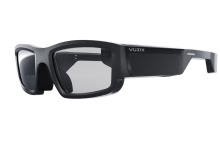 Original Blade glasses in three-quarter view.

References
- ↑ 1.00 1.01 1.02 1.03 1.04 1.05 1.06 1.07 1.08 1.09 1.10 "Vuzix Announces the Launch of Consumer Version of the Blade Augmented Reality Smart Glasses". Vuzix via PR Newswire. 2019-01-08. https://www.prnewswire.com/news-releases/vuzix-announces-the-launch-of-consumer-version-of-the-blade-augmented-reality-smart-glasses-300774621.html. Retrieved 2026-10-14.
- ↑ 2.0 2.1 2.2 2.3 2.4 2.5 2.6 "Annual report for the year ended December 31, 2018". Vuzix. 2019. https://ir.vuzix.com/reports-filings/all-sec-filings/content/0001144204-19-014093/tv514947_10k.htm. Retrieved 2026-10-14.
- ↑ 3.0 3.1 3.2 3.3 "Vuzix Announces its Third Quarter 2018 Financial Results and Delivers Year-Over-Year Revenue and Operating Performance Improvements". Vuzix. 2018-11-08. https://d1io3yog0oux5.cloudfront.net/_61897dcd35beb3d1526483d56066ed60/vuzix/news/2018-11-08_Vuzix_Announces_its_Third_Quarter_2018_Financial_1662.pdf. Retrieved 2026-10-14.
- ↑ 4.0 4.1 4.2 4.3 "Vuzix Blade Safety Glasses User's Manual, version 1.0, Model 447 (447PB0015)". Vuzix. 2019. https://files.vuzix.com/Content/pdfs/Vuzix-BLADE-Safety-User-Manual-v1.pdf. Retrieved 2026-10-14.
- ↑ 5.0 5.1 5.2 "Using Vuzix HUD API Resources and Packages". Vuzix. 2024-05-24. https://support.vuzix.com/docs/using-vuzix-hud-api-resources-and-packages-2. Retrieved 2026-10-14.
- ↑ 6.00 6.01 6.02 6.03 6.04 6.05 6.06 6.07 6.08 6.09 6.10 6.11 6.12 6.13 6.14 6.15 6.16 6.17 6.18 6.19 "Vuzix Blade: Augmented Reality Smart Glasses - Prosumer". Vuzix. 2018. https://files.vuzix.com/Content/docs/north-american/web/Vuzix-Blade-Prosumer-Smart-Glasses-11-18.pdf. Retrieved 2026-10-14.
- ↑ 7.00 7.01 7.02 7.03 7.04 7.05 7.06 7.07 7.08 7.09 7.10 7.11 7.12 7.13 7.14 7.15 7.16 7.17 7.18 7.19 7.20 7.21 "Vuzix Blade User's Manual, version 1.0 (447PB0001)". Vuzix. 2018. https://files.vuzix.com/Content/pdfs/Vuzix-Blade-User-Manual.pdf. Retrieved 2026-10-14.
- ↑ 8.0 8.1 8.2 8.3 8.4 "Vuzix Receives International Regulatory Approvals and Begins Shipping Vuzix Blade Upgraded Smart Glasses". Vuzix via PR Newswire. 2020-09-29. https://www.prnewswire.com/news-releases/vuzix-receives-international-regulatory-approvals-and-begins-shipping-vuzix-blade-upgraded-smart-glasses-301139977.html. Retrieved 2026-10-14.
- ↑ 9.0 9.1 9.2 9.3 9.4 9.5 9.6 "Working with the Blade's Camera". Vuzix. 2024-02-07. https://support.vuzix.com/docs/working-with-the-blades-camera. Retrieved 2026-10-14.
- ↑ 10.00 10.01 10.02 10.03 10.04 10.05 10.06 10.07 10.08 10.09 10.10 10.11 10.12 10.13 10.14 10.15 10.16 "Vuzix Blade Dev Kit User Experience (UX) Design Guidelines, V2.12". Vuzix. 2020-11-13. https://cdn.shopify.com/s/files/1/0581/1208/2086/files/Vuzix_Blade_UX_Design_Guidelines_v2.pdf?v=1633373651. Retrieved 2026-10-14.
- ↑ 11.00 11.01 11.02 11.03 11.04 11.05 11.06 11.07 11.08 11.09 11.10 11.11 11.12 11.13 Scharon Harding (2019-02-14). "Vuzix Blade Smart Glasses Review: AR Fun Over Fashion". Tom's Hardware. https://www.tomshardware.com/reviews/vuzix-blade-ar-smart-glasses-consumer%2C5667.html. Retrieved 2026-10-14.
- ↑ 12.00 12.01 12.02 12.03 12.04 12.05 12.06 12.07 12.08 12.09 12.10 12.11 12.12 12.13 12.14 12.15 12.16 "Overview: Vuzix Blade hardware and interaction capabilities". Vuzix. 2024-05-24. https://support.vuzix.com/docs/overview-29. Retrieved 2026-10-14.
- ↑ 13.0 13.1 13.2 13.3 13.4 13.5 13.6 "How large is the Vuzix Blade display?". Vuzix. 2024-01-23. https://support.vuzix.com/docs/how-large-is-the-vuzix-blade-display. Retrieved 2026-10-14.
- ↑ 14.0 14.1 14.2 14.3 14.4 14.5 "Vuzix Blade for the Workplace". Vuzix. 2019-01-01. https://files.vuzix.com/Content/docs/north-american/web/Vuzix-Blade-Business-Smart-Glasses-CES_2019.pdf. Retrieved 2026-10-14.
- ↑ 15.0 15.1 15.2 "Support: Legacy Products". Vuzix. https://www.vuzix.com/pages/support. Retrieved 2026-10-14.
- ↑ 16.0 16.1 "Vuzix Blade Smart Glasses Now Available on Amazon Features Alexa Built-in and DJI Drone Support". Vuzix via PR Newswire. 2019-07-22. https://www.prnewswire.com/news-releases/vuzix-blade-smart-glasses-now-available-on-amazon-features-alexa-built-in-and-dji-drone-support-300888655.html. Retrieved 2026-10-14.
- ↑ 17.0 17.1 "Vuzix Blade Quick Start Guide, commercial edition (447PB0002)". Vuzix. 2019. https://files.vuzix.com/Content/pdfs/QUICK-START-GUIDE-BLADE-US-Commercial.pdf. Retrieved 2026-10-14.
- ↑ "Blade Downloads". Vuzix. 2026-04-15. https://support.vuzix.com/docs/blade-downloads-3. Retrieved 2026-10-14.
- ↑ "Connectivity SDK". Vuzix. https://vuzix.github.io/connectivity-sdk/. Retrieved 2026-10-14.
- ↑ 20.0 20.1 Kyungjun Lee; Daisuke Sato; Saki Asakawa; Hernisa Kacorri; Chieko Asakawa (2020-04). "Pedestrian Detection with Wearable Cameras for the Blind: A Two-way Perspective". Proceedings of the 2020 CHI Conference on Human Factors in Computing Systems. Retrieved 2026-10-14.
- ↑ 21.0 21.1 Kyungjun Lee; Daisuke Sato; Saki Asakawa; Chieko Asakawa; Hernisa Kacorri (2021). "Accessing Passersby Proxemic Signals through a Head-Worn Camera: Opportunities and Limitations for the Blind". Proceedings of the 23rd International ACM SIGACCESS Conference on Computers and Accessibility. Retrieved 2026-10-14.
- ↑ 22.0 22.1 Molly Jane Nicholas; Brian A. Smith; Rajan Vaish (2021-12-15). "Friendscope: Exploring In-the-Moment Experience Sharing on Camera Glasses via a Shared Camera". arXiv preprint 2112.08460. https://arxiv.org/pdf/2112.08460. Retrieved 2026-10-14.
- ↑ Abner Li (2019-05-20). "Glass Enterprise Edition 2 launches at $999, graduates from X to Google AR/VR". 9to5Google. https://9to5google.com/2019/05/20/glass-enterprise-edition-2-launch/?extended-comments=1. Retrieved 2026-10-14.
- ↑ 24.0 24.1 24.2 24.3 Scharon Harding (2019-09-19). "North Focals Review: Stealthy, Stylish Smart Glasses". Tom's Hardware. https://www.tomshardware.com/reviews/north-focals-smart-glasses-ar,5968.html. Retrieved 2026-10-14.
- ↑ 25.0 25.1 25.2 25.3 "About Glass Enterprise Edition 2". Google. https://support.google.com/glass-enterprise/customer/answer/9220200?hl=en. Retrieved 2026-10-14.
- ↑ Chris Smith (2019-10-31). "Focals by North Smart Glasses Review". Trusted Reviews. https://www.trustedreviews.com/reviews/focals-by-north-smart-glasses. Retrieved 2026-10-14.