

Google Glass Enterprise Edition 2
More actions
| Google Glass Enterprise Edition 2 | |
|---|---|

| |
| Basic Info | |
| VR/AR | Augmented Reality |
| Type | Smart Glasses |
| Subtype | Enterprise AR |
| Platform | Android |
| Creator | Google[1] |
| Developer | |
| Manufacturer | Google LLC; manufactured in China[2] |
| Announcement Date | May 20, 2019[1] |
| Release Date | May 2019 (enterprise launch); February 2020 (direct reseller purchase for developers)[3] |
| Price | US$999 (reported launch price, May 2019; frames sold separately)[4][5] |
| Website | https://support.google.com/glass-enterprise/customer/answer/13417888 (end-of-sales notice) |
| Versions | Glass Enterprise Edition 2, model GG2[2] |
| Requires | Eyewear frame; charging; network connection for online services[5][6] |
| Predecessor | Google Glass Enterprise Edition[7] |
| System | |
| Operating System | Android Open Source Project 8.1 (Oreo), API level 27; no Google Mobile Services or Google Play services[7] |
| Chipset | Qualcomm Snapdragon XR1[1] |
| Storage | |
| Storage | 32GB eMMC Flash[6] |
| Memory | 3GB LPDDR4[6] |
| Display | |
| Display | Transparent display above the right eye[1][6] |
| Resolution | 640 pixel x 360 pixel RGB[6] |
| Optics | |
| Optics | Hinged prism, adjustable alignment[8] |
| Ocularity | Monocular, right eye[6] |
| Adjustable Diopter | Prescription-frame options; numerical diopter adjustment not specified[5] |
| Passthrough | Optical see-through display[1] |
| Tracking | |
| Tracking | Inertial sensor data and Android rotation-vector API[9] |
| Play Space | Assisted reality[5] |
| Audio | |
| Audio | Mono speaker; USB audio; Bluetooth audio with HFP support[6] |
| Microphone | 3 near field beam-forming microphones[6] |
| Camera | 8 Megapixel color sensor, fixed focus; up to 1080p30; green privacy LED[6] |
| Connectivity | |
| Connectivity | Dual-band Wi-Fi; Bluetooth 5.0; USB-C[6] |
| Ports | USB-C compliant connector; USB 2.0 data transfer[6] |
| WiFi | IEEE 802.11a/g/b/n/ac, dual-band[6] |
| Bluetooth | Bluetooth 5.0[6] |
| Power | Internal lithium-ion battery; USB PD 2.0 charging[2][6] |
| Battery Capacity | 800 mA⋅h (2880 C), published Google specification[6] |
| Charge Time | At least 50% in 20 minutes, Google claim[6] |
| Device | |
| Dimensions | Without frame: 212 mm x 57 mm x 29 mm unfolded; 182 mm x 55 mm x 29 mm folded[6] |
| Weight | 46 g without frame[6] |
| Material | Resin nylon (pod)[6] |
| Headstrap | Detachable eyewear frame; Smith Optics safety-frame option[5][1] |
| Color | Black pod and safety frames shown in the launch illustration[1] |
| Sensors | 3-axis accelerometer, gyroscope and magnetometer; Android light sensor; no GPS module[6][9] |
| Input | Multi-touch gesture touchpad, programmable camera button and app-defined voice commands[6][9] |
| Compliance | Google states FCC Part 15 Class B and Directive 2014/53/EU compliance; IP53 specification[2][6] |
The Google Glass Enterprise Edition 2 (Glass EE2) is a monocular smart glasses device for enterprise applications. Its transparent display sits above the right eye, while an onboard camera and microphones support first-person communication. Google announced the device on May 20, 2019, with the Qualcomm Snapdragon XR1 platform, Android-based software and compatible safety frames developed with Smith Optics.[1][6]
Google ended sales on March 15, 2023 and support on September 15, 2023. Its announcement said existing devices and software could continue to be used, but Google planned no further software updates. The preinstalled Meet on Glass app could stop working after support ended.[10]
History and development
Glass EE2 succeeded the first Google Glass Enterprise Edition. Google's May 2019 announcement described improvements in processing, camera performance, USB-C charging and battery life. Google described the XR1 platform as having a more powerful multicore CPU and a new artificial-intelligence engine, with support for computer vision and advanced machine learning. Its launch announcement attributed power savings and improved performance to that platform. It also recorded the Glass team's move from Alphabet's X to Google. Its examples of AGCO, DHL, Sutter Health and H.B. Fuller concerned the enterprise program's preceding work at X; they were not a list of confirmed EE2 deployments.[1][7]
At announcement, businesses could contact Google's sales team or its solution partners. Contemporary reporting gave a US$999 launch price. In February 2020 Google separately announced that developers and businesses could buy devices directly from hardware resellers including CDW, Mobile Advance and SHI. The device and eyewear frames were sold separately, so the device price did not describe every complete deployment.[1][4][3][5]
Design and display
Google describes EE2 as an assisted reality wearable. It presents information on a small display above the right eye while leaving the surrounding scene directly visible. The support documentation specifies a 640 pixel x 360 pixel RGB display. Google's design guidance favors short, readable cards with limited input and information relevant to the current task.[5][6][11]
The removable device attaches to a frame through a bayonet hinge. Frame choices accommodate different uses, including prescription lenses; Google partnered with Smith Optics for safety frames. Display alignment is adjustable: the fitting guide describes moving the display hinge and adjusting the nose pads until the whole screen is visible. TeamViewer's EE2 guide specifically describes moving the hinged prism inward or outward. This is a physical alignment adjustment, rather than a documented numerical diopter range.[5][1][8]
The published 46 g weight excludes the frame. Google lists resin nylon for the pod, with unframed dimensions of 212 mm x 57 mm x 29 mm unfolded and 182 mm x 55 mm x 29 mm folded. Its launch illustration shows a black device mounted on black safety frames.[6][1]
Hardware
The following values are Google's published EE2 specifications. Camera field of view is listed separately from the display, and the dimensions and weight exclude the frame.[6]
| Component | Published specification |
|---|---|
| Processing | Qualcomm XR1 system-on-chip |
| Memory and storage | 3GB LPDDR4; 32GB eMMC Flash |
| Display | 640 pixel x 360 pixel RGB, above the right eye |
| Camera | 8 Megapixel color sensor; f/2.4; fixed focus, best focus at 0.6m; up to 1080p30 video |
| Camera field of view | 83° diagonal; developer documentation gives 71° x 57° in landscape orientation[9] |
| Audio output | Mono speaker, USB audio, Bluetooth audio with Hands-Free Profile support |
| Microphones | 3 near field beam-forming microphones |
| Wireless connectivity | IEEE 802.11a/g/b/n/ac, dual-band; Bluetooth 5.0 |
| Charging and data | USB PD 2.0; fast charge up to 1.5 A @ 5 V; USB 2.0 data; USB-C connector |
| Indicators | Green camera-privacy LED; white rear power LED |
| Battery | 800 mA⋅h (2880 C) |
| Ruggedization | IP53, described as resistance to water spray and limited dust ingress |
| Operating conditions | 0° C to 35° C; 5% to 95% relative humidity, noncondensing |
| Storage temperature | -20° C to 45° C |
The camera supports photo and video applications, including first-person streaming. The button on the hinge can trigger actions defined by an application. The LEDs documented by Google indicate camera privacy and power status.[6][9]
The mono speaker sits inside the battery pod just behind the ear and plays device sounds such as notifications. Google also documents USB and Bluetooth audio, allowing an application or deployment to use an external audio device. The microphones provide advanced processing for Android's voice-communication and voice-recognition audio sources.[6][9]
Sensors
Google lists three-axis accelerometer, gyroscope and magnetometer hardware. The Android API also exposes gravity, linear acceleration, light and rotation-vector sensor types. The inertial sensors are in the optics pod, whose physical rotation changes their orientation relative to the wearer's head. Google's developer guide therefore cautions that applications cannot directly measure the pod's adjustment angle. Its suggestion that 50 Hz is often sufficient for head motion is application guidance, not a guaranteed maximum sensor rate.[9]
The documentation explicitly excludes a GPS module. Android location services are present for discovering nearby Wi-Fi networks and Bluetooth devices, but do not provide the user's location. It also lists Android proximity, pressure, humidity and temperature sensor types as unsupported.[9]
Battery and charging
Google's support specification lists an 800 mA⋅h battery. A contemporary May 2019 report gave 820mAh. These are differing published figures; neither source establishes a hardware-revision change that would explain them.[6][4]
Google states that fast charging reaches at least 50% in 20 minutes and recommends an 18W USB-C adapter compliant with USB Power Delivery 2.0. The support page says USB-compliant chargers can charge EE2. Its developer guidance recommends the supplied cable for fast charging and warns that other cables may perform differently. These statements do not establish a fixed runtime or time to a full charge.[6][12]
The battery is internal and is not intended for user replacement. Google's safety guidance distinguishes water resistance from waterproofing and states that the charging cable is not water resistant. The support specification lists IP53, while the safety page expresses the water-protection component as IPX3.[2][6]
Input and software
Touch, camera button and voice
The touchpad lies beside the right temple. Google's default gesture guidance uses a tap for confirmation, forward or backward swipes to navigate cards, and a downward swipe to go back or exit. The deployment can customize these interactions. The power button is inside the enclosure near the rear.[6][5][9]
Applications can handle the camera button through Android's camera-key event. From firmware OPM1.200313.001, the launcher sends photo or video capture intents on a short or long press respectively. Voice commands are defined by an application's Android menus; native speech recognition is documented for English. Google's Text-to-Speech engine works offline and includes multiple language locales. Speech recognition, menu commands and speech synthesis are separate features.[9][13]
Android development and deployment
EE2 runs Android Open Source Project 8.1 (Oreo), API level 27. It excludes Google Mobile Services and Google Play services. Google's guide uses the standard Android SDK and says the older Glass Development Kit is deprecated for EE2; porting an EE1 app requires removing its GDK dependencies.[7]
Google supported Android Enterprise mobile device management and QR-based provisioning. A QR code can point to an MDM or custom agent that configures the device. The setup flow varies by firmware version. Archived instructions describe obtaining an APK from a solution provider and transferring it through a USB-connected Android Flash Station. These are historical development and deployment mechanisms, rather than a current Google support commitment.[1][14][15][10]
Screen mirroring through an Android 8.1-compatible tool such as Vysor or scrcpy can display the EE2 screen on a computer and permit remote operation over USB. This is distinct from an enterprise app streaming the wearer's camera view to another person. Google's development guidance favors an interface with one action per page, full-screen content and controls suited to the touchpad.[6][7][12]
Selected firmware history
Google's archived release notes document the following changes. These dates identify software releases, not new hardware models.[13]
| Version | Date | Documented changes |
|---|---|---|
| OPM1.200313.001 | March 20, 2020 | Camera and gallery sample apps; English voice-input interface; hinge-suspend and charging fixes |
| OPM1.200625.001 | July 7, 2020 | Voice-command API; offline Google Text-to-Speech; Bluetooth Hands-Free Profile |
| OPM1.210124.001 | February 4, 2021 | OTA update notifications and policies; hinge auto-shutdown timeout; voice-command reloading and debugging |
| OPM1.210425.001 | April 30, 2021 | French, German, Spanish and Japanese language support; language and time settings |
| OPM1.220316.001 | March 28, 2022 | Bluetooth Low Energy Fast Pair; Meet on Glass; concurrent voice-command audio during a call |
| OPM1.221111.001 | November 18, 2022 | Enterprise Companion Application support for Early Access Program participants; Bluetooth pairing and Meet updates; removal of some sample apps when flashing, but not through an OTA update |
OPM1.221111.001 is the newest image listed on the archived system-images page checked in October 2026. The page remains a historical reference and does not imply that Google resumed software maintenance.[16][10]
Enterprise applications
Google's launch material describes checklists, work instructions, inspection photos and videos, with logistics, manufacturing and field service as intended enterprise uses. First-person camera streaming can connect an onsite wearer to a remote person; the application, network and remote viewer determine how that communication works.[1][6]
A documented partner example is TeamViewer and Google Cloud's October 2021 Assisted Order Picking announcement. It specified EE2 running Frontline vision-picking software, connected to a retailer's or grocer's order-fulfillment systems to update inventory in real time and show picking information on the headset. TeamViewer's EE2 installation guide, last modified in June 2024, says Frontline Workplace compatibility is guaranteed up to release 4.22 and that EE2 is no longer promoted as a primarily supported device. That bounded statement does not guarantee compatibility with every later Frontline release.[17][8]
Research
Remote cooperative nursing training
Yoon and colleagues' 2021 study evaluated a custom EE2 collaboration system during arrhythmia-care simulations. It used two headsets on Android 8.1 with firmware OPM1.200625.001, Bluetooth earphones, a small attached mirror and App-RTC video communication. A remote desktop tool sent images and text to the wearer. The mirror provided an additional downward view for procedures, while dividing the remote video into two views.[18]
The authors report 31 nursing students who took turns as bedside trainees and remote supporters during a 15-hour simulation program. The evaluation used eight essay questions about the remote supporters' desktop experience. Participants described limited camera coverage, motion blur, unstable streaming and confusion from the mirror view. The study evaluated that modified system and its remote interface, rather than measuring the native headset's standalone accuracy or a clinical treatment benefit. Its small, young sample, qualitative questionnaire and simulated setting limit generalization.[18]
Emergency-department supervision simulation
McTavish and colleagues studied EE2 with Google Meet at a single Wellington hospital simulation center. Fifteen sixth-year medical trainee interns and 19 supervising clinicians participated in trauma and stroke scenarios using a manikin or standardized patient. The headset used a mobile hotspot because it was incompatible with the hospital Wi-Fi. The remote clinician's setup changed during the study from a MacBook Air to a desktop with two displays and an Ethernet connection.[19]
Feedback was generally favorable, but participants reported intermittent audiovisual interruptions, audio-control difficulties and a camera view too high to show some procedural work. Supervisors also described reduced situational awareness. The authors treated the results as exploratory feasibility evidence. The small sample, single center, simulation, unblinded supervision and potential survey-response bias prevent a conclusion of clinical superiority or proof of patient safety. The article appeared online in December 2022 and in the journal's February 2023 issue.[19]
Safety and regulatory scope
Google identifies EE2 as model GG2, designed by Google LLC and manufactured in China. Its regulatory page states compliance with FCC Part 15 Class B limits and Directive 2014/53/EU. It also states that the device does not comply with IEC 60079 explosive-atmosphere standards and is not intended for hazardous environments that require fail-safe performance.[2]
The safety documentation says EE2 is not registered or intended as a medical device. The clinical research above does not change that manufacturer statement. Glass-compatible safety eyewear and prescription frames have their own seller-approved use and standards; Google says first-generation frames have not been tested or approved for EE2. Compatibility with safety frames does not establish unrestricted suitability for every workplace.[2]
Discontinuation
Google's March 15, 2023 announcement ended sales immediately and retained support, including replacement through distributors or resellers, until September 15, 2023. It planned no further software updates. Existing software and devices could continue operating, while third parties remained responsible for their apps. The notice specifically warned that Meet on Glass could cease working after the support deadline.[10]
The announcement committed to keeping system images and the OTA process available until at least April 1, 2024. That was a minimum availability date, not an announcement that devices would stop operating on that day. The archived developer documentation remained accessible when checked in October 2026.[10][16]
See Also
Gallery
-
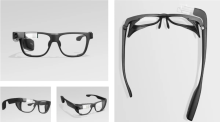 Glass Enterprise Edition 2 with safety frames, shown from several angles.

References
- ↑ 1.00 1.01 1.02 1.03 1.04 1.05 1.06 1.07 1.08 1.09 1.10 1.11 1.12 1.13 "Glass Enterprise Edition 2: faster and more helpful". Google. 2019-05-20. https://blog.google/products-and-platforms/devices/glass-enterprise-edition-2/. Retrieved 2026-10-14.
- ↑ 2.0 2.1 2.2 2.3 2.4 2.5 2.6 "Safety, Regulatory, Recycling, and Handling Information for Glass Enterprise Edition 2". Google. https://support.google.com/glass-enterprise/customer/answer/9324122?hl=en. Retrieved 2026-10-14.
- ↑ 3.0 3.1 "Glass Enterprise Edition 2 now available for developers". Google Developers Blog. 2020-02-04. https://developers.googleblog.com/glass-enterprise-edition-2-now-available-for-developers/. Retrieved 2026-10-14.
- ↑ 4.0 4.1 4.2 "Glass Enterprise Edition 2 launches at $999, graduates from X to Google AR/VR". 9to5Google. 2019-05-20. https://9to5google.com/2019/05/20/glass-enterprise-edition-2-launch/?extended-comments=1. Retrieved 2026-10-14.
- ↑ 5.0 5.1 5.2 5.3 5.4 5.5 5.6 5.7 5.8 "Get started". Google. https://support.google.com/glass-enterprise/customer/answer/9220199?hl=en. Retrieved 2026-10-14.
- ↑ 6.00 6.01 6.02 6.03 6.04 6.05 6.06 6.07 6.08 6.09 6.10 6.11 6.12 6.13 6.14 6.15 6.16 6.17 6.18 6.19 6.20 6.21 6.22 6.23 6.24 6.25 6.26 6.27 6.28 6.29 6.30 6.31 6.32 6.33 "About Glass Enterprise Edition 2". Google. https://support.google.com/glass-enterprise/customer/answer/9220200?hl=en. Retrieved 2026-10-14.
- ↑ 7.0 7.1 7.2 7.3 7.4 "Get started". Google for Developers. https://developers.google.com/glass-enterprise/guides/get-started. Retrieved 2026-10-14.
- ↑ 8.0 8.1 8.2 "Google Glass Enterprise Edition 2". TeamViewer. 2024-06-04. https://www.teamviewer.com/en/global/support/knowledge-base/teamviewer-frontline/installation-and-configuration/frontline-workplace/google-glass-enterprise-edition-2/?language-switched=true. Retrieved 2026-10-14.
- ↑ 9.00 9.01 9.02 9.03 9.04 9.05 9.06 9.07 9.08 9.09 "Inputs and sensors". Google for Developers. https://developers.google.com/glass-enterprise/guides/inputs-sensors. Retrieved 2026-10-14.
- ↑ 10.0 10.1 10.2 10.3 10.4 "Glass Enterprise Edition Announcement FAQ". Google. 2023-03-15. https://support.google.com/glass-enterprise/customer/answer/13417888?hl=en. Retrieved 2026-10-14.
- ↑ "Design guidelines". Google for Developers. https://developers.google.com/glass-enterprise/guides/design-guidelines. Retrieved 2026-10-14.
- ↑ 12.0 12.1 "Development tips". Google for Developers. https://developers.google.com/glass-enterprise/guides/development-tips. Retrieved 2026-10-14.
- ↑ 13.0 13.1 "Release notes". Google for Developers. https://developers.google.com/glass-enterprise/guides/release-notes. Retrieved 2026-10-14.
- ↑ "Provision the device using a QR code". Google. https://support.google.com/glass-enterprise/customer/answer/10427910?hl=en. Retrieved 2026-10-14.
- ↑ "Add apps to Glass Enterprise Edition 2". Google. https://support.google.com/glass-enterprise/customer/answer/10426551?hl=en. Retrieved 2026-10-14.
- ↑ 16.0 16.1 "System images". Google for Developers. https://developers.google.com/glass-enterprise/downloads/system-images. Retrieved 2026-10-14.
- ↑ "TeamViewer Partners with Google Cloud to Deliver Enterprise Augmented Reality Solutions on Google Glass". TeamViewer. 2021-10-12. https://www.teamviewer.com/apac/global/company/press/2021/teamviewer-google-cloud-deliver-enterprise-ar-solutions-on-google-glass/. Retrieved 2026-10-14.
- ↑ 18.0 18.1 Hyoseok Yoon; Sun Kyung Kim; Youngho Lee; Jongmyung Choi (2021-06-17). "Google Glass-Supported Cooperative Training for Health Professionals: A Case Study Based on Using Remote Desktop Virtual Support". Journal of Multidisciplinary Healthcare 14: 1451-1462. doi:10.2147/JMDH.S311766. Retrieved 2026-10-14.
- ↑ 19.0 19.1 Arthur McTavish; Peter Larsen; Alice Rogan; Emma Carlin; Matthew Lynch; Brad Peckler (2022-12-13). "Exploring the feasibility of smartglass facilitated remote supervision in the emergency department: A simulation study". Emergency Medicine Australasia 35 (1): 170-172. doi:10.1111/1742-6723.14142. Retrieved 2026-10-14.