

HP Windows Mixed Reality Headset
More actions
| HP Windows Mixed Reality Headset | |
|---|---|

| |
| Basic Info | |
| VR/AR | Virtual Reality |
| Type | Head-mounted Display |
| Subtype | PC-Powered VR |
| Platform | Windows Mixed Reality |
| Developer | HP |
| Manufacturer | HP |
| Release Date | Developer preorders: May 11, 2017; consumer availability: October 17, 2017[1][2] |
| Price | US$329 Developer Edition (2017); US$449 with controllers in a contemporary retail review[1][3] |
| Website | https://support.hp.com/in-en/document/c05579470 |
| Versions | Developer Edition; retail headset/controller bundle; Professional Edition |
| Requires | Compatible PC, HDMI and USB 3.0 connections; PC Bluetooth for original motion controllers.[4][5] |
| System | |
| Operating System | Host PC: Windows 10 with Windows Mixed Reality, historically. Microsoft's current compatibility guidance excludes Windows 11 version 24H2 and newer.[6] |
| Display | |
| Display | Two LCD panels, 2.89 in diagonal each[5][4] |
| Resolution | 1440 x 1440 per eye (2880 x 1440 combined)[4] |
| Refresh Rate | 90Hz when paired to HDMI 2.0 port; 60Hz when paired to HDMI 1.4 port (HP specifications)[4] |
| Image | |
| Field of View | 95 degrees horizontal (2017 HP datasheet)[4] |
| Optics | |
| Optics | Fresnel-Aspherical[4] |
| Tracking | |
| Tracking | 6 degrees of freedom; Inside-out tracking[1] |
| Audio | |
| Audio | 3.5mm combo audio jack for headphones and microphone[4] |
| Camera | 2 front-facing tracking cameras[4] |
| Connectivity | |
| Connectivity | HDMI; USB 3.0; 3.5mm audio jack[4] |
| Device | |
| Weight | 0.83 kg without packaging (VR1000-010 product specification)[7] |
| Sensors | Cameras and inertial sensing[8] |
| Input | Windows Mixed Reality motion controllers; gamepad or keyboard/mouse, depending on application[5] |
| Size | Height 17.60 cm; width 12.78 cm; depth 33.88 cm (VR1000-010 product specification)[7] |
| Cable Length | 4.0m/0.6m removable cable in the developer announcement; other edition specifications differ[1] |
The HP Windows Mixed Reality Headset is HP's first-generation VR1000 headset for Microsoft's Windows Mixed Reality platform, part of the HP VR product range. It connects to a PC for its display and software. It is an opaque virtual reality headset whose front cameras support inside-out tracking.[5][8]
The Developer Edition opened for preorders in May 2017, before the consumer headset with motion controllers became available in October. HP subsequently offered a Professional Edition with replaceable, cleanable face cushions. These first-generation products are distinct from the later HP Reverb headsets.[1][2][9][5]
Introducing the HP Windows MR headset
Microsoft announced HP, Lenovo, Dell, Acer and Asus as headset partners with the Windows 10 Creators Update on October 26, 2016.[10] The initial Acer and HP developer headsets shared the display, audio and tracking features listed by Microsoft, but used different industrial designs. They were intended for developing applications ahead of the consumer platform rollout.[1][11]
Hardware
The HP Windows Mixed Reality Headset uses a double-padded headband. Its adjustment knob changes the fit of the band, and the front-hinged display can be raised without removing the entire headset.[1] The headset's 3.5mm combination jack supports an external audio headset with a microphone. A hands-on inspection of the retail device found no integrated headphones or microphone.[12]
The mixed reality headset comes with two 1440 x 1440 high-resolution displays.[1] HP's 2017 developer and retail datasheets specify 2.89-inch displays and Fresnel-Aspherical optics, with 95 degrees of horizontal field of view. They associate 90 Hz operation with HDMI 2.0 and 60 Hz operation with HDMI 1.4. These are published specifications, rather than measurements of an individual user's visible field or an application's rendering performance.[13][4]
Later documentation uses other field-of-view figures: Microsoft's VR1000 summary lists 105 degrees without specifying an axis, while the Professional Edition QuickSpecs list approximately 100 degrees. These values should retain their document and edition context.[5][14]
Cables, fit and edition differences
The developer announcement describes a removable 4.0m/0.6m cable arrangement. HP's VR1000-010 specification instead lists a 3.6-meter cable in the box. The Professional Edition documentation describes separate 3.6m and 0.6m HDMI/USB cables, with the shorter cable intended for HP's separately sold Z VR Backpack PC.[1][7][14] A Developer Edition teardown shows a proprietary connector between the removable HDMI/USB lead and the headset's short cable assembly.[15]
HP reports the VR1000-010's weight as 0.83 kg without packaging. The Professional Edition QuickSpecs separately report 524g without the cable. The documents use different measurement labels, so the figures should not be treated as interchangeable headset-only weights.[7][14]
Microsoft lists the VR1000 as using software IPD adjustment. This changes calibration for the user's eye spacing; it is separate from physically moving the lenses. The platform's calibration control is in Settings > Mixed Reality > Headset display.[5]
Tracking
The two front cameras support inside-out positional and rotational tracking, providing six degrees of freedom. Microsoft's tracking documentation describes visible-light cameras identifying features in the room, with the camera observations combined with IMU data to estimate the headset's pose. This removes the need to install external tracking cameras or emitters for the original WMR system.[1][8]
The original Oculus Rift uses external tracking cameras, while the HTC Vive uses infrared signals from external base stations. The HP headset observes room features with its onboard cameras.[5]
Tracking depends on room conditions. The documented system needs adequate light and distinguishable visual features; darkness, featureless surfaces and strong light differences can prevent reliable visual tracking. Microsoft's setup offers a traced room-scale boundary or a seated/standing configuration. Its recommended clear room-scale space is at least 1.5 meters by 2 meters.[8][16]
An iFixit contributor's Developer Edition teardown identified a Cypress CYUSB3064-BZXC USB bridge, Cypress CYUSB3304-68LTXI USB hub and STMicroelectronics STM32F103C8 microcontroller on the board. The cable connector also contained Spectra7 VR8050 USB and HT8181 HDMI equalizers. These observations describe the dissected developer unit, rather than a guarantee that every VR1000 edition uses an identical board.[15]
Camera views
The Windows 10 October 2018 Update (version 1809) added Mixed Reality Flashlight for WMR immersive PC headsets. It let users view their physical surroundings without removing the headset, with the viewed area directed by a motion controller. The feature could be activated from the Start menu, with Windows + Grab on a controller, or through speech commands.[17] Microsoft's driver history also identifies Flashlight as a feature enabled in Windows 10 version 1809.[18]
For the separate Oasis software path, the developer's camera-setup documentation checked on October 14, 2026 describes views from the headset's black-and-white front cameras through SteamVR's Camera settings. Its Show Camera on Controller option displays a camera view when the controller's Windows button opens the dashboard. The same document describes a full-screen Room View, enabled in Camera settings and invoked through the dashboard's eye icon.[19] Its FAQ lists basic monoscopic camera passthrough but describes Room View as still being worked on. These documents differ on Room View's status, so they do not establish its availability in every driver release or configuration.[20] The Microsoft and Oasis compatibility limits remain those described below.
Apps and games
At the consumer launch, Windows Mixed Reality provided a spatial Windows environment and Microsoft Store content. Microsoft's October 2017 announcement named immersive titles including Superhot, Arizona Sunshine, Space Pirate Trainer and Minecraft. It also announced developer access to a Windows Mixed Reality SteamVR preview, with consumer preview access planned for that holiday season.[21]
The Microsoft software path subsequently used SteamVR together with the Windows Mixed Reality for SteamVR bridge. Application hardware and controller requirements still applied; a platform-level compatibility claim did not mean every SteamVR title supported every controller configuration.[22][5] The current limits of this software path are described under Support and compatibility.
Input options
The consumer VR1000-100 bundle includes two wireless motion controllers.[4] The original WMR controllers use Bluetooth to communicate with the PC and the headset cameras to support positional tracking. Unlike later HP Reverb products with built-in Bluetooth, Microsoft's VR1000 listing specifies no headset Bluetooth radio.[5] Each controller has a thumbstick, touchpad, trigger, grab button, menu button and Windows button, and uses two AA batteries.[14] The controllers also provide haptic feedback.[23]
Controller position is most directly observed within the headset cameras' view. Microsoft's original system continues to infer position for a time when a controller leaves view, then reduces positional accuracy while retaining orientation information.[5] Controller lighting, battery condition and Bluetooth interference can affect tracking; Microsoft's troubleshooting guidance distinguishes these from application input-mapping problems.[23]
Keyboard, mouse and Xbox gamepad input are alternatives for applications that support them. Speech commands use a microphone. These platform input options should not be read as a promise that every application supports every input method.[16][5]
Development kit
The 2017 Developer Edition was offered to developers in the United States and Canada for US$329. HP's own announcement also listed CA$449. Microsoft recommended Unity and Visual Studio 2017 Community for developing and packaging immersive Windows applications, with the Universal Windows Platform as the application platform.[1][11][21]
A contemporary June 2017 report inspected HP's Device Companion Application listing and its first-run setup role. Although the listing named mobile devices among its platforms, the reporter found that installation on a Windows phone failed and the headset needed a Windows PC. This is a historical setup-app record, rather than evidence of a phone-powered VR1000 mode.[24]
Release date and cost
The Developer Edition and the retail controller bundle had separate release records. Road to VR's May 2017 preorder report described August delivery as scheduled. HP's later product-release-information field for the US VR1000-010 instead gives June 23, 2017. Neither record should be substituted for the October consumer rollout.[25][7]
| Date or document | Edition or event | Documented information |
|---|---|---|
| May 11, 2017 | Developer Edition preorders | Microsoft opened developer preorders in the US and Canada at US$329 for the HP headset.[1] |
| June 23, 2017 | VR1000-010, product Z5N70AA | HP's US product specification gives this release-information date. The listed box contains no controller.[7] |
| 2017 Developer Edition datasheet | VR1000-009, product Z5N73AA#ABL | HP's separate datasheet identifies this developer SKU and an advertised date of July 30, 2017.[13] |
| October 17, 2017 | Consumer headset with controllers | Microsoft's availability update lists HP among the purchasable headsets. HP's VR1000-100 datasheet identifies product 2HJ34AA#ABA and an October 17 on-ad date.[2][4] |
| November 23, 2017 review | Retail pricing | Windows Central listed US$329 for the headset alone and US$449 with controllers.[3] |
| February 5, 2018 | Professional Edition announcement | HP announced the commercial edition with cleanable replacement face cushions and scheduled March availability at US$449. Its later QuickSpecs identify the 3VM67AA product family.[9][14] |
The Professional Edition announcement specified one installed standard face cushion plus three cleanable cushions in the box. Its QuickSpecs describe 1440 x 1440 pixels per eye, two motion controllers and 3.6m/0.6m cable choices. It should not be confused with the separately listed HP Reverb, which Microsoft's device table identifies as a 2019 product with 2160 x 2160 pixels per eye.[9][14][5]
Technical specifications
HP states that performance specifications are typical component-manufacturer figures and actual performance may vary. The published hardware figures below retain their edition context.[4]
| Part | Specification and context |
|---|---|
| Display | 2 x high-resolution liquid crystal display (1440 x 1440 per eye).[1] |
| Display size | 2 x 2.89-inch diagonal display.[4] |
| Headset design | Double-padded headband, adjustment knob and front-hinged display.[1] |
| Field of view | 95 degrees horizontal in the 2017 HP developer and retail datasheets; later documents use other figures.[13][4] |
| Refresh rate | Up to 90Hz. HP associates 90Hz with HDMI 2.0 and 60Hz with HDMI 1.4.[4] |
| Audio output | External headphones through a 3.5mm combination jack.[12] |
| Audio input | Microphone support through the same 3.5mm jack.[1] |
| Connectivity | USB 3.0 for data connectivity and HDMI for display connectivity.[4] |
| Cable arrangement | Removable 4.0m/0.6m arrangement in the developer announcement; 3.6m cable listed for VR1000-010; 3.6m and 0.6m cables in Professional Edition QuickSpecs.[1][7][14] |
| Tracking technology | Inside-out tracking, with two front cameras and inertial data; 6DoF headset tracking.[8][1] |
Recommended system requirements for developers
These were May 2017 development-PC recommendations, not components inside the headset and not the minimum requirements for every consumer application. HP's developer datasheet explicitly says development recommendations exceed minimum hardware requirements.[13]
| Item | Microsoft's May 2017 developer recommendation |
|---|---|
| Operating system | Windows 10 Creators Update; HP's developer sheet also specifies Developer Mode enabled.[1][13] |
| Desktop processor | Intel Desktop Core i7 (6+ Core) or AMD Ryzen 7 1700 (8 Core, 16 threads).[1] |
| Desktop graphics | NVIDIA GTX 980/1060 or AMD Radeon RX 480 (8GB), equivalent or greater DX12 and WDDM 2.2 capable GPU.[1] |
| Graphics driver | Windows Display Driver Model (WDDM) 2.2.[1] |
| Listed thermal design power | 15W or greater.[1] |
| Display connection | HDMI 1.4 or DisplayPort 1.2 for 60Hz; HDMI 2.0 or DisplayPort 1.2 for 90Hz, with an available graphics display port for the headset.[1] |
| PC display | SVGA (800 x 600) or greater; 32 bits of color per pixel.[1] |
| Memory | 16 GB of RAM or greater.[1] |
| Storage | More than 10 GB additional free space.[1] |
| USB | Available USB 3.0 Type-A port supplying at least 900mA.[1] |
| Accessories | Bluetooth 4.0.[1] |
HP's 2017 datasheets additionally listed notebook graphics recommendations: NVIDIA GTX 965M or AMD RX 480M (2GB), or an equivalent or greater DX12/WDDM 2.2-capable GPU. Their recommendation tables differ from Microsoft's desktop guidance, including the listed Radeon memory. Those historical development recommendations do not establish present application compatibility.[13][4]
Support and compatibility
Microsoft's compatibility guidance checked on October 14, 2026 limits its Windows Mixed Reality path to Windows 10 version 20H2 through Windows 11 version 23H2, excluding Windows 11 version 24H2 and newer. This is separate from the 2017 Creators Update developer environment and Fall Creators Update consumer launch.[6][1][2]
Microsoft's SteamVR documentation says existing WMR devices continue to work with Steam through November 2026 if users remain on Windows 11 version 23H2. It states that WMR will receive no security updates, bug fixes or technical support after that period. This is a dated support statement for Microsoft's software, rather than an assurance of compatibility with a later operating system.[22]
Independently developed software
Oasis Driver for Windows Mixed Reality, developed by Matthieu Bucchianeri and released on Steam on August 29, 2025, provides a separate native SteamVR driver path. The developer lists support for WMR headsets, a category that includes Microsoft's HP VR1000 entry, and Windows 11 version 24H2 and later. It runs OpenVR and OpenXR applications through SteamVR without Microsoft's Mixed Reality Portal.[26][20][5]
Oasis has its own requirements and limits. The current developer listing requires NVIDIA or AMD graphics and excludes Intel graphics; AMD support requires an RDNA card from the RX 5000 series or newer and Windows 11 version 24H2 or later. The FAQ warns that some headset/AMD-driver combinations have problems, and excludes AMD 60Hz mode. It also describes Linux support through Ignition with limited technical support. Oasis does not reproduce the WMR Cliff House or Windows menu, and early applications using only Microsoft's WMR API are outside its supported OpenVR/OpenXR path.[26][20] These are developer-documented capabilities and restrictions, rather than a hardware test of this particular headset.
Research use
A 2024 Computers & Graphics pilot used the HP Windows Mixed Reality Headset Developer Edition, identified in the paper as VR1000-10, with Unity 2019.4.7f1 and an external Azure Kinect DK for body tracking. Sixteen healthy, non-clinical participants compared first-person and third-person avatar views and two virtual-coaching styles during six balance poses. The Kinect, rather than the headset cameras, supplied the body-motion measurements.[27]
The authors reported effects on steadiness, measured through vertical hand-height variation, but no significant effects on foot height or mistakes. They noted the small, mainly young-adult sample, Kinect measurement limitations and possible learning effects. The experiment studied a combined display, body-tracking and coaching system; it did not establish clinical rehabilitation efficacy or compare the HP headset's tracking accuracy against other headsets.[27]
Contemporary assessments
In a November 2017 review, Jez Corden found the headset comfortable after adjusting its position but reported that its face padding and visor could cause condensation. Kevin Carbotte's July 2018 hands-on review praised the removable cable and cleanable headband cushions, while criticizing fit and field of view. Carbotte reported less than 80 degrees of horizontal view for his own fit in a SteamVR test environment and explicitly noted that this measurement varies with the user and eye-to-lens distance. He described the screen door effect as visible but difficult to notice unless looking for it. These observations describe the reviewers' experience, rather than universal comfort or optical guarantees.[3][12]
Gallery
-
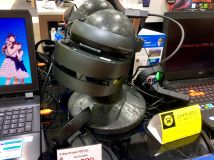 HP Windows Mixed Reality headset on display in December 2017.

References
- ↑ 1.00 1.01 1.02 1.03 1.04 1.05 1.06 1.07 1.08 1.09 1.10 1.11 1.12 1.13 1.14 1.15 1.16 1.17 1.18 1.19 1.20 1.21 1.22 1.23 1.24 1.25 1.26 1.27 1.28 Windows Apps Team (2017-05-11). "Windows Mixed Reality Dev Kits available for pre-order". Windows Developer Blog. https://blogs.windows.com/windowsdeveloper/2017/05/11/windows-mixed-reality-dev-kits-available-pre-order/. Retrieved 2026-10-14.
- ↑ 2.0 2.1 2.2 2.3 Elana Pidgeon (2017-10-03). "Windows Mixed Reality headsets available today". Windows Experience Blog. https://blogs.windows.com/windowsexperience/2017/10/03/how-to-pre-order-your-windows-mixed-reality-headset/. Retrieved 2026-10-14.
- ↑ 3.0 3.1 3.2 Jez Corden (2017-11-23). "HP Windows Mixed Reality Headset review: I'm a believer". Windows Central. https://www.windowscentral.com/hp-windows-mixed-reality-headset-review-im-believer. Retrieved 2026-10-14.
- ↑ 4.00 4.01 4.02 4.03 4.04 4.05 4.06 4.07 4.08 4.09 4.10 4.11 4.12 4.13 4.14 4.15 4.16 4.17 "HP Windows Mixed Reality Headset VR1000-100 with Controllers". HP product datasheet, hosted by Best Buy. 2017. https://files.bbystatic.com/yb95Jpp3ydKgEmhGKY1xjw==/6086401_ds.pdf. Retrieved 2026-10-14.
- ↑ 5.00 5.01 5.02 5.03 5.04 5.05 5.06 5.07 5.08 5.09 5.10 5.11 5.12 5.13 "Before you buy frequently asked questions". Microsoft Learn. https://learn.microsoft.com/en-us/previous-versions/mixed-reality/enthusiast-guide/before-you-buy-faqs. Retrieved 2026-10-14.
- ↑ 6.0 6.1 "Minimum PC hardware guidelines". Microsoft Learn. https://learn.microsoft.com/en-us/previous-versions/mixed-reality/enthusiast-guide/windows-mixed-reality-minimum-pc-hardware-compatibility-guidelines. Retrieved 2026-10-14.
- ↑ 7.0 7.1 7.2 7.3 7.4 7.5 7.6 "HP Windows Mixed Reality Headset VR1000-010 Product Specifications". HP Support. https://support.hp.com/in-en/document/c05579470. Retrieved 2026-10-14.
- ↑ 8.0 8.1 8.2 8.3 8.4 "Inside-out tracking". Microsoft Learn. https://learn.microsoft.com/en-us/previous-versions/mixed-reality/enthusiast-guide/tracking-system. Retrieved 2026-10-14.
- ↑ 9.0 9.1 9.2 "HP Revs Up Workstation, Unveils New VR Products and Services". HP Inc. press release, GlobeNewswire. 2018-02-05. https://www.globenewswire.com/news-release/2018/02/05/1332987/0/en/hp-revs-up-workstation-unveils-new-vr-products-and-services.html. Retrieved 2026-10-14.
- ↑ "Microsoft presenta Windows 10 Creators Update". Microsoft Prensa. 2016-10-26. https://news.microsoft.com/es-es/2016/10/26/microsoft-presenta-windows-10-creators-update/. Retrieved 2026-10-14.
- ↑ 11.0 11.1 Sarah Murry (2017-05-12). "More than just gaming HP Windows Mixed Reality Developer Edition". HP Newsroom. https://www.hp.com/us-en/newsroom/blogs/2017/more-than-just-gaming-hp-windows-mixed-reality-developer-edition.html. Retrieved 2026-10-14.
- ↑ 12.0 12.1 12.2 Kevin Carbotte (2018-07-05). "HP Windows Mixed Reality Headset Review: Narrow FOV Is Not What You Want". Tom's Hardware. https://www.tomshardware.com/reviews/hp-windows-mixed-reality-headset,5665.html. Retrieved 2026-10-14.
- ↑ 13.0 13.1 13.2 13.3 13.4 13.5 "HP Windows Mixed Reality Headset Developer Edition VR1000-009". HP product datasheet. 2017. https://www.hp.com/wcsstore/hpusstore/Treatment/MR_Headset_q2fy17_specification.pdf. Retrieved 2026-10-14.
- ↑ 14.0 14.1 14.2 14.3 14.4 14.5 14.6 "HP Windows Mixed Reality Headset - Professional Edition QuickSpecs". HP QuickSpecs, c05893139, version 3, hosted by 1WorldSync. 2019-10-08. https://cdn.cs.1worldsync.com/f7/0a/f70a4181-87f6-42c1-8df8-37fa1a3830c4.pdf. Retrieved 2026-10-14.
- ↑ 15.0 15.1 Super_All_In_One. "HP Windows Mixed Reality Headset Developer Edition Teardown". iFixit. https://documents.cdn.ifixit.com/pdf/ifixit/guide_96608_en.pdf. Retrieved 2026-10-14.
- ↑ 16.0 16.1 "Set up Windows Mixed Reality". Microsoft Learn. https://learn.microsoft.com/en-us/previous-versions/mixed-reality/enthusiast-guide/set-up-windows-mixed-reality. Retrieved 2026-10-14.
- ↑ "Release notes - October 2018". Microsoft Learn. https://learn.microsoft.com/nl-nl/previous-versions/mixed-reality/enthusiast-guide/release-notes-october-2018. Retrieved 2026-10-14.
- ↑ "Mixed Reality software overview and release history". Microsoft Learn. https://learn.microsoft.com/en-us/previous-versions/mixed-reality/enthusiast-guide/mixed-reality-software. Retrieved 2026-10-14.
- ↑ "Setting up camera passthrough: Oasis Driver for Windows Mixed Reality". Matthieu Bucchianeri, GitHub. https://github.com/mbucchia/Oasis-Driver-for-Windows-Mixed-Reality/wiki/Setting-up-camera-passthrough. Retrieved 2026-10-14.
- ↑ 20.0 20.1 20.2 "Frequently Asked Questions: Oasis Driver for Windows Mixed Reality". Matthieu Bucchianeri, GitHub. https://github.com/mbucchia/Oasis-Driver-for-Windows-Mixed-Reality/wiki/Frequently-Asked-Questions. Retrieved 2026-10-14.
- ↑ 21.0 21.1 Alex Kipman (2017-10-03). "The era of Windows Mixed Reality begins October 17". Windows Experience Blog. https://blogs.windows.com/windowsexperience/2017/10/03/the-era-of-windows-mixed-reality-begins-october-17/. Retrieved 2026-10-14.
- ↑ 22.0 22.1 "Using SteamVR with Windows Mixed Reality". Microsoft Learn. https://learn.microsoft.com/en-us/previous-versions/mixed-reality/enthusiast-guide/using-steamvr-with-windows-mixed-reality. Retrieved 2026-10-14.
- ↑ 23.0 23.1 "Motion controller FAQs". Microsoft Learn. https://learn.microsoft.com/en-us/previous-versions/mixed-reality/enthusiast-guide/motion-controller-problems. Retrieved 2026-10-14.
- ↑ Andy Weir (2017-06-08). "Windows Mixed Reality headsets from Acer and HP get companion apps in the Windows Store". Neowin. https://www.neowin.net/news/windows-mixed-reality-headsets-from-acer-and-hp-get-companion-apps-in-the-windows-store. Retrieved 2026-10-14.
- ↑ Shawn Whiting (2017-05-11). "Acer & HP Windows Mixed Reality Headset Dev Kits Now Available for Pre-order Starting at $300". Road to VR. https://www.roadtovr.com/acer-and-hp-windows-holographic-mixed-reality-vr-dev-kits-now-available-for-purchase-starting-at-300/. Retrieved 2026-10-14.
- ↑ 26.0 26.1 "Oasis Driver for Windows Mixed Reality". Matthieu Bucchianeri, Steam. https://store.steampowered.com/app/3824490/Oasis_Driver_for_Windows_Mixed_Reality/. Retrieved 2026-10-14.
- ↑ 27.0 27.1 Sydney Segear; Vuthea Chheang; Lauren Baron; Jicheng Li; Kangsoo Kim; Roghayeh Leila Barmaki (2024). "Visual Feedback and Guided Balance Training in an Immersive Virtual Reality Environment for Lower Extremity Rehabilitation". Computers & Graphics 119: Article 103880. doi:10.1016/j.cag.2024.01.007. Retrieved 2026-10-14.