

Samsung Odyssey
More actions
| Samsung HMD Odyssey | |
|---|---|
 
| |
| Basic Info | |
| VR/AR | Virtual Reality |
| Type | Head-mounted display |
| Subtype | PC VR |
| Platform | Windows Mixed Reality (original); SteamVR through Oasis (later third-party driver) |
| Creator | Samsung |
| Developer | Samsung, Microsoft |
| Manufacturer | Samsung |
| Announcement Date | October 3, 2017 [1] |
| Release Date | November 6, 2017 (reported U.S. retail availability) [2] |
| Price | US$499 with motion controllers (2017 U.S. price) [2] |
| Website | https://www.samsungmobilepress.com/media-assets/hmd_odyssey?tab=specs |
| Versions | Samsung HMD Odyssey, XE800ZAA [3] |
| Requires | Compatible host PC; software and GPU requirements vary by driver and Windows version |
| Successor | Samsung Odyssey Plus |
| System | |
| Operating System | Host Windows with original WMR; Windows 11 or Linux/SteamOS with Oasis (see software section) |
| Display | |
| Display | Dual 3.5-inch AMOLED [4] |
| Resolution | 1440 × 1600 per eye (2880 × 1600 combined) [4] |
| Refresh Rate | 60 Hz or 90 Hz, subject to host and driver support [4] |
| Image | |
| Field of View | 110° (manufacturer specification; axis unspecified) [4] |
| Optics | |
| Optics | Single Fresnel [4] |
| Ocularity | Binocular [4] |
| IPD Range | 60-72 mm, mechanical [4] |
| Passthrough | Version-dependent camera views: WMR Flashlight from Windows 10 version 1809; Oasis camera modes (see text) |
| Tracking | |
| Tracking | 6DoF inside-out, two front cameras [4] |
| Base Stations | No external tracking sensors required [5] |
| Rotational Tracking | Yes [5] |
| Positional Tracking | Yes [5] |
| Play Space | Room-scale use with a configured boundary [3] |
| Audio | |
| Audio | Integrated AKG headphones [4] |
| Microphone | Two built-in microphones [4] |
| Camera | Two front tracking cameras [4] |
| Connectivity | |
| Connectivity | HDMI 2.0 and USB 3.0 through a 4 m bound cable [4] |
| Ports | HDMI 2.0 and USB 3.0 host connectors [4] |
| Wired Video | HDMI [4] |
| Bluetooth | Controllers pair with the PC; no built-in headset radio [6] |
| Power | Host USB 3.0 [7] |
| Device | |
| Dimensions | 202 mm (W) × 131.5 mm (D) × 111 mm (H), manufacturer specification [4] |
| Weight | 645 g (manufacturer specification; cable basis unspecified) [4] |
| Headstrap | Rigid adjustable headband with rear adjustment wheel [5] |
| Haptics | Motion-controller vibration [3] |
| Color | Black (appearance in manufacturer product imagery) [5] |
| Sensors | Tracking cameras, accelerometer, gyroscope, compass, proximity sensor and IPD sensor [4] |
| Input | Pair of tracked Windows Mixed Reality controllers; compatible PC inputs depend on the application [3] |
| Compliance | FCC Part 15 Class B statement in the U.S. manual; IC radio statement for controllers [3] |
The Samsung HMD Odyssey (XE800ZAA) is a PC-tethered virtual reality headset developed by Samsung with Microsoft for the Windows Mixed Reality platform. It was announced in San Francisco on October 3, 2017, and reached U.S. retail in November at a reported US$499 with two motion controllers. Its dual AMOLED displays, integrated AKG headphones and mechanical adjustment of lens spacing distinguished it from the LCD-based Lenovo Explorer and Dell Visor. [1] [2] [6]
The Odyssey uses front-mounted cameras for inside-out head and controller tracking, without external tracking stations. It is an opaque VR headset powered by a computer, rather than an optical see-through display. Camera views became available through later software, including Windows Mixed Reality's Flashlight feature. The 2018 Odyssey+ is a separate successor with an anti-screen-door-effect display and built-in Bluetooth. [5] [3] [8] [9]
Microsoft states that Windows Mixed Reality headsets are no longer manufactured or sold. It removed Windows Mixed Reality from Windows 11 version 24H2 and ends platform support after November 2026. Since August 2025 the free third-party Oasis driver has let the Odyssey run directly under SteamVR on Windows 11, and since its 1.0.4 release of October 9, 2026, also on Linux and SteamOS. [6] [10] [11] [12]
History and availability
Microsoft and Samsung introduced the Odyssey at Microsoft's October 3, 2017 mixed-reality event. Preorders opened alongside those for other Windows Mixed Reality headsets. The headset required a compatible Windows 10 PC and the Fall Creators Update, rather than a smartphone as used by Samsung's Gear VR line. [1] [5] [6]
On October 17, Microsoft announced November 6 as the Odyssey's availability date. Neowin's November 6 retail report described the US$499 package with controllers as available for pickup at some Microsoft Store locations, while online stock was already unavailable. Microsoft separately confirmed on November 9 that the Odyssey was available for purchase. These are contemporary launch records, rather than evidence of present stock. [13] [2] [14]
Road to VR's November 7 launch report said Samsung had confirmed initial availability in the United States, China, South Korea, Brazil and Hong Kong through Samsung and Microsoft stores. It also noted that Samsung.com's listing included the game Rock and Rails with the purchase; no such bundle was mentioned for Microsoft's store. A Samsung spokesperson had told Notebookcheck in October 2017 that the Odyssey would not be released in Europe, without giving a reason. [15] [16]
Samsung's November 15 South Korean announcement set a domestic launch for November 21, 2017, at KRW790,000. It named about 40 demonstration and sales locations as well as Samsung's website. [17]
In February 2018 Microsoft's U.S. online store and Samsung cut the price of the Odyssey with two motion controllers by US$100, from US$499 to US$399. TechRadar described the offer as U.S.-only because the Odyssey was not sold in Europe. Samsung's Brazilian newsroom gave a suggested price of R$3,499 on March 22, 2018. [18] [19]
| Date | Event |
|---|---|
| October 3, 2017 | Announced at Microsoft's mixed-reality event in San Francisco; preorders opened [1] |
| November 6-7, 2017 | U.S. retail availability at US$499 with controllers; initial markets reported as the U.S., China, South Korea, Brazil and Hong Kong [2] [15] |
| November 15, 2017 | Windows Mixed Reality for SteamVR released as a free public preview [20] |
| November 21, 2017 | South Korean launch at KRW790,000 [17] |
| February 2018 | U.S. price cut to US$399 at Microsoft's online store and Samsung [18] |
| March 22, 2018 | Samsung Brazil lists a suggested price of R$3,499 [19] |
| October 22, 2018 | Successor Odyssey+ available in the U.S. [9] |
| August 29, 2025 | Oasis third-party SteamVR driver released on Steam [11] |
| October 9, 2026 | Oasis 1.0.4 adds Linux and SteamOS support [12] |
| November 2026 | End of Microsoft's Windows Mixed Reality support for Windows 11 version 23H2 users [10] |
The user manual identifies the model as XE800ZAA. It lists the left and right controllers as optional items that can also be bought separately, and says supplied accessories vary by region. This differs from the U.S. launch package, which included two controllers. [3] [2]
Design and controls
The headset has a rigid headband, forehead padding, face cushioning and a rear wheel that adjusts the band's circumference. Its integrated headphones can be repositioned over the ears. A separate wheel beneath the display adjusts the distance between the lenses; the volume buttons are physical headset controls. Samsung specifies dimensions of 202 × 131.5 × 111 mm and a mass of 645 g, without specifying a cable inclusion basis in the cited table. [3] [5] [4] Other published figures differ slightly: Road to VR gave 1.42 pounds (644 grams), while Samsung's Brazilian specification table lists 625 g ±20 g, the 625-gram figure also quoted in Engadget's hands-on. [15] [19] [21]
The manual calls the lens-spacing control a "focus adjustment wheel" and explains that it adjusts the distance between the lenses. It is an interpupillary-distance control, with Samsung specifying a 60-72 mm range. The wording does not establish a separate diopter adjustment. [3] [4]
Samsung's December 2017 manual warns against wearing the headset over glasses, while the company's February 2018 hands-on account says the headband can fit while wearing glasses. The two descriptions differ, so the headset's mechanical IPD adjustment should not be treated as a promise of spectacle fit. [3] [5]
Display and optics
Samsung specifies two 3.5-inch AMOLED displays, each with 1440 × 1600 pixels. Their combined pixel dimensions are 2880 × 1600. Compared with the Explorer and Visor's 1440 × 1440 per-eye displays, the Odyssey has the same horizontal pixel count and a higher vertical count. Samsung specifies single Fresnel optics, a 110° field of view and 60 Hz and 90 Hz display modes; the cited specification does not identify the field-of-view axis. [4] [6]
The two refresh rates are discrete supported modes. In the original Windows Mixed Reality stack, the selected mode depended on the computer's graphics hardware and output connection. Microsoft's historical 90 Hz tier specified HDMI 2.0 or DisplayPort 1.2, while its 60 Hz tier allowed HDMI 1.4 or DisplayPort 1.2. The Odyssey's own cable ends in HDMI and USB connectors; DisplayPort use requires an appropriate adapter. [7] [4]
Samsung's hands-on account described deeper blacks, more vivid colors and sharper contrast from AMOLED. These were manufacturer descriptions, rather than measurements against other headsets. [5]
Tracking and play space
The Odyssey tracks head translation and rotation in six degrees of freedom. Its two front cameras and inertial sensors support inside-out tracking of the headset and its motion controllers. Samsung's sensor list also includes a compass, proximity sensor and IPD sensor. The proximity sensor detects whether the headset is being worn; it is distinct from tracking the movement of the eyes. [5] [4] [3]
Mixed Reality Portal setup included checking the computer, updating firmware when required, pairing the controllers and tracing a play-space boundary. The headset itself was used to trace the perimeter while facing the computer. Samsung's manual explains that the boundary helps mark the usable area but cannot guarantee that a wearer will remain inside it. [3]
Controller tracking is limited by camera visibility. Microsoft's WMR documentation explains that controller positions can be inferred temporarily when the controllers leave the cameras' field of view. After a sufficiently long loss of visual tracking, the platform supplies an approximate position relative to the wearer while retaining orientation from the controller's internal sensors. This is a limitation of the original tracking system, rather than evidence of full visual tracking behind the headset. [6]
Camera views
The tracking cameras do not make the headset optically transparent. However, the Windows 10 October 2018 Update, version 1809, added Mixed Reality Flashlight for immersive WMR headsets. It displayed a view of the surroundings in the direction of the controller and could be invoked from the Start menu, with Windows + Grab on a motion controller, or by a voice command. Microsoft's driver history identifies driver 10.0.17760.1000 as enabling Flashlight in Windows 10 version 1809. Camera-view capability therefore depends on the software version. [8] [22]
Oasis's camera documentation describes black-and-white camera views, including a controller-attached Flashlight view and a full-screen Room View option. Its FAQ, however, describes basic monoscopic passthrough as supported and Room View as still being worked on. The developer's two pages give conflicting descriptions of Room View's availability; these documentation statements do not establish that every camera mode works in a particular Odyssey setup. The developer's release notes for the update published on May 31, 2026, say that it "Added support for SteamVR 'Room View' camera passthrough"; the FAQ, last edited on October 11, 2026, had not been updated to match. [23] [24] [25]
Audio and controllers
The Odyssey has integrated AKG headphones and two built-in microphones. Samsung described spatial audio based on sound direction, distance and environment, and voice chat through the microphone array. The headset's physical volume buttons adjust playback level. Samsung's launch specification also listed Cortana voice input. [4] [5] [3]
The supplied Samsung motion controllers have a ring of tracking lights and use Bluetooth to communicate with the PC. Microsoft's comparison table lists no built-in Bluetooth radio for the original Odyssey, while listing built-in Bluetooth for Odyssey+. A compatible PC radio or external adapter is therefore part of the original controller setup. [6] [3] [26]
| Controller component | Documented function |
|---|---|
| Thumbstick | Movement or teleportation within supported apps |
| Clickable touchpad | Selection, scrolling or swiping, depending on the app |
| Trigger | Selection or application-specific trigger input |
| Grab button | Grabbing objects in supported games or apps |
| Menu button | Application menu |
| Windows/power button | Start menu and controller power |
| Pairing button | Bluetooth pairing; located beneath the battery cover |
| Power and feedback | Two AA batteries per controller; vibration and an indicator light |
These functions are documented in the XE800ZAA manual, which also notes that controller behavior varies by application. Its optional controller set includes four AA batteries and two wrist straps. [3]
Samsung specifies each controller as 154.2 × 119.1 × 119.1 mm and 160 g. Its specification sheet lists an accelerometer, gyroscope and compass. These are published component specifications, rather than tracking-accuracy or battery-runtime measurements. [4]
PC requirements
The Odyssey cannot operate by itself. Its original software ran on the host PC, and the 4 m bound cable carried HDMI 2.0 video and the USB 3.0 connection. Samsung's manual recommended using a laptop's power adapter and discouraged additional extension cables. The original controllers needed the PC's Bluetooth connection. [3] [4]
Samsung's November 2017 Korean launch announcement recommended an Intel Core i5 or better, at least 8 GB of RAM, a GeForce GTX 1050 or better and an up-to-date graphics driver. Microsoft's historical WMR guidelines separated 60 Hz and 90 Hz PC tiers rather than specifying one requirement for every experience: [17]
| Component | Historical WMR 60 Hz tier | Historical WMR 90 Hz tier |
|---|---|---|
| Processor examples | Intel Core i5-7200U, with Hyper-Threading enabled, or AMD Ryzen 5 1400 | Intel Core i5-4590 or AMD Ryzen 5 1400 |
| Graphics examples | Intel HD Graphics 620, GeForce MX150/GTX 1050/965M, or Radeon RX 460/560 | GeForce GTX 1060 or Radeon RX 470/570 |
| Memory | 8 GB DDR3, dual channel | 8 GB DDR3 |
| Free disk space | At least 10 GB | At least 10 GB |
| Video-output guideline | HDMI 1.4 or DisplayPort 1.2 | HDMI 2.0 or DisplayPort 1.2 |
| USB and controllers | USB 3.0 and Bluetooth 4.0 | USB 3.0 and Bluetooth 4.0 |
The table gives Microsoft's historical platform examples for headsets outside its later high-resolution Reverb G2 section. It describes host PCs, not hardware inside the Odyssey, and does not guarantee a particular game's frame rate. Modern third-party drivers have different requirements. [7]
Software and support
Original Windows Mixed Reality stack
Mixed Reality Portal provided the headset's original home environment, known as Cliff House, and launched compatible applications. Samsung's manual described placing and resizing 2D apps and 3D objects, viewing saved images and video, using a browser, and capturing the virtual view. Keyboard, mouse or a PC gamepad could also be used where supported. The manual describes historical software behavior, rather than present availability of each app or service. [3] [5]
For SteamVR content, the original stack used both SteamVR and the Windows Mixed Reality for SteamVR bridge. At the Odyssey's launch, WMR headsets could only use VR content from Microsoft's store; the SteamVR bridge followed on November 15, 2017, as a free public preview. [15] [20] The manufacturer companion app also delivered firmware updates for the Samsung Odyssey. Compatibility depended on a game's hardware and controller requirements; WMR support was not a guarantee that every SteamVR title worked. [22] [6]
Microsoft subsequently removed Windows Mixed Reality from Windows 11 version 24H2, including Mixed Reality Portal and its SteamVR integration. Its published support statement says existing WMR devices can continue working with Steam through November 2026 if users remain on Windows 11 version 23H2. After November 2026, WMR will no longer receive security or nonsecurity updates, bug fixes, technical support or online technical-content updates. This is a Microsoft software-support schedule, rather than a claim that the headset's electronics stop functioning on that date. [10]
Microsoft's archived buying FAQ says WMR headsets are no longer manufactured or sold. That describes the platform's official product status; it does not establish whether used units or residual retailer stock are available in any particular market. [6]
Oasis driver
Oasis Driver for Windows Mixed Reality is a later third-party SteamVR driver whose developer explicitly lists Samsung Odyssey among supported WMR headsets. It is developed by Matthieu Bucchianeri and distributed free of charge through Steam, where it was released on August 29, 2025. [11] [27] It provides a native SteamVR rendering path and headset/controller tracking without Mixed Reality Portal. The documented application interfaces are OpenVR and OpenXR through SteamVR; applications that depend only on the old Windows Mixed Reality API are outside the FAQ's stated support. [28] [25]
The developer documents support for the Odyssey's physical IPD slider, motion-controller buttons and vibration, and SteamVR features such as remapping controls. The original Cliff House and Windows menu are replaced by SteamVR Home and its dashboard. [25]
Windows compatibility depends on the GPU and driver. The quickstart lists NVIDIA support on Windows 11, and AMD support on Windows 11 version 24H2 or newer with RX 5000 or newer GPUs. Intel GPUs and AMD's 60 Hz mode are unsupported. The FAQ also warns that some headsets have AMD-driver problems that cannot be predicted from the model alone, while the known-issues page lists driver versions that work and versions that do not. The FAQ limits developer technical support to the latest Windows 11, even though the quickstart includes older Windows 11 configurations. [29] [28] [25]
The project also documents Linux and SteamOS support using bundled Ignition, with limited developer support because configurations vary. The developer first offered Linux support through Ignition on the Oasis preview branch on September 6, 2026, describing it as intended for advanced users. [30] Linux and SteamOS support reached the default branch in Oasis 1.0.4 on October 9, 2026; its release notes credit the Ignition project by Bnuuy Solutions and state that the Windows build was unchanged. [12] Its developer's listed Linux tests include the Odyssey+ rather than the original Odyssey, so those tests are not evidence of an exact XE800ZAA configuration. The developer's general headset-support statement and specific test list have different scopes. [28] [25]
| Oasis release | Date | Changes relevant to the original Odyssey |
|---|---|---|
| Initial release | August 29, 2025 | Driver published on Steam with installation, unlock and troubleshooting documentation [11] |
| 1.0.1 | September 5, 2025 | Software IPD adjustment setting, chromatic-aberration and distortion-correction settings, USB 3.0 speed check, proximity sensor disabled by default [31] |
| Preview branch | September 20, 2025 | Partial AMD GPU support; the developer reported success with the Samsung Odyssey among other headsets [32] |
| 1.0.2 | September 27, 2025 | AMD GPU support on Windows 11 version 24H2 and later with AMD Adrenalin 25.9.2; 60 Hz mode listed as not working with AMD GPUs [33] |
| 1.0.3 | March 21, 2026 | Built-in Bluetooth receiver support for HP Reverb, HP Reverb G2 and Samsung Odyssey+ (the original Odyssey has no built-in receiver [6]); new 3DoF mode [34] |
| 1.0.3 update | May 31, 2026 | SteamVR Room View camera passthrough; automatic cross-eye distortion fix [23] |
| Preview branch | September 6, 2026 | Linux support through bundled Ignition, for advanced users [30] |
| 1.0.4 | October 9, 2026 | Linux and SteamOS support through bundled Ignition; no Windows changes [12] |
The table summarizes the developer's own release announcements. They describe intended changes and are not independent tests of an Odyssey setup.
Comparison with other WMR headsets
This comparison uses 2017 headset hardware and dated U.S. package prices. Field-of-view values are published specifications with unspecified axes, rather than measurements under one common test method.
| Feature | Samsung Odyssey | Lenovo Explorer | Dell Visor |
|---|---|---|---|
| Dated U.S. price and package | US$499 with controllers, reported November 6, 2017 [2] | US$349 headset only; from US$449 with controllers, announced August 31, 2017 [35] | US$349.99 headset only; US$449.99 bundle, listed November 1, 2017 [36] |
| Resolution per eye | 1440 × 1600 | 1440 × 1440 | 1440 × 1440 |
| Display | AMOLED | LCD | LCD |
| Published field of view | 110° | 105° in Microsoft's table | 105° in Microsoft's table; 110° in Dell's product sheet |
| Audio | Integrated AKG headphones | 3.5 mm jack | 3.5 mm jack |
| IPD adjustment | Mechanical, 60-72 mm | Software; lens spacing fixed | Software; lens spacing fixed |
| Manufacturer weight statement | 645 g, basis unspecified | 380 g in features; 0.55 kg unpacked in the same support table [37] | 0.59 kg in Dell's product sheet; basis unspecified [38] |
Display, audio, IPD and Microsoft's field-of-view values are from its headset comparison; Samsung's IPD range and weight are from Samsung's specification. Lenovo's two weight descriptions differ and are not reconciled by assigning a cable weight. Dell's 110° statement and Microsoft's 105° statement likewise should not be treated as equivalent measurements. [6] [4] [37] [38]
Reception
Early hands-on reports concentrated on the display. Engadget's Nicole Lee, writing after the October 2017 unveiling, described the image as sharp, saw none of the screen-door effect and found that the 625-gram headset looked bulky but fit snugly. TechRadar's hands-on called the visuals "Incredibly crisp" and the built-in audio "a big plus", and listed an "Uninspired design with a somewhat cheap feel" and the US$500 price as drawbacks. [21] [39]
Road to VR's Ben Lang reported a "marked increase in screen sharpness" over the Oculus Rift and HTC Vive, with pixels and the screen-door effect reduced but still visible. He found it hard to get a comfortable fit with the lenses' sweet spot and the headphones positioned well, and regretted the lack of the flip-up visor used by other WMR headsets. [15]
Later reviews were mostly favorable. In January 2018, Ian Hamilton of UploadVR rated the Odyssey "Worth It" and wrote that it "sits among the best VR headsets on the market", while noting that the controllers were "still a little bulky" and that the SteamVR integration was still in early access. The Next Web's Napier Lopez wrote that it had "the best viewing experience" he had tried so far, but reported "black smearing" in dark, fast-moving scenes, warm materials during long sessions and a "still kind of buggy" SteamVR beta. [40] [41]
Tom's Hardware's March 2018 review by Kevin Carbotte said that the Odyssey "wears the crown within the Windows Mixed Reality world" and judged it a better overall value than cheaper WMR headsets. It still preferred an HTC Vive with the Deluxe Audio Strap for "the most complete VR experience", while recommending the Odyssey's higher pixel count for productivity and text-heavy games such as Elite Dangerous. [42]
| Outlet | Author | Date | Type | Summary |
|---|---|---|---|---|
| Engadget | Nicole Lee | October 3, 2017 | Hands-on | Sharp image with no screen-door effect; bulky but snug fit [21] |
| Road to VR | Ben Lang | November 7, 2017 | Hands-on impressions | Sharper than Rift and Vive; fit and lens sweet spot hard to find [15] |
| UploadVR | Ian Hamilton | January 30, 2018 | Review | Final recommendation "Worth It" [40] |
| TechRadar | Michelle Fitzsimmons | 2017 hands-on (page dated February 15, 2018) | Hands-on | Crisp visuals and built-in audio; plain design and price [39] |
| The Next Web | Napier Lopez | February 23, 2018 | Review | "Best viewing experience" the reviewer had tried; black smearing and buggy SteamVR beta [41] |
| Tom's Hardware | Kevin Carbotte | March 30, 2018 | Review | Best WMR headset; Vive with Deluxe Audio Strap still preferred overall [42] |
Odyssey+ successor
The Odyssey+ became available in the U.S. on October 22, 2018. Its announcement described an anti-screen-door-effect display that diffuses light around pixel boundaries, a wider eye box, revised face padding and built-in Bluetooth with pre-paired controllers. The original XE800ZAA pairs its controllers to the PC, while the successor pairs them to its own Bluetooth radio. [9]
Technical specifications summary
| Specification | Original Odyssey |
|---|---|
| Display | Two 3.5-inch AMOLED panels, 1440 × 1600 pixels per eye |
| Combined resolution | 2880 × 1600 pixels |
| Refresh modes | 60 Hz and 90 Hz, subject to host and driver support |
| Field of view | 110°, manufacturer value with no axis specified |
| Optics and IPD | Single Fresnel; mechanical 60-72 mm adjustment |
| Tracking | Two front cameras, inside-out 6DoF head and controller tracking |
| Audio | Integrated AKG headphones and two microphones |
| Cable | 4 m bound HDMI 2.0/USB 3.0 cable |
| Dimensions | 202 × 131.5 × 111 mm (W × D × H) |
| Mass | 645 g, manufacturer specification |
| Historical U.S. price | US$499 with controllers, November 2017; US$399 after the February 2018 price cut [18] |
Hardware specifications are Samsung's published values; the price is a historical retail report. [4] [2]
See also
Gallery
-
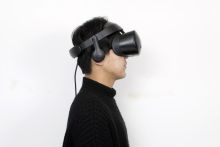 Samsung HMD Odyssey worn by a user.

References
- ↑ 1.0 1.1 1.2 1.3 "The era of Windows Mixed Reality begins October 17". Windows Experience Blog; Microsoft. 2017-10-03. https://blogs.windows.com/windowsexperience/2017/10/03/the-era-of-windows-mixed-reality-begins-october-17/. Retrieved 2026-10-14.
- ↑ 2.0 2.1 2.2 2.3 2.4 2.5 2.6 2.7 "Samsung's Windows Mixed Reality Odyssey headset is now available". Neowin. 2017-11-06. https://www.neowin.net/news/samsungs-windows-mixed-reality-odyssey-headset-is-now-available/. Retrieved 2026-10-14.
- ↑ 3.00 3.01 3.02 3.03 3.04 3.05 3.06 3.07 3.08 3.09 3.10 3.11 3.12 3.13 3.14 3.15 3.16 "XE800ZAA User Manual (English/Spanish, Rev. 1.4)". Samsung Electronics; original manual hosted by Syndigo. 2017-12. https://content.syndigo.com/asset/b287b73c-2379-49ab-a7c1-9830a7f4c318/original.pdf. Retrieved 2026-10-14.
- ↑ 4.00 4.01 4.02 4.03 4.04 4.05 4.06 4.07 4.08 4.09 4.10 4.11 4.12 4.13 4.14 4.15 4.16 4.17 4.18 4.19 4.20 4.21 4.22 4.23 4.24 4.25 4.26 "HMD Odyssey: headset and controller product specifications". Samsung Mobile Press. https://www.samsungmobilepress.com/media-assets/hmd_odyssey?tab=specs. Retrieved 2026-10-14.
- ↑ 5.00 5.01 5.02 5.03 5.04 5.05 5.06 5.07 5.08 5.09 5.10 5.11 5.12 "[Hands-on Get Ready to Explore Windows Mixed Reality with Samsung’s HMD Odyssey"]. Samsung Newsroom Malaysia. 2018-02-13. https://news.samsung.com/my/hands-on-get-ready-to-explore-windows-mixed-reality-with-samsungs-hmd-odyssey. Retrieved 2026-10-14.
- ↑ 6.00 6.01 6.02 6.03 6.04 6.05 6.06 6.07 6.08 6.09 6.10 "Before you buy frequently asked questions". Microsoft Learn. https://learn.microsoft.com/en-us/previous-versions/mixed-reality/enthusiast-guide/before-you-buy-faqs. Retrieved 2026-10-14.
- ↑ 7.0 7.1 7.2 "Minimum PC hardware guidelines". Microsoft Learn. https://learn.microsoft.com/en-us/previous-versions/mixed-reality/enthusiast-guide/windows-mixed-reality-minimum-pc-hardware-compatibility-guidelines. Retrieved 2026-10-14.
- ↑ 8.0 8.1 "Release notes - October 2018". Microsoft Learn. 2018-10-02. https://learn.microsoft.com/en-us/previous-versions/mixed-reality/enthusiast-guide/release-notes-october-2018. Retrieved 2026-10-14.
- ↑ 9.0 9.1 9.2 "Go to the next level of Windows Mixed Reality with the Samsung HMD Odyssey+". Windows Experience Blog; Microsoft. 2018-10-22. https://blogs.windows.com/windowsexperience/2018/10/22/go-to-the-next-level-of-windows-mixed-reality-with-the-samsung-hmd-odyssey/. Retrieved 2026-10-14.
- ↑ 10.0 10.1 10.2 "Features and functionality removed in Windows client". Microsoft Learn. https://learn.microsoft.com/en-us/windows/whats-new/removed-features. Retrieved 2026-10-14.
- ↑ 11.0 11.1 11.2 11.3 Matthieu Bucchianeri (2025-08-29). "Oasis Driver is now released!". Steam (Oasis Driver for Windows Mixed Reality news). https://store.steampowered.com/news/app/3824490/view/1809235871622259. Retrieved 2026-10-17.
- ↑ 12.0 12.1 12.2 12.3 Matthieu Bucchianeri (2026-10-09). "Oasis 1.0.4 - Linux/SteamOS support". Steam (Oasis Driver for Windows Mixed Reality news). https://store.steampowered.com/news/app/3824490/view/1846018067932493. Retrieved 2026-10-17.
- ↑ "Windows 10 Fall Creators Update and mixed reality headsets available today; Announcing Surface Book 2". Windows Experience Blog; Microsoft. 2017-10-17. https://blogs.windows.com/windowsexperience/2017/10/17/windows-10-fall-creators-update-and-mixed-reality-headsets-available-today-announcing-surface-book-2/. Retrieved 2026-10-14.
- ↑ "This Week on Windows: Surface Book 2 now available for pre-order, Xbox One X launch, Samsung HMD Odyssey availability and more". Windows Experience Blog; Microsoft. 2017-11-09. https://blogs.windows.com/windowsexperience/2017/11/09/week-windows-surface-book-2-now-available-pre-order-xbox-one-x-launch-samsung-hmd-odyssey-availability/. Retrieved 2026-10-14.
- ↑ 15.0 15.1 15.2 15.3 15.4 15.5 Ben Lang (2017-11-07). "Samsung Odyssey Windows VR Headset Now Available - Everything You Need to Know". Road to VR. https://www.roadtovr.com/samsung-odyssey-vr-headset-mixed-reality-now-available-everything-you-need-to-know/. Retrieved 2026-10-17.
- ↑ Christian Hintze (2017-10-19). "Samsung-VR: Bestes WMR-Headset HMD Odyssey kommt nicht für Europa". Notebookcheck. https://www.notebookcheck.com/Samsung-VR-Bestes-WMR-Headset-HMD-Odyssey-kommt-nicht-fuer-Europa.258700.0.html. Retrieved 2026-10-17.
- ↑ 17.0 17.1 17.2 "Samsung announces November 21 domestic launch of Samsung HMD Odyssey". Samsung Newsroom Korea. 2017-11-15. https://news.samsung.com/kr/%EC%82%BC%EC%84%B1%EC%A0%84%EC%9E%90-%ED%98%BC%ED%95%A9-%ED%98%84%EC%8B%A4mixed-reality-%ED%97%A4%EB%93%9C%EC%85%8B-%EC%82%BC%EC%84%B1-hmd-%EC%98%A4%EB%94%94%EC%84%B8%EC%9D%B4-21%EC%9D%BC. Retrieved 2026-10-14.
- ↑ 18.0 18.1 18.2 Darren Allan (2018-02-27). "Windows Mixed Reality headsets from Samsung and Dell get big discounts". TechRadar. https://www.techradar.com/news/samsungs-hmd-odyssey-vr-headset-is-seriously-tempting-with-a-100-discount. Retrieved 2026-10-17.
- ↑ 19.0 19.1 19.2 "Explore o mundo da realidade virtual com o Samsung HMD Odyssey". Samsung Newsroom Brasil. 2018-03-22. https://news.samsung.com/br/explore-o-mundo-da-realidade-virtual-com-o-samsung-hmd-odyssey. Retrieved 2026-10-17.
- ↑ 20.0 20.1 Ben Lang (2017-11-15). "Windows VR Headsets Can Now Play VR Games on Steam". Road to VR. https://www.roadtovr.com/windows-vr-mixed-reality-steam-support-steamvr-preview/. Retrieved 2026-10-17.
- ↑ 21.0 21.1 21.2 Nicole Lee (2017-10-03). "Samsung's HMD Odyssey proves image quality is worth the cost". Engadget. https://www.engadget.com/2017-10-03-samsung-hmd-odyssey-hands-on.html. Retrieved 2026-10-17.
- ↑ 22.0 22.1 "Mixed Reality software overview and release history". Microsoft Learn. https://learn.microsoft.com/en-us/previous-versions/mixed-reality/enthusiast-guide/mixed-reality-software. Retrieved 2026-10-14.
- ↑ 23.0 23.1 Matthieu Bucchianeri (2026-05-31). "Oasis 1.0.3 - Room View support + some distortion fixes". Steam (Oasis Driver for Windows Mixed Reality news). https://store.steampowered.com/news/app/3824490/view/1833968530896077. Retrieved 2026-10-17.
- ↑ "Oasis Driver: Setting up camera passthrough". Matthieu Bucchianeri. https://github.com/mbucchia/Oasis-Driver-for-Windows-Mixed-Reality/wiki/Setting-up-camera-passthrough. Retrieved 2026-10-14.
- ↑ 25.0 25.1 25.2 25.3 25.4 "Oasis Driver: Frequently Asked Questions". Matthieu Bucchianeri. https://github.com/mbucchia/Oasis-Driver-for-Windows-Mixed-Reality/wiki/Frequently-Asked-Questions. Retrieved 2026-10-14.
- ↑ "Motion controller FAQs". Microsoft Learn. https://learn.microsoft.com/en-us/previous-versions/mixed-reality/enthusiast-guide/motion-controller-problems. Retrieved 2026-10-14.
- ↑ "Oasis Driver for Windows Mixed Reality". Steam. Matthieu Bucchianeri. https://store.steampowered.com/app/3824490/. Retrieved 2026-10-17.
- ↑ 28.0 28.1 28.2 "Oasis Driver for Windows Mixed Reality: documentation". Matthieu Bucchianeri. https://github.com/mbucchia/Oasis-Driver-for-Windows-Mixed-Reality/wiki. Retrieved 2026-10-14.
- ↑ "Oasis Driver: Known Issues". Matthieu Bucchianeri. https://github.com/mbucchia/Oasis-Driver-for-Windows-Mixed-Reality/wiki/Known-Issues. Retrieved 2026-10-14.
- ↑ 30.0 30.1 Matthieu Bucchianeri (2026-09-06). "Oasis for Linux - Support with Ignition". Steam (Oasis Driver for Windows Mixed Reality news). https://store.steampowered.com/news/app/3824490/view/1842846814451557. Retrieved 2026-10-17.
- ↑ Matthieu Bucchianeri (2025-09-05). "Oasis 1.0.1". Steam (Oasis Driver for Windows Mixed Reality news). https://store.steampowered.com/news/app/3824490/view/1809869180057929. Retrieved 2026-10-17.
- ↑ Matthieu Bucchianeri (2025-09-20). "Launching Oasis "Preview" Branch / Partial AMD Graphics Support". Steam (Oasis Driver for Windows Mixed Reality news). https://store.steampowered.com/news/app/3824490/view/1811138915469295. Retrieved 2026-10-17.
- ↑ Matthieu Bucchianeri (2025-09-27). "Oasis 1.0.2". Steam (Oasis Driver for Windows Mixed Reality news). https://store.steampowered.com/news/app/3824490/view/1811772772316358. Retrieved 2026-10-17.
- ↑ Matthieu Bucchianeri (2026-03-21). "Oasis 1.0.3 - Built-in Bluetooth support". Steam (Oasis Driver for Windows Mixed Reality news). https://store.steampowered.com/news/app/3824490/view/1827626365760498. Retrieved 2026-10-17.
- ↑ "IFA 2017: Lenovo announces Windows Mixed Reality headset and new 2-in-1 laptops". Windows Experience Blog; Microsoft. 2017-08-31. https://blogs.windows.com/windowsexperience/2017/08/31/ifa-2017-lenovo-announces-windows-mixed-reality-headset-new-2-1-laptops/. Retrieved 2026-10-14.
- ↑ "Dell Announces Biggest Black Friday and Cyber Monday Deals On Widest Selection Ever". Dell; PR Newswire. 2017-11-01. https://www.prnewswire.com/news-releases/dell-announces-biggest-black-friday-and-cyber-monday-deals-on-widest-selection-ever-300547181.html. Retrieved 2026-10-14.
- ↑ 37.0 37.1 "Overview for Lenovo Explorer". Lenovo Support. https://smartsupport.lenovo.com/us/en/products/smart/arvr/lenovo-explorer/solutions/pd500067-overview-for-lenovo-explorer. Retrieved 2026-10-14.
- ↑ 38.0 38.1 "Dell Visor & Dell Visor Controllers product sheet". Dell; original product sheet hosted by Best Buy. 2017. https://files.bbystatic.com/7Xb6OZ1mzHKVGIf0yaGcTw%3D%3D/e9fc8b44-6b8d-4949-935c-1c4549021d2f.pdf. Retrieved 2026-10-14.
- ↑ 39.0 39.1 Michelle Fitzsimmons (2018-02-15). "Hands on: Samsung HMD Odyssey review". TechRadar. https://www.techradar.com/reviews/samsung-hmd-odyssey. Retrieved 2026-10-17.
- ↑ 40.0 40.1 Ian Hamilton (2018-01-30). "Review: Samsung Odyssey Sits Among The Best VR Headsets". UploadVR. https://www.uploadvr.com/review-samsung-odyssey-sits-among-best-vr-headsets/. Retrieved 2026-10-17.
- ↑ 41.0 41.1 Napier Lopez (2018-02-23). "Samsung's HMD Odyssey is the best way to experience Microsoft's Mixed Reality". The Next Web. https://thenextweb.com/news/samsungs-hmd-odyssey-best-way-experience-microsofts-mixed-reality. Retrieved 2026-10-17.
- ↑ 42.0 42.1 Kevin Carbotte (2018-03-30). "Samsung HMD Odyssey Windows Mixed Reality Headset Review: MR Goes Premium (Our Conclusion)". Tom's Hardware. https://www.tomshardware.com/reviews/samsung-odyssey-windows-mixed-reality-hmd-vr,5526-7.html. Retrieved 2026-10-17.