

Dell Visor
More actions
| Dell Visor | |
|---|---|

| |
| Basic Info | |
| VR/AR | Virtual Reality |
| Type | Head-mounted display |
| Subtype | PC VR |
| Platform | Windows Mixed Reality |
| Creator | Dell |
| Developer | Dell |
| Manufacturer | Dell |
| Announcement Date | August 28, 2017[1] |
| Release Date | Fall 2017 (Microsoft’s listing)[2] |
| Price | US$349.99 headset; US$449.99 with controllers (Dell's November 2017 listing)[3] |
| Website | https://www.dell.com/ |
| Versions | VR118 headset; VRP100 headset/controller bundle[4] |
| Requires | Compatible Windows PC; see software status below[5] |
| System | |
| Operating System | Windows 10 Fall Creators Update on the host PC (original requirement)[4] |
| Display | |
| Display | Two Sharp 2.89-inch LCD panels[6] |
| Subpixel Layout | RGB subpixels (Dell specification)[4] |
| Resolution | 1440 × 1440 per eye[4] |
| Pixel Density | 706ppi (Dell panel specification)[4] |
| Refresh Rate | 90Hz with WMR Ultra/HDMI 2.0; 60Hz with WMR/HDMI 1.4[6] |
| Image | |
| Field of View | 110° (Dell); 105° (Microsoft’s comparison)[4][2] |
| Optics | |
| Optics | Fresnel lenses[4] |
| Ocularity | Binocular[4] |
| IPD Range | Software adjustment; no mechanical adjustment[4] |
| Tracking | |
| Tracking | 6DoF inside-out[4] |
| Base Stations | No external tracking cameras required[6] |
| Rotational Tracking | Yes[4] |
| Positional Tracking | Yes[4] |
| Play Space | Room boundary or stationary setup[4] |
| Audio | |
| Audio | External headphones via 3.5mm jack[4][6] |
| 3.5mm Audio Jack | Yes[6] |
| Camera | Two monochrome VGA tracking cameras[4] |
| Connectivity | |
| Connectivity | HDMI and USB 3.0[4] |
| Ports | HDMI, USB Type-A, 3.5mm audio[4][6] |
| Bluetooth | Controllers pair to the host PC[4] |
| Power | USB bus powered[4] |
| Device | |
| Dimensions | 170.5 × 270 × 130.5mm (W × D × H, Dell specification)[6] |
| Weight | 0.59kg (Dell specification)[6] |
| Headstrap | Adjustable band with rear thumbwheel[1] |
| Haptics | VRC100 controller feedback[4] |
| Sensors | Gyroscope, accelerometer, magnetometer; two mapping cameras[4] |
| Input | VRC100 motion controllers; gamepad or mouse alternatives[4] |
The Dell Visor is a PC VR head-mounted display developed by Dell for Microsoft's Windows Mixed Reality platform. Dell announced it on August 28, 2017. Microsoft lists its release period as fall 2017.[1][2] The VR118 headset connects to a PC through HDMI and USB; VRP100 is the bundle with two VRC100 motion controllers.[4]
The headset has a flip-up display assembly, a padded adjustable headband, two LCD panels and inside-out tracking cameras. It supports positional as well as rotational head tracking, without external tracking cameras.[1][4][6] Despite the platform's name, the Visor is an immersive VR headset; Dell's guide states that it does not support augmented reality.[4] Its original software platform has since been deprecated, with Windows Mixed Reality removed from Windows 11 version 24H2.[5]
History and development
Dell introduced the Visor during IFA 2017. Its announcement described a flip-up visor, head and face padding, a thumbwheel for adjusting the band and controllers tracked by the headset's sensors. The announced US distribution included Dell, Microsoft Store and selected Best Buy stores.[1]
Microsoft's August 28 announcement listed US prices of US$359.99 for the headset and US$459.99 with controllers.[1] Dell's own November 1, 2017 holiday release listed the headset at US$349.99 and the controller bundle at US$449.99.[3]
On October 3, 2017, Microsoft announced preorders for the Dell Visor alongside headsets from Acer, HP, Lenovo and Samsung. Windows Mixed Reality on PCs was tied to the Windows 10 Fall Creators Update scheduled for October 17. The same announcement distinguished the SteamVR developer preview from the consumer preview planned for the holiday period.[7]
The headset and controller product codes identify different packages, rather than different display specifications:
| Code | Product |
|---|---|
| VR118 | Dell Visor headset. |
| VRC100 | Pair of Dell Visor motion controllers, supplied with four AA batteries and two wrist lanyards. |
| VRP100 | Bundle containing the VR118 headset and VRC100 controllers. |
These package descriptions come from Dell's November 2017 user guide.[4]
Physical design and fit
The display assembly can be lifted away from the face while the headband remains in place. Front and rear padding support the band, and a rear thumbwheel adjusts its tightness. Dell's brochure also identifies a clip that routes the cable to the back of the headband.[1][6] The guide describes use with distance-viewing glasses and warns that the face-mask material is not washable.[4]
Dell published a headset weight of 0.59kg and dimensions of 170.5 × 270 × 130.5mm in width, depth and height order. These are its product specifications; the brochure does not define a separate cable-inclusive measurement.[6]
Display and optics
The Visor uses two Sharp 2.89-inch LCD panels with 1440 × 1440 pixels per eye. Dell lists RGB subpixels and 706 pixels per inch for the panels. The physical panel density is separate from the angular detail seen through the Fresnel lenses.[6][4]
Dell recommends a Windows Mixed Reality Ultra PC with HDMI 2.0 for 90Hz operation. Its brochure's footnote specifies 60Hz for a Windows Mixed Reality PC using HDMI 1.4, so 90Hz is conditional on the PC configuration.[6]
Field of view and IPD
Dell's guide and brochure specify a 110° field of view, while Microsoft's headset comparison lists 105°. Neither specification defines its measurement axis or procedure, so the figures cannot establish separate horizontal and vertical angles.[4][6][2]
There is no mechanical interpupillary distance adjustment. Windows Mixed Reality provides a software IPD setting, which Dell describes as adjusting image distortion and depth accuracy for the wearer's IPD. This setting does not move the lenses.[4]
Tracking and interaction
Two monochrome VGA cameras map the surroundings for inside-out tracking, alongside a gyroscope, accelerometer and magnetometer. Dell specifies six degrees of freedom, covering changes in both head position and orientation.[4] The cameras also track the controllers' visible-light LED constellations. Dell's controller specification limits their six-degree-of-freedom tracking to the headset cameras' field of view.[4]
The original setup process offered room-boundary calibration by walking the headset around the perimeter of the space. It also allowed the boundary step to be skipped for seated or stationary use. Dell's instructions called for sufficient lighting and unobstructed tracking sensors when tracing the boundary.[4]
Camera views
The Windows 10 October 2018 Update (version 1809) added Mixed Reality Flashlight for immersive WMR PC headsets. Users could view their physical surroundings without removing the headset, pointing a motion controller toward the area to see. Microsoft documented activation from the Start menu, with Windows + Grab on a controller, or through speech commands.[8] Its driver history identifies Flashlight as a feature enabled in Windows 10 version 1809.[9]
For the separate Oasis software path described below, the developer's camera-setup page checked on October 14, 2026 describes black-and-white views from the headset's front cameras in SteamVR. Its Show Camera on Controller option displays a view when the controller's Windows button opens the dashboard. The document also describes a full-screen Room View.[10] However, the FAQ lists basic monoscopic camera passthrough and describes Room View as still being worked on. These documents differ on Room View's status, so they do not establish its availability in every driver release or configuration.[11]
VRC100 motion controllers
Each handheld controller has a thumbstick, touchpad, trigger, grab button, Windows button and menu button, with a pairing button inside the battery compartment. The controller set uses four AA batteries and includes two wrist lanyards. Haptic feedback belongs to these controllers.[12][4]
The controllers pair with the PC's Bluetooth radio. Dell's guide provides a Bluetooth 4.0 Low Energy USB-adapter option for a PC without Bluetooth; Microsoft's comparison lists no Bluetooth radio built into the Visor itself. The guide also documents a gamepad or mouse as an alternative to motion controllers during setup.[4][2]
Audio and connections
The Visor has a 3.5mm jack for separate headphones. Its HDMI connection carries the display signal, and the USB connection supplies power as well as the PC connection used by the headset. Dell specifies USB bus power and USB Type-A at the cable end.[4][6] The original guide required a suitable microphone for Cortana voice use; headphones and that microphone were separate setup considerations.[4]
PC requirements and software
Historical requirements
The November 2017 guide recommended Windows Mixed Reality Ultra and listed the following PC requirements. They describe the host system, rather than components installed inside the headset.[4]
| Component | Dell's 2017 WMR Ultra requirement |
|---|---|
| Processor | Sixth-generation Intel Core i5 with four or more physical cores, or desktop AMD FX-4350 at 4.2GHz with four or more physical cores. |
| Graphics | NVIDIA GTX 965M or AMD RX 460 or greater DirectX 12-capable discrete GPU; WDDM 2.2 or later. |
| Memory and disk | At least 8GB DDR3 memory and 10GB of additional free disk space. |
| Monitor | An external or integrated display for setup and use, with at least 800 × 600 resolution and 32-bit colour. |
| USB | An available USB 3.0 port supplying at least 900mA; a connector adapter for USB Type-C. |
| Controllers | Bluetooth 4.0 accessory connectivity. |
| Software | Windows 10 Fall Creators Update or later, as specified in the original guide. |
The manual's compatibility matrix includes Windows 10 Home, Pro, Enterprise, Education and Pro Education, and states that Windows 10 S needed to switch to Pro for WMR functionality. Later operating-system support follows a different lifecycle.[4]
Windows Mixed Reality and SteamVR
The original guide describes entering the Windows Mixed Reality Cliff House, checking controller tracking and using teleportation. Dell advertised games, 360-degree video, social applications and live events as uses for the platform, with separate software needed for some activities.[4] These are historical software capabilities, rather than assurances that the original online services remain available.
Microsoft's SteamVR integration uses SteamVR and the separate Windows Mixed Reality for SteamVR component. Its guide states that application requirements vary by title.[13]
As checked on October 14, 2026, Microsoft records Windows Mixed Reality as removed from Windows 11 version 24H2. The removal includes Mixed Reality Portal and the Windows Mixed Reality SteamVR components. Microsoft says existing WMR devices can continue using Steam through November 2026 if they remain on Windows 11 version 23H2; after that period, it lists an end to security and other updates, bug fixes, technical support and online technical-content updates. This is Microsoft's documented platform lifecycle, not a test of a particular Visor installation.[5]
Independently developed driver
Oasis Driver for Windows Mixed Reality, developed by Matthieu Bucchianeri and released on Steam on August 29, 2025, explicitly lists Dell Visor among its supported headsets. It provides a native SteamVR path for Windows 11 version 24H2 and newer without Mixed Reality Portal. The developer lists headset and controller tracking, haptics, and OpenVR and OpenXR applications among its supported features.[14][11]
As checked on October 14, 2026, its listing requires an NVIDIA or AMD graphics card and excludes Intel graphics. AMD support requires an RDNA card, specified driver versions and Windows 11 24H2 or newer; the developer warns that some headset combinations fail and that AMD does not expose the 60Hz mode. Oasis replaces the Cliff House and Windows menu with SteamVR interfaces, and does not run applications that use only the original Windows Mixed Reality API. These are the developer's documented capabilities and limits, rather than a verified test of every Visor and PC combination.[14][11]
Research use
Bicycle speed perception
A VRST 2018 study by Tran and colleagues used Dell Visor as the display for a stationary hybrid electric-bicycle simulator. The system combined Unity scenes, a Hall-sensor/Arduino speedometer, a fan and external speakers. Forty participants aged 18-33 compared pedalling with throttle-controlled movement while maintaining a simulator speed of about 20km/h. The experiment varied seven visual velocity gains, two acceleration durations and three airflow conditions, with counterbalanced movement blocks.[15]
The authors reported more correct speed-change responses with pedalling than throttling, and better discrimination when airflow matched the simulated movement speed. They identified the simulator's lack of pedal resistance, difficulty maintaining speed and uncomfortable seat as limitations. The findings concern movement perception in that apparatus; they do not measure the Visor's tracking accuracy or display latency.[15]
Perception of curved paths
In an INTERACT 2019 experiment, Tran, Regenbrecht and Tran again used Dell Visor with a stationary hybrid bicycle simulator. Thirty-two university students aged 18-22 performed pedalling and throttling blocks, judging paths that bent by different amounts during five seconds of travel at about 20km/h. Road appearance, width, curve direction and the following path were experimental factors.[16]
The fitted data gave an overall point of subjective equality of 1.42° and a just-noticeable difference of 0.75° for the tested five-second segment. The authors noted that the simulator lacked realistic pedal resistance and that its seat was uncomfortable during longer use. These configuration-specific results describe curve perception in seated virtual locomotion, rather than a universal perceptual threshold for Visor users.[16]
Comparison with other WMR headsets
Microsoft's published comparison gives the following specifications for these 2017 headsets. Its resolution column combines the two eyes; its FoV figures lack a stated axis or measurement method.[2]
| Feature | Dell Visor | Lenovo Explorer | Samsung HMD Odyssey |
|---|---|---|---|
| Combined resolution | 2880 × 1440 | 2880 × 1440 | 2880 × 1600 |
| Display | LCD | LCD | AMOLED |
| Refresh rate | Up to 90Hz | Up to 90Hz | Up to 90Hz |
| FoV in Microsoft's table | 105° | 105° | 110° |
| IPD adjustment | Software | Software | Mechanical |
| Audio | 3.5mm jack | 3.5mm jack | Integrated AKG headphones.[7] |
The Dell guide's 110° FoV differs from Microsoft's 105° entry, as described above.[4]
See Also
- Dell
- Windows Mixed Reality
- Lenovo Explorer
- Acer Windows Mixed Reality
- Samsung Odyssey
- HP Windows Mixed Reality
Gallery
-
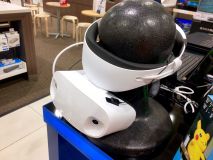 Rear view of Dell Visor on display in December 2017.

References
- ↑ 1.0 1.1 1.2 1.3 1.4 1.5 1.6 "IFA 2017: Dell unveils mixed reality headset, new laptops, and 2-in-1s with Windows 10". Windows Experience Blog. 2017-08-28. https://blogs.windows.com/windowsexperience/2017/08/28/ifa-2017-dell-unveils-mixed-reality-headset-new-laptops-2-1s-windows-10/. Retrieved 2026-10-14.
- ↑ 2.0 2.1 2.2 2.3 2.4 2.5 "Before you buy - FAQs". Microsoft Learn. https://learn.microsoft.com/sv-se/windows/mixed-reality/enthusiast-guide/before-you-buy-faqs. Retrieved 2026-10-14.
- ↑ 3.0 3.1 "Dell Announces Biggest Black Friday and Cyber Monday Deals On Widest Selection Ever". Dell (release distributed by PR Newswire). 2017-11-01. https://www.prnewswire.com/news-releases/dell-announces-biggest-black-friday-and-cyber-monday-deals-on-widest-selection-ever-300547181.html. Retrieved 2026-10-14.
- ↑ 4.00 4.01 4.02 4.03 4.04 4.05 4.06 4.07 4.08 4.09 4.10 4.11 4.12 4.13 4.14 4.15 4.16 4.17 4.18 4.19 4.20 4.21 4.22 4.23 4.24 4.25 4.26 4.27 4.28 4.29 4.30 4.31 4.32 4.33 4.34 4.35 4.36 4.37 4.38 4.39 4.40 "Dell Visor with Controllers VRP100 / Dell Visor VR118 / Dell Visor Controllers VRC100: User’s Guide, Rev. A01". Dell (original guide preserved by VRTech.wiki). 2017-11. https://vrtech.wiki/wp-content/uploads/2021/01/Dell-Visor-Controllers-VR118-VRP100-VRC100-Instruction-Manual-Optimized.pdf. Retrieved 2026-10-14.
- ↑ 5.0 5.1 5.2 "Features and functionality removed in Windows client". Microsoft Learn. https://learn.microsoft.com/en-gb/windows/whats-new/removed-features. Retrieved 2026-10-14.
- ↑ 6.00 6.01 6.02 6.03 6.04 6.05 6.06 6.07 6.08 6.09 6.10 6.11 6.12 6.13 6.14 "The perfect fit for any reality: Dell Visor & Dell Visor Controllers". Dell (original brochure hosted by Best Buy). 2017. https://files.bbystatic.com/7Xb6OZ1mzHKVGIf0yaGcTw%3D%3D/e9fc8b44-6b8d-4949-935c-1c4549021d2f.pdf. Retrieved 2026-10-14.
- ↑ 7.0 7.1 "The era of Windows Mixed Reality begins October 17". Windows Experience Blog. 2017-10-03. https://blogs.windows.com/windowsexperience/2017/10/03/the-era-of-windows-mixed-reality-begins-october-17/. Retrieved 2026-10-14.
- ↑ "Release notes - October 2018". Microsoft Learn. https://learn.microsoft.com/nl-nl/previous-versions/mixed-reality/enthusiast-guide/release-notes-october-2018. Retrieved 2026-10-14.
- ↑ "Mixed Reality software overview and release history". Microsoft Learn. https://learn.microsoft.com/en-us/previous-versions/mixed-reality/enthusiast-guide/mixed-reality-software. Retrieved 2026-10-14.
- ↑ "Setting up camera passthrough". Oasis Driver for Windows Mixed Reality developer documentation. https://github.com/mbucchia/Oasis-Driver-for-Windows-Mixed-Reality/wiki/Setting-up-camera-passthrough. Retrieved 2026-10-14.
- ↑ 11.0 11.1 11.2 "Frequently Asked Questions". Oasis Driver for Windows Mixed Reality developer documentation. https://github.com/mbucchia/Oasis-Driver-for-Windows-Mixed-Reality/wiki/Frequently-Asked-Questions. Retrieved 2026-10-14.
- ↑ "Virtual reality at your fingertips: Dell Visor Controllers". Dell (original brochure hosted by Best Buy). 2017. https://files.bbystatic.com/a0GPjaonuJC6z%2BNlgRN9hg%3D%3D/86831404-b7ac-41e1-a88e-f8238cf6244d.pdf. Retrieved 2026-10-14.
- ↑ "Using SteamVR with Windows Mixed Reality". Microsoft Learn. https://learn.microsoft.com/windows/mixed-reality/enthusiast-guide/using-steamvr-with-windows-mixed-reality. Retrieved 2026-10-14.
- ↑ 14.0 14.1 "Oasis Driver for Windows Mixed Reality". Matthieu Bucchianeri (developer Steam listing). https://store.steampowered.com/app/3824490/Oasis_Driver_for_Windows_Mixed_Reality/. Retrieved 2026-10-14.
- ↑ 15.0 15.1 Tran, Tanh Quang; Tran, Thanh Dat Ngoc; Nguyen, Tam Duy; Regenbrecht, Holger; Tran, Minh-Triet (2018). "Can We Perceive Changes in Our Moving Speed? A Comparison between Directly and Indirectly Powering the Locomotion in Virtual Environments". Proceedings of the 24th ACM Symposium on Virtual Reality Software and Technology (VRST ’18). doi:10.1145/3281505.3281510. Retrieved 2026-10-14.
- ↑ 16.0 16.1 Tran, Tanh Quang; Regenbrecht, Holger; Tran, Minh-Triet (2019-08-23). "Am I Moving Along a Curve? A Study on Bicycle Traveling-In-Place Techniques in Virtual Environments". Human-Computer Interaction – INTERACT 2019 11749: 345–363. doi:10.1007/978-3-030-29390-1_19. Retrieved 2026-10-14.