

Lenovo Mirage Solo
More actions
| Lenovo Mirage Solo | |
|---|---|

| |
| Basic Info | |
| VR/AR | Virtual Reality |
| Type | Head-mounted display |
| Subtype | Standalone VR |
| Platform | Google Daydream |
| Creator | Lenovo, Google |
| Developer | Lenovo |
| Manufacturer | Lenovo |
| Announcement Date | January 9, 2018 (CES)[1] |
| Release Date | May 4, 2018 (purchase availability announced by Google)[2] |
| Price | US$399 (contemporary May 2018 retail report)[3] |
| Website | https://www.lenovo.com/ch/en/p/smart-devices/virtual-and-augmented-reality/mirage-solo/mirage-solo/zzirzrhvr01 |
| Versions | Lenovo Mirage Solo with Daydream; headset model VR-1541F[4] |
| Requires | Google account and WLAN for documented initial setup[5] |
| System | |
| Operating System | Daydream OS (Daydream 2.0 Euphrates in Lenovo data sheet; Android 8.0 in launch hands-on report)[6][7] |
| Chipset | Qualcomm Snapdragon 835[8] |
| CPU | Eight Kryo 280 cores (chip architecture; headset clock settings not specified)[9] |
| GPU | Adreno 540[7] |
| Storage | |
| Storage | 64 GB UFS[7] |
| Memory | 4 GB[8] |
| SD Card Slot | microSD; 256 GB in data sheet, up to 2 TB in Lenovo FAQ[6][10] |
| Display | |
| Display | Single 5.5-inch IPS LCD[7] |
| Resolution | 1280 x 1440 per eye; 2560 x 1440 total[7] |
| Pixel Density | Approximately 534 PPI (nominal panel density calculated from 5.5-inch 2560 x 1440 panel)[7] |
| Refresh Rate | 75 Hz[6] |
| Image | |
| Field of View | 110° (manufacturer figure; axis unspecified)[8] |
| Optics | |
| Optics | Two Fresnel-aspheric lenses[6] |
| Ocularity | Binocular[4] |
| Passthrough | Experimental SDK see-through mode (separately documented after launch)[11] |
| Tracking | |
| Tracking | 6DoF inside-out (WorldSense)[8] |
| Base Stations | None required[2] |
| Rotational Tracking | Yes (WorldSense headset 6DoF)[8] |
| Positional Tracking | Yes (WorldSense headset 6DoF)[8] |
| Play Space | Seated or standing within documented approximately 0.8 m-radius boundary[5] |
| Audio | |
| Audio | 3.5 mm headphones; no built-in speakers; earphones included[7][10] |
| Microphone | Dual microphones listed in data sheet; microphone function unsupported in Lenovo FAQ[6][10] |
| 3.5mm Audio Jack | Yes[4] |
| Camera | Two WorldSense tracking cameras[8] |
| Connectivity | |
| Connectivity | Dual-band Wi-Fi 802.11ac/n, 2x2 MIMO; Bluetooth 5.0 + BLE[6] |
| Ports | USB Type-C, 3.5 mm audio jack, microSD[4] |
| WiFi | Wi-Fi 802.11ac/n; 2x2 MIMO, dual band[6] |
| Bluetooth | Bluetooth 5.0 + BLE; original quick guide limits pairing to controller[6][4] |
| Power | Built-in rechargeable battery; USB Type-C charging[4] |
| Battery Capacity | 4000 mAh[7] |
| Battery Life | 2.5 hours (maker data sheet); about 3 hours (Lenovo FAQ), use dependent[6][10] |
| Charge Time | About 170 minutes for headset in standby with standard charger (Lenovo FAQ)[10] |
| Device | |
| Dimensions | 204.01 x 269.5 x 179.86 mm (W x L x H, manufacturer)[6] |
| Weight | 645 g (data sheet); 650 g (Lenovo FAQ)[6][10] |
| Material | Plastic[6] |
| Headstrap | Rigid band with rear adjustment dial and front head support[4] |
| Color | Moonlight White[6] |
| Sensors | Tracking cameras, proximity sensor, gyroscope, accelerometer, magnetometer[6] |
| Input | Wireless Daydream controller (3DoF), clickable touchpad and buttons[6][4] |
| Compliance | FCC Part 15 Class B; EU Radio Equipment Directive 2014/53/EU declaration/CE mark[5][4] |
The Lenovo Mirage Solo is a standalone virtual reality head-mounted display developed by Lenovo in partnership with Google. It was announced at CES on January 9, 2018, and Google announced purchase availability on May 4, 2018. A contemporary U.S. retail report listed US$399.[1][2][3] It was the first standalone headset running Google Daydream. Its WorldSense system tracks the headset's position and orientation without external sensors, while the included handheld controller tracks orientation.[2][6]
History and development
The Daydream platform had previously paired compatible phones with the Daydream View viewer, introduced in 2016. Google announced standalone Daydream headsets at Google I/O on May 17, 2017. It described a reference design developed with Qualcomm and identified Lenovo and HTC as hardware partners. Google also said WorldSense used technology from Tango. Those announcements described a platform and planned products; Lenovo's named Mirage Solo was unveiled the following January.[12][1]
The Mirage Solo's May 2018 availability preceded the original Oculus Quest, which launched in May 2019.[2][13]
At the May 2018 release, Google reported more than 350 games, apps and experiences in the Daydream library, with more than 70 using WorldSense. These were catalog counts at launch. They did not mean that every Daydream app had been redesigned for positional interaction.[2]
Standalone design
The Mirage Solo contains its display, processor, storage, battery and tracking hardware. It does not need a smartphone inserted into the viewer or a PC to run its Daydream experiences. Online applications require an Internet connection. The two front tracking cameras belong to the headset; the separately sold Mirage Camera was a VR180 content-capture device.[8][1]
Display technology
The headset has a single 5.5-inch IPS LCD panel with a total resolution of 2560 x 1440, allocated as 1280 x 1440 per eye. Lenovo specified a 75 Hz display frequency and two Fresnel-aspheric lenses. Its advertised 110° field of view does not identify a horizontal, vertical or diagonal measurement axis.[7][6][8] Display refresh and physical panel resolution describe the display; they are not measurements of every application's frame rate or of the tracking system's update frequency.
WorldSense tracking
WorldSense provides six degrees of freedom for the headset, including rotation and forward/backward, side-to-side and vertical translation. It uses inside-out tracking with two front cameras and onboard motion sensors. The tracked viewpoint responds when the wearer leans, ducks or steps, without installing external base stations.[8][7]
Play boundary
The original user and quick-start guides describe a seated or standing play area with an approximately 0.8 m radius around the starting position. The view starts fading after about 0.4 m of movement toward its edge and becomes fully occluded outside the boundary. Putting on the headset or manually recentering defines the starting position. This software boundary should not be treated as a specification for the maximum space the cameras can track.[5][4]
Lenovo's FAQ recommends clearing at least a 1 m radius around the user. It advises against outdoor use and warns that sunlight entering the lenses can damage the headset. These clearance and handling instructions differ from the on-screen boundary dimensions.[10]
Processing power and storage
The headset uses the Qualcomm Snapdragon 835 with Adreno 540 graphics, 4 GB of RAM and 64 GB of UFS storage. PCWorld's hands-on account and UploadVR's report based on the launch reviewer guide listed the RAM as LPDDR4.[8][7][14] Qualcomm's chip brief lists eight Kryo 280 CPU cores, a chip maximum of up to 2.45 GHz and a 10 nm FinFET process. These are specifications of the chip design, rather than measured clock settings for an application running on the Mirage Solo.[9]
A microSD slot expands storage. Lenovo's data sheet and product page specify cards up to 256 GB, while its FAQ says up to 2 TB. The sources give different limits without identifying a hardware revision that explains the difference. The user guide describes copying media and documents onto a microSD card and then accessing them through the headset's storage settings; it says the consumer file-transfer workflow does not transfer data by connecting the headset to a computer.[6][8][10][5]
Controller
The included Daydream controller provides three degrees of freedom: its orientation is tracked, while translation is not directly tracked as it is for the headset. The Google VR SDK's arm model estimates a controller position from its orientation and modeled shoulder, elbow and wrist joints. That modeled position is distinct from positional tracking of the physical hand.[6][15]
The controller has a clickable touchpad, an App button, a Daydream button and side volume buttons. Pointing moves the cursor; clicking the touchpad selects an item and swiping scrolls. The App button's role depends on the application. The Daydream button opens the dashboard, and holding it recenters the view and cursor. The original quick-start guide identifies the Bluetooth controller as DG1CA/VAC-141B.[4][5]
Experimental 6DoF controllers
On September 21, 2018, Google announced separate experimental controllers with optical six-degree-of-freedom tracking. The developer kit required an additional tracking faceplate attached to the Mirage Solo and connected by USB. The experimental controllers added trigger and grip buttons alongside a touchpad, App button and Daydream button. They were not the orientation-only controller supplied with the retail headset. Google's archived documentation says applications for the developer kit are closed.[16][17]
Audio and connectivity
The Mirage Solo has a 3.5 mm audio jack and included earphones, with no built-in speakers. Its data sheet lists dual microphones, but Lenovo's FAQ says microphone functionality is not supported. The hardware listing therefore does not establish voice commands, Google Assistant or recorded microphone audio as supported features.[7][10][6]
Lenovo lists dual-band Wi-Fi 802.11ac/n with 2x2 MIMO and Bluetooth 5.0 + BLE. The original quick-start guide limits Bluetooth pairing to the controller. PCWorld's launch hands-on report also documented Chromecast mirroring of the headset's view and audio to a television. That is an outward screen-sharing function.[6][4][7]
Battery
The built-in 4000 mAh battery charges through USB Type-C. Lenovo's data sheet gives 2.5 hours of general use.[6] Its FAQ describes about three hours, depending on the apps and functions being used. The FAQ gives an approximately 170-minute full charge for the headset in standby with a standard charger. It separately lists about 12 hours of controller use and 120 minutes to charge the controller. These figures are manufacturer estimates under their stated conditions.[7][8][10]
Physical design
The rigid headband has a rear adjustment dial, front head support and face padding. Lenovo described the band as designed to distribute weight and reduce pressure at the nose.[8] A quick-release button lets the visor move forward or backward relative to the face, adjusting eye relief. The guides describe this fore-and-aft adjustment rather than specifying an IPD adjustment range. Lenovo says glasses can be worn, while warning that contact between eyeglass and headset lenses can scratch either surface.[4][5][10]
Lenovo's data sheet gives dimensions of 204.01 x 269.5 x 179.86 mm (W x L x H), a plastic construction and the color name Moonlight White. It lists a weight of 645 g; Lenovo's FAQ gives 650 g. Neither figure is a claim that the headset is comfortable for every user or session length.[6][10] The user guide warns that parts can become hot during operation or charging, depending on system activity and battery charge.[5]
Software platform
Lenovo called the operating system Daydream OS, with Daydream 2.0 Euphrates listed in its data sheet. PCWorld's May 2018 hands-on account described it as based on Android 8.0. The original setup instructions require selecting a WLAN network and signing in with a Google account.[8][6][7][5]
The historical software list included YouTube, Google Photos, Google Play Movies & TV, Google Arts and Culture and Google Street View. At launch, Google described viewing VR180 photographs and videos made with the separate Mirage Camera through the headset and Google Photos. App availability varied by region and by the service's lifetime.[6][2][8]
Experimental see-through mode
Google's September 2018 announcement also introduced camera-based see-through mode and the ability to display smartphone Android applications on a virtual screen. The accompanying archived SDK documentation describes predominantly virtual and predominantly augmented scenes. Camera-eye spatial offsets and camera-frame latency can produce visible artifacts; rotational reprojection does not correct every translational difference. These were separately documented developer features, rather than evidence that the retail launch software offered all those functions.[16][11]
Education deployments
The Mirage Solo was used in the first-generation Lenovo VR Classroom. A May 2019 U.K. instructor guide describes Solo headsets and an E300 teacher Chromebook preloaded with Google Expeditions field trips associated with ten Tablet Academy lesson plans. Discover mode let pupils explore independently, while Guide mode let the teacher lead a shared trip from the Chromebook. Additional content had to be downloaded beforehand. The guide distinguished VR tours from AR tours, which were incompatible with that system.[18] This documents the classroom system's historical workflow; it does not measure a learning benefit.
Platform discontinuation
Google's archived developer site states that Daydream View sales ended on October 15, 2019. That statement concerns the phone viewer, and should not be used as a Mirage Solo hardware discontinuation date. The current Daydream help page says the VR software is no longer supported and receives no further software or security updates; continued service access is only described as possible. The developer banner additionally says that new users of previously supported devices could no longer download and install Google VR Services from November 2023.[17][19]
Google confirmed that Expeditions and Tour Creator were deactivated on June 30, 2021 and would no longer work on devices. Many tours moved to Google Arts & Culture. Consequently, the 2019 classroom instructions and the launch app list describe historical arrangements, without guaranteeing that an existing app, account setup or service still works on a Mirage Solo.[20]
Comparison with Oculus Go
Both products were standalone headsets sold in May 2018. The table compares documented launch-era hardware and controller arrangements, rather than current prices or a measured ranking of performance.[2][21]
| Feature | Lenovo Mirage Solo | Oculus Go |
|---|---|---|
| U.S. starting price, May 2018 | US$399 for 64 GB, contemporary retail report[3] | US$199 for 32 GB; US$249 for 64 GB, manufacturer announcement[22] |
| Headset tracking | 6DoF WorldSense[8] | Orientation tracking; no positional tracking[23] |
| Processor | Qualcomm Snapdragon 835[8] | Snapdragon 821[23] |
| Total panel resolution | 2560 x 1440[8] | 2560 x 1440[22] |
| Included controller | 3DoF Daydream controller[6] | 3DoF Oculus Go controller[24] |
| Platform | Google Daydream[2] | Oculus mobile platform; Gear VR-compatible applications[24] |
| Audio | Headphones through 3.5 mm jack; earphones included[7][10] | Built-in spatial audio[21] |
Device-specific research
In a 2020 ISMAR study, Ehsan Sayyad, Misha Sra and Tobias Höllerer used Mirage Solo headsets, 3DoF controllers and the Google VR SDK for Unity. Sixteen participants (average age 19) completed counterbalanced, within-subject comparisons of walking and instant teleportation in five-minute virtual exploration trials. The researchers disabled the play boundary, added printed ground textures to a 61 x 26 m indoor rink and monitored participants. Tracking required three resets across 160 minutes of walking. The SDK did not expose localization and mapping, so the researchers could not tune tracking in software.[25]
Fifteen participants preferred walking; one did not answer. Walking had lower reported simulator-sickness changes (median changes in total SSQ score 1.75 versus 11.92; p = 0.044). The Slater-Usoh-Steed presence score and pointing error showed no significant difference (p = 0.098 and 0.952); averaged raw presence answers favored walking (p = 0.011). The study evaluates those locomotion tasks in a prepared, supervised space. Outdoor tracking attempts failed repeatedly, and the prototype peripheral camera view was excluded from the final experiment. It does not establish stock room-scale support, safe unattended walking or a general comfort advantage.[25]
Technical specifications summary
| Specification | Documented detail |
|---|---|
| Display | Single 5.5-inch IPS LCD, 1280 x 1440 per eye[7] |
| Total resolution | 2560 x 1440 (QHD)[8] |
| Refresh rate | 75 Hz[6] |
| Field of view | 110°, manufacturer value with unspecified axis[8] |
| Tracking | WorldSense, headset 6DoF and inside-out tracking[8] |
| Processor | Qualcomm Snapdragon 835[8] |
| Memory and storage | 4 GB RAM, 64 GB UFS; microSD expansion with differing maker limits noted above[7][10] |
| Battery | 4000 mAh; 2.5-hour maker estimate, about 3 hours in FAQ[6][7][8][10] |
| Audio | 3.5 mm jack and included earphones; no built-in speakers[7][10] |
| Weight | 645 g in data sheet; 650 g in FAQ[6][10] |
| Retail controller | 3DoF wireless Daydream controller[6] |
| U.S. price at launch | US$399 in May 2018 retail report[3] |
| Platform support | Daydream software no longer supported; historical services have separate closure dates[19][20] |
See Also
Gallery
-
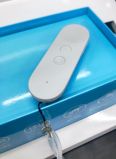 Lenovo Mirage Solo controller on display in July 2018.
-
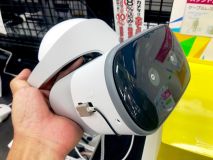 Lenovo Mirage Solo on display in July 2018.


References
- ↑ 1.0 1.1 1.2 1.3 "From Pocket to PC to Home: Lenovo's CES 2018 Lineup Makes Reality Better". Lenovo StoryHub. 2018-01-09. https://news.lenovo.com/pressroom/press-releases/from-pocket-to-pc-to-home-lenovos-ces-2018-lineup-makes-reality-better/. Retrieved 2026-10-14.
- ↑ 2.0 2.1 2.2 2.3 2.4 2.5 2.6 2.7 2.8 "Introducing the first Daydream standalone VR headset and new ways to capture memories". Google. 2018-05-04. https://blog.google/products-and-platforms/products/google-ar-vr/new-daydream-headset-and-vr180-camera-now-available/. Retrieved 2026-10-14.
- ↑ 3.0 3.1 3.2 3.3 "Review: Lenovo Mirage Solo headset with Google WorldSense tracking". TechCrunch. 2018-05-04. https://techcrunch.com/2018/05/04/review-lenovo-mirage-solo-headset-with-google-worldsense-tracking/. Retrieved 2026-10-14.
- ↑ 4.00 4.01 4.02 4.03 4.04 4.05 4.06 4.07 4.08 4.09 4.10 4.11 4.12 "Mirage Solo with Daydream Safety, Warranty & Quick Start Guide, V1.1". Lenovo. 2018-02-02. https://download.lenovo.com/consumer/mobiles_pub/lenovo_vega_swsg_en_v1.1_20180202.pdf. Retrieved 2026-10-14.
- ↑ 5.0 5.1 5.2 5.3 5.4 5.5 5.6 5.7 5.8 "Mirage Solo with Daydream User Guide". Lenovo. https://download.lenovo.com/consumer/mobiles_pub/mirage_solo_ug_en_v1.0_201806.pdf. Retrieved 2026-10-14.
- ↑ 6.00 6.01 6.02 6.03 6.04 6.05 6.06 6.07 6.08 6.09 6.10 6.11 6.12 6.13 6.14 6.15 6.16 6.17 6.18 6.19 6.20 6.21 6.22 6.23 6.24 6.25 6.26 6.27 6.28 6.29 "Mirage SOLO with Daydream: specifications". Lenovo. 2018. https://files.bbystatic.com/L1a7ZsXy66ahUVNSGNHnpA%3D%3D/0f336a49-41b5-4cdd-9d78-891b7c52d129.pdf. Retrieved 2026-10-14.
- ↑ 7.00 7.01 7.02 7.03 7.04 7.05 7.06 7.07 7.08 7.09 7.10 7.11 7.12 7.13 7.14 7.15 7.16 7.17 7.18 7.19 "Lenovo Mirage Solo Review: No-wires VR arrives, and it's pretty awesome". PCWorld. 2018-05-04. https://www.pcworld.com/article/401891/lenovo-mirage-solo-review.html. Retrieved 2026-10-14.
- ↑ 8.00 8.01 8.02 8.03 8.04 8.05 8.06 8.07 8.08 8.09 8.10 8.11 8.12 8.13 8.14 8.15 8.16 8.17 8.18 8.19 8.20 8.21 8.22 8.23 "Mirage Solo with Daydream". Lenovo. https://www.lenovo.com/ch/en/p/smart-devices/virtual-and-augmented-reality/mirage-solo/mirage-solo/zzirzrhvr01. Retrieved 2026-10-14.
- ↑ 9.0 9.1 "Snapdragon 835 mobile platform product brief". Qualcomm. 2017. https://www.qualcomm.com/content/dam/qcomm-martech/dm-assets/documents/snapdragon_product_brief_835_0.pdf. Retrieved 2026-10-14.
- ↑ 10.00 10.01 10.02 10.03 10.04 10.05 10.06 10.07 10.08 10.09 10.10 10.11 10.12 10.13 10.14 10.15 10.16 "Lenovo Mirage Solo with Daydream - FAQ's and Troubleshooting". Lenovo Support. 2025-06-23. https://support.lenovo.com/ie/en/solutions/ht506545-lenovo-mirage-solo-with-daydream-faqs-and-troubleshooting. Retrieved 2026-10-14.
- ↑ 11.0 11.1 "About see-through mode". Google for Developers. https://developers.google.com/vr/develop/experimental/see-through-about. Retrieved 2026-10-14.
- ↑ "The latest on VR and AR at Google I/O". Google. 2017-05-17. https://blog.google/products-and-platforms/products/google-ar-vr/latest-vr-and-ar-google-io/. Retrieved 2026-10-14.
- ↑ "Five Years of VR: A Look at the Greatest Moments from Oculus". Meta Newsroom. 2021-03-29. https://about.fb.com/news/2021/03/five-years-of-vr-a-look-at-the-greatest-moments-from-oculus/. Retrieved 2026-10-14.
- ↑ "Lenovo Mirage Solo Features Major Upgrades Over Oculus Go". UploadVR. 2018-05-04. https://www.uploadvr.com/lenovo-mirage-solo-features-major-upgrades-over-oculus-go/. Retrieved 2026-10-14.
- ↑ "Daydream (3DoF) controller support in Unity". Google for Developers. https://developers.google.com/vr/develop/unity/controller-support. Retrieved 2026-10-14.
- ↑ 16.0 16.1 "New experimental features for Daydream". Google Developers Blog. 2018-09-21. https://developers.googleblog.com/en/new-experimental-features-for-daydream/. Retrieved 2026-10-14.
- ↑ 17.0 17.1 "Experimental Daydream 6DoF controllers". Google for Developers. https://developers.google.com/vr/experimental/6dof-controllers. Retrieved 2026-10-14.
- ↑ "Lenovo VR Classroom Instructor Guide, U.K., May 2019". Lenovo Education. 2019-05. https://download.lenovo.com/km/media/attachment/Lenovo_VR_Classroom_Instructor_Guide_U.K._May_2019.pdf. Retrieved 2026-10-14.
- ↑ 19.0 19.1 "Daydream service update". Google Daydream Help. https://support.google.com/daydream/answer/7185096?hl=en. Retrieved 2026-10-14.
- ↑ 20.0 20.1 "Expeditions & Tour Creator are no longer available". Google Expeditions Help. https://support.google.com/edu/expeditions/answer/10892826?hl=en. Retrieved 2026-10-14.
- ↑ 21.0 21.1 "F8 2018: Oculus Go Available Now for $199". Meta Newsroom. 2018-05-01. https://about.fb.com/news/2018/05/oculus-go/. Retrieved 2026-10-14.
- ↑ 22.0 22.1 "Oculus Go Available Now: Our Best VR Optics in Our First Standalone VR Headset". Meta Quest Blog. 2018-05-01. https://www.meta.com/blog/oculus-go-available-now-our-best-vr-optics-in-our-first-standalone-vr-headset/. Retrieved 2026-10-14.
- ↑ 23.0 23.1 "Optimizing Oculus Go for Performance". Meta Horizon OS Developers. 2018-03-22. https://developers.meta.com/vr/blog/optimizing-oculus-go-for-performance/. Retrieved 2026-10-14.
- ↑ 24.0 24.1 "Everything You Need to Know To Develop for Oculus Go". Meta Horizon OS Developers. 2018-04-20. https://developers.meta.com/vr/blog/everything-you-need-to-know-to-develop-for-oculus-go/. Retrieved 2026-10-14.
- ↑ 25.0 25.1 Ehsan Sayyad; Misha Sra; Tobias Höllerer (2020). "Walking and Teleportation in Wide-area Virtual Reality Experiences". 2020 IEEE International Symposium on Mixed and Augmented Reality (ISMAR). doi:10.1109/ISMAR50242.2020.00088. Retrieved 2026-10-14.