

Google Glass
More actions
| Google Glass | |
|---|---|

| |
| Basic Info | |
| VR/AR | Augmented Reality |
| Type | Optical head-mounted display |
| Developer | |
| Release Date | April 2013 (Explorer program) |
| Price | US$1,500 (historical Explorer price) |
| Website | Explorer documentation |
| Successor | Google Glass Enterprise Edition |
| System | |
| Operating System | Android |
| CPU | Texas Instruments OMAP4430 (examined Explorer hardware) |
| Storage | |
| Storage | 16 GB flash; 12 GB usable in the original specification |
| Memory | 1 GB early hardware; 2 GB later Explorer revision |
| Display | |
| Display | Monocular optical see-through display |
| Resolution | 640 × 360 |
| Tracking | |
| Tracking | Accelerometer, Gyroscope (motion sensor APIs) |
| Audio | |
| Audio | Bone conduction transducer |
| Camera | 5 MP photos; 720p video |
| Connectivity | |
| Connectivity | 2.4 GHz Wi-Fi 802.11b/g, Bluetooth, micro-USB |
| Power | 570 mAh battery (examined Explorer hardware) |
| Device | |
| Input | Touchpad, voice commands, camera button |
Google Glass, also called Glass Explorer Edition, is a wearable computer developed by Google with a monocular optical head-mounted display. The Explorer program opened in April 2013 to let participants try the hardware and help develop its uses. Glass combined a camera with a small display above the wearer's normal line of sight, and supported touch and voice input.[1][2]
The original Explorer hardware is the main subject of this article. Google Glass Enterprise Edition and Google Glass Enterprise Edition 2 are later products designed around workplace applications. Their sales and support lifecycle is separate from the Explorer program, whose withdrawal was announced in January 2015.[3][4][5]
Hardware
Glass places its display in front of one eye while leaving the surrounding scene visible. Google's January 2013 FCC draft manual described adjusting the display pod and nose pads so the complete display could be seen just above normal vision. It also documented removing the pod from its frame and attaching it to another frame.[6]
Optics engineer Karl Guttag identified field-sequential color in Google's demonstration footage by examining successive red, green and blue image fields. In a subsequent analysis, he compared a teardown photograph with his own photograph of a Himax HX7309 LCoS panel and identified five matching physical features. This is an attributed component identification from that hardware, rather than a specification for every Glass revision.[7][8]
The display and its software interface should be distinguished from augmented reality that registers graphics to objects or locations in a three-dimensional scene. Google's documented Explorer interface used a timeline of two-dimensional cards. The sensor APIs exposed motion and orientation data, which alone do not establish world registration. Because the sensors sit in the movable optics pod, adjusting it changes their alignment with the head.[9][10]
Specifications
The following values distinguish direct examination of Explorer hardware from software documentation. They should not be applied to the Enterprise editions.
| Part | Verified Explorer specification or observation | Scope |
|---|---|---|
| Processor | Texas Instruments OMAP4430 | Identified in TechInsights' Explorer teardown.[11] |
| Memory | 1 GB DDR2 SDRAM in examined early hardware; 2 GB in later shipments announced by Google | The early value is from the teardown; Google's June 2014 announcement establishes the later revision.[11][12] |
| Storage | 16 GB flash total; 12 GB usable | Google's original specification distinguished total and usable storage. Its cloud-sync description was an Explorer-era service, not present availability.[13] |
| Display resolution | 640 × 360 | Teardown display specification. Google independently documented timeline cards of this size.[11][9] |
| Camera | 5 MP photos; 720p video | Google's original Explorer specification.[13] |
| Audio | Bone conduction transducer | Google's original Explorer specification; Enterprise hardware should be checked separately.[13] |
| Wireless | Wi-Fi 802.11b/g at 2.4 GHz; Bluetooth and Bluetooth Low Energy | The XEB radio test exhibit describes these radios. It is a report for the tested configuration, not a certification of every later revision.[14] |
| Connector | Micro-USB | Google's early manual documents charging from a wall supply or computer.[6] |
| Battery | 570 mAh | Capacity reported for the teardown hardware; it is not a measured runtime or a value established for every revision.[11] |
| Motion and light sensors | Accelerometer, Gyroscope, magnetic-field and light sensor APIs; derived gravity, linear acceleration and rotation-vector outputs | Google's Explorer GDK lists supported Android sensor types. It separately documents optional on-head detection.[10] |
| Software platform | Android 4.4/API level 19 in the later GDK documentation | Sensor API features were frozen at Android 4.2/API level 17; this is not the launch software version.[10] |
In June 2014, Google announced that Glass would start shipping with 2 GB of RAM. The same announcement introduced a voice-activated viewfinder, which displayed framing marks before taking a picture. These changes belonged to the Explorer program, rather than either of the later Enterprise products.[12]
Google described the original display as equivalent to viewing a 25-inch high-definition screen from eight feet away. That was a vendor description of the apparent screen size, separate from the pixel resolution. Its original battery guidance described a day of typical use, while identifying video calls and recording as more demanding; it did not define a reproducible runtime test.[13]
Edition distinctions
| Edition | Historical role | Milestone |
|---|---|---|
| Google Glass Explorer Edition | Experimental wearable computer and Glassware platform described here | Explorer program opened in April 2013; US sales expanded in May 2014.[1][15] |
| Google Glass Enterprise Edition | Workplace hardware with software supplied through partners | X announced wider business availability on July 18, 2017, after a special customer program.[3] |
| Google Glass Enterprise Edition 2 | Later enterprise platform | Announced May 20, 2019; Google described a Snapdragon XR1 platform, Android development and USB-C charging.[4] |
Interacting with Glass
The controls below describe the historical Explorer interface. The surviving help and developer pages document that interface; their continued presence does not establish that its companion applications or online services still operate.
Gestures
The touchpad is on the right side near the temple. Google's Explorer help describes these actions:[16]
| Gesture | Historical action |
|---|---|
| Tap | Turn on the display; select a timeline card or expand a bundle. |
| Swipe forward or backward | Move right or left through timeline items. |
| Swipe with two fingers | Show a zoomed-out timeline for faster navigation. |
| Swipe down | Go back; from the Home screen, turn off the display. |
The GDK translated a tap into an Android D-pad center event and a downward swipe into a Back event. Applications could also use a gesture detector for more complex touch input.[17]
Head Wake Up
Head Wake Up let the wearer activate the display by tilting the head upward. The settings card showed whether the feature was enabled and the configured angle; the wearer could set a different wake angle. With Head nudge enabled, another quick upward nod turned the display off.[18][16]
Voice commands
In the Explorer platform, the "ok glass" menu launched Glassware from the Home card. Developers could also expose contextual voice actions within an activity or request free-form speech recognition. Main voice commands had touch-menu alternatives, and applications could make commands conditional on the availability of the camera, network or microphone.[19]
The GDK command list included actions such as taking a picture, recording a video, taking a note and starting a timer. A listed API command is an application launch trigger, not evidence that an associated app or cloud service is currently available.[20]
| Input or command | Documented behavior |
|---|---|
| "ok glass" | Open the voice menu from Home or an enabled contextual voice menu.[19] |
| Take a picture | Listed as TAKE_A_PICTURE in the GDK. The hardware camera button also started still capture.[20][21]
|
| Record a video | Listed as RECORD_A_VIDEO. The camera guidelines describe a long camera-button press for video.[20][21]
|
| Take a note; start a timer | Listed as TAKE_A_NOTE and START_A_TIMER, both added in GDK API level XE16.[20]
|
| Get directions | GET_DIRECTIONS appeared in the GDK command list.[20]
|
| Search; reply to messages | Historical design examples included Google Search and replies spoken aloud.[2] |
Setup tutorial
Explorer setup depended on the software generation. The early FCC manual required Google-account sign-in and described micro-USB charging and display adjustment.[6] Google's later GDK quick-start instructions used Android 4.4.2/API 19 and the Glass Development Kit Preview, with USB debugging enabled on Glass and authorization on the device for the connected development computer.[22]
These are historical procedures. Google's final Explorer update notice, preserved in a December 2019 archive, specified a manual update that removed Google-account sign-in and backend connections after February 25, 2020. Its FAQ said Mirror apps such as Gmail, YouTube and Hangouts would no longer work, and MyGlass would not work after the final update. It described remaining local functions including photography, video, sideloaded apps and direct Bluetooth pairing. The notice expressly excluded Enterprise devices.[23] Google's surviving factory-image page lists XE24 alongside earlier Explorer images; a download listing does not establish current support or successful installation on a particular device.[24]
Apps
Explorer applications were called Glassware. Google's interface documentation distinguished static timeline cards for text and media, live cards that updated within the timeline, and immersions that ran outside the timeline with control over their own interface and input. It included Google Now weather cards as a historical example.[9]
MyGlass historically connected a paired phone to the Explorer platform. The archived 2013 specifications described MyGlass for Android 4.0.3 or later and listed GPS and SMS messaging among its functions.[13] Google's location documentation explains that Glass could receive location data from a Bluetooth-paired device with MyGlass installed, as well as local providers such as a wireless-network provider. Access to such location data is different from an internal GPS receiver or positional tracking of graphics in a room.[10]
Enterprise apps
Enterprise software depended on the application partner and deployment. These examples describe applications discussed in 2017.
| Application or related article | Historical context |
|---|---|
| Upskill's EyeSight | Pristine's remote collaboration software, discussed after Upskill acquired Pristine in a June 2017 interview with Upskill's Jay Kim.[25] |
| Ubimax with Glass | X's July 2017 announcement described visual order-picking instructions used by DHL workers.[3] |
| Glass with Augmedix | The same announcement described remote-scribe applications at Dignity Health and Sutter Health.[3] |
Developer
Google offered two different development approaches for Explorer Glassware. The GDK was an Android SDK add-on for code running directly on Glass. The Mirror API provided a cloud interface for web services without requiring their code to run on the device.[26][27] These documents describe the historical platform architecture.
Camera applications could invoke the built-in capture activity or use the Android Camera API. Google advised applications using the camera to release it when possible if the user pressed the hardware camera button, allowing the system camera to take over.[21] For voice development, unlisted commands required the com.google.android.glass.permission.DEVELOPMENT permission; Google's guidance limited that mechanism to development and required approved commands for distribution.[19]
Google's design guidance emphasized brief, relevant information, restrained notification frequency and complementing the user's other devices.[2] Its style guide specified standard card layouts, 40-pixel text padding and a 32-pixel minimum for main text.[28]
Research on display use
Original studies examined the tradeoffs of presenting information near the eye. Their findings concern the tested tasks, participants and Glass configurations.
| Study | Methods | Findings and limits |
|---|---|---|
| Lewis and Neider (2016) | Five laboratory experiments used Google Glass to show short words during a computer-screen visual-search task. Experiment 1 recruited 90 undergraduates and excluded eight from analysis. | Secondary words slowed search responses, including when participants were told to ignore them; search accuracy did not significantly differ across conditions. The study measured laboratory visual attention, rather than actual road or workplace safety.[29] |
| Chua and colleagues (2016) | 27 participants aged 20-27, each with at least a year of driving experience, used Explorer Edition 2.0 during desktop driving simulation and notification tasks. Researchers physically adjusted the display to nine positions. | Middle-center notifications elicited faster responses than top-center and top-left; middle-right received significantly higher comfort and preference scores than top-left and bottom-left. No significant effect of display position on lane deviation or notification error was found. The authors explicitly excluded conclusions about real-world driving safety.[30] |
History
Glass developed through an Explorer phase and a later Enterprise phase. X's retrospective places public wearing and testing in April 2012 and the opening of the Explorer program in April 2013.[1]
| Date | Event |
|---|---|
| June 27, 2012 | At Google I/O, attendees could preorder the experimental Explorer Edition for US$1,500, with delivery expected the following year. A firsthand account records completing a preorder that day.[31] |
| April 2013 | The Explorer program opened to participants. This was distinct from the 2012 reservations and later wider sales.[1] |
| April 15, 2014 | Google offered a one-day public sale. TechInsights describes acquiring the Explorer hardware it examined through that sale.[11] |
| May 13, 2014 | US Explorer sales opened without an invitation for US$1,500, still described as an open beta.[15] |
| January 15, 2015 | Google announced withdrawal of individual Explorer sales after January 19, while continuing Glass at Work. The announcement did not describe the end of every Glass project.[5] |
| July 18, 2017 | X announced wider availability of Glass Enterprise Edition through its partner network.[3] |
| May 20, 2019 | Google announced Glass Enterprise Edition 2 and described the team's move from X to Google.[4] |
Sales and software retirement
Explorer sales ended years before the account and application changes documented in the final-update notice.[5][23]
For the Enterprise editions, Google's March 15, 2023 announcement ended sales that day and set September 15, 2023 as the end of support. Its FAQ said existing devices and software could continue to be used, with no further Google software updates planned. It separately warned that the preinstalled Meet on Glass app could stop working at any time after the support deadline. Those statements concern Enterprise products, not Explorer MyGlass services.[32]
Gallery
-
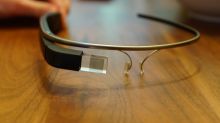 Google Glass Explorer Edition.

References
- ↑ 1.0 1.1 1.2 1.3 "Google Glass". X. https://x.company/projects/glass/. Retrieved 2026-10-13.
- ↑ 2.0 2.1 2.2 "Principles". Google for Developers, Glass Explorer Edition. https://developers.google.com/glass/design/principles. Retrieved 2026-10-13.
- ↑ 3.0 3.1 3.2 3.3 3.4 Jay Kothari (2017-07-18). "A New Chapter for Glass". X. https://x.company/blog/posts/a-new-chapter-for-glass/. Retrieved 2026-10-13.
- ↑ 4.0 4.1 4.2 Jay Kothari (2019-05-20). "Glass Enterprise Edition 2: faster and more helpful". Google Blog. https://blog.google/products-and-platforms/devices/glass-enterprise-edition-2/. Retrieved 2026-10-13.
- ↑ 5.0 5.1 5.2 Victor Luckerson (2015-01-15). "Google Will Stop Selling Glass Next Week". Time. https://time.com/3669927/google-glass-explorer-program-ends/. Retrieved 2026-10-13.
- ↑ 6.0 6.1 6.2 Google Inc. (2013-01-07). "Glass Installation and Operating Instructions" (PDF). FCC filing A4R-X1, draft user manual. https://fccid.io/A4R-X1/User-Manual/user-manual-1890332.pdf. Retrieved 2026-10-13.
- ↑ Karl Guttag (2013-03-11). "Google Glass Is Using Field Sequential Color (FSC) LCOS (Likely Himax)". KGOnTech. https://kguttag.com/2013/03/11/google-glass-is-using-field-sequential-color-fsc-lcos-likely-himax/. Retrieved 2026-10-13.
- ↑ Karl Guttag. "Proof That Google Glass Uses A Himax LCOS Microdisplay". Seeking Alpha. https://seekingalpha.com/article/1504292-proof-that-google-glass-uses-a-himax-lcos-microdisplay. Retrieved 2026-10-13.
- ↑ 9.0 9.1 9.2 "User Interface". Google for Developers, Glass Explorer Edition. https://developers.google.com/glass/design/ui. Retrieved 2026-10-13.
- ↑ 10.0 10.1 10.2 10.3 "Locations and Sensors". Google for Developers, Glass Explorer Edition. https://developers.google.com/glass/develop/gdk/location-sensors. Retrieved 2026-10-13.
- ↑ 11.0 11.1 11.2 11.3 11.4 "Google Glass Teardown". TechInsights. https://www.techinsights.com/ko/node/30068. Retrieved 2026-10-13.
- ↑ 12.0 12.1 Google Glass. "Thanks to you, Glass just got even better". Google+, archived June 25, 2014. https://web.archive.org/web/20140625224917/https://plus.google.com/+GoogleGlass/posts/1tSYsPCCsGf. Retrieved 2026-10-13.
- ↑ 13.0 13.1 13.2 13.3 13.4 "Tech specs". Google Glass Help, archived September 24, 2013. https://web.archive.org/web/20130924113518/https://support.google.com/glass/answer/3064128. Retrieved 2026-10-13.
- ↑ UL CCS. "Certification Test Report for Glass, Model XEB, FCC ID A4R-X1, Report 13U14955-2A" (PDF). FCC filing A4R-X1. p. 6. https://fccid.io/m/b0972b935b8b2465ea1828acb4e166cc90a7a6d71ceb8192512aa3811ca8534c.pdf. Retrieved 2026-10-13.
- ↑ 15.0 15.1 Emil Protalinski (2014-05-13). "Google launches Glass open beta: Anyone in the US can now buy the Explorer Edition for $1,500". The Next Web. https://thenextweb.com/news/google-launches-glass-open-beta-anyone-us-can-now-buy-explorer-edition-1500. Retrieved 2026-10-13.
- ↑ 16.0 16.1 "Glass gestures". Google Glass Help. https://support.google.com/glass/answer/3064184?hl=en. Retrieved 2026-10-13.
- ↑ "Touch Gestures". Google for Developers, Glass Explorer Edition. https://developers.google.com/glass/develop/gdk/touch. Retrieved 2026-10-13.
- ↑ "Head Wake Up". Google Glass Help. https://support.google.com/glass/answer/3079855?hl=en. Retrieved 2026-10-13.
- ↑ 19.0 19.1 19.2 "Voice Input". Google for Developers, Glass Explorer Edition. https://developers.google.com/glass/develop/gdk/voice. Retrieved 2026-10-13.
- ↑ 20.0 20.1 20.2 20.3 20.4 "VoiceTriggers.Command". Google for Developers, Glass Explorer Edition. https://developers.google.com/glass/develop/gdk/reference/com/google/android/glass/app/VoiceTriggers.Command. Retrieved 2026-10-13.
- ↑ 21.0 21.1 21.2 "Camera". Google for Developers, Glass Explorer Edition. https://developers.google.com/glass/develop/gdk/camera. Retrieved 2026-10-13.
- ↑ "GDK Quick Start". Google for Developers, Glass Explorer Edition. https://developers.google.com/glass/develop/gdk/quick-start. Retrieved 2026-10-13.
- ↑ 23.0 23.1 "Final software update for Glass Explorer Edition". Google Glass Help, archived December 9, 2019. https://web.archive.org/web/20191209081732/https://support.google.com/glass/answer/9649198. Retrieved 2026-10-13.
- ↑ "System and Kernel Downloads". Google for Developers, Glass Explorer Edition. https://developers.google.com/glass/tools-downloads/system. Retrieved 2026-10-13.
- ↑ "Jay Kim of Upskill on the Pristine Acquisition and the Future of AR". AREA. 2017-06-12. https://thearea.org/jay-kim-upskill-pristine-acquisition-future-ar/. Retrieved 2026-10-13.
- ↑ "Glass Development Kit". Google for Developers, Glass Explorer Edition. https://developers.google.com/glass/develop/gdk. Retrieved 2026-10-13.
- ↑ "The Mirror API". Google for Developers. https://developers.google.com/glass/develop/mirror. Retrieved 2026-10-13.
- ↑ "Style". Google for Developers, Glass Explorer Edition. https://developers.google.com/glass/design/style. Retrieved 2026-10-13.
- ↑ Lewis, Joanna E.; Neider, Mark B. (2016). "Through the Google Glass: The impact of heads-up displays on visual attention". Cognitive Research: Principles and Implications 1: 13. doi:10.1186/s41235-016-0015-6. Retrieved 2026-10-13.
- ↑ Chua, Soon Hau; Perrault, Simon T.; Matthies, Denys J. C.; Zhao, Shengdong (2016). "Positioning Glass: Investigating Display Positions of Monocular Optical See-Through Head-Mounted Display". Proceedings of the Fourth International Symposium of Chinese CHI. Association for Computing Machinery. pp. 1-6. https://www-igd.igd.fraunhofer.de/files/media/biblio/2016/2016_matthies_positioning_glass_investigating_display_positions.pdf. Retrieved 2026-10-13.
- ↑ Ryan Paul (2012-06-27). "Preordering a Google Glass Explorer Edition unit". Ars Technica. https://arstechnica.com/information-technology/2012/06/ars-at-google-io-preordering-a-google-glass-explorer-edition-unit/. Retrieved 2026-10-13.
- ↑ "Glass Enterprise Edition Announcement FAQ". Glass Enterprise Edition Help. 2023-03-15. https://support.google.com/glass-enterprise/customer/answer/13417888?hl=en. Retrieved 2026-10-13.