

Acer Windows Mixed Reality Headset
More actions
| Acer Windows Mixed Reality Headset | |
|---|---|

| |
| Basic Info | |
| VR/AR | Virtual Reality |
| Type | Head-mounted display |
| Subtype | PC-Powered VR |
| Platform | Windows Mixed Reality |
| Developer | Acer |
| Release Date | October 2017 (consumer AH101); developer availability preceded it[1] |
| Price | US$399.99 with two motion controllers (US launch MSRP)[2] |
| Website | https://www.acer.com/ns/ja/JP/smart/ah101/ |
| Requires | PC |
| System | |
| Operating System | Windows 10 at launch; later supported Windows versions are limited (see Software)[2][3] |
| Display | |
| Display | Two 2.89-inch Impulse BL LCD panels[4] |
| Resolution | 2880 x 1440 total; 1440 x 1440 per eye |
| Pixel Density | 706 ppi (manufacturer specification) |
| Refresh Rate | 60 Hz (HDMI 1.4); up to 90 Hz (HDMI 2.0)[4] |
| Image | |
| Field of View | 95 degrees advertised; retail specification does not identify an axis[4] |
| Optics | |
| Optics | Fresnel lenses |
| Tracking | |
| Tracking | 6DoF inside-out tracking[2] |
| Rotational Tracking | Gyroscope, Accelerometer, Magnetometer |
| Positional Tracking | Inside-out tracking with two front cameras[4] |
| Connectivity | |
| Connectivity | HDMI 1.4/2.0; USB 3.0; 3.5 mm audio/microphone jack[4] |
| Device | |
| Weight | 440 g excluding cable (Japanese AH101 specification; see Hardware for conflicting figures)[4] |
| Input | Keyboard/Mouse, Xbox One gamepad, Motion Controllers (application-dependent)[2][5] |
| Size | 195.8 mm (W) x 143.4 mm (H) x 384.2 mm (D), Japanese AH101 specification[4] |
| Cable Length | 4 m |
The Acer Windows Mixed Reality Headset is a first-generation PC-powered virtual reality head-mounted display developed by Acer for Microsoft's Windows Mixed Reality platform. Its developer model was the AH100; the consumer AH101 added a pair of wireless motion controllers and a different headband design. Acer described their other hardware specifications as the same.[6] The consumer bundle was part of the October 2017 Windows Mixed Reality launch.[1]
Despite the platform name, the retail headset presents an opaque VR view. Its two front cameras track the headset and controllers; they did not provide native camera passthrough AR at launch. The hinged visor lets the wearer see the physical room by lifting the display rather than removing the entire headset.[7]
Features
Acer's headset uses inside-out tracking for head position and orientation, with six degrees of freedom covering movement along three axes and rotation around them. It does not need external tracking cameras or infrared base stations.[2] Early reporting described the tracking as an offshoot of technology Microsoft developed for HoloLens.[5]
Both the developer and consumer designs have a front-hinged display. The retail headband has double padding and a rear adjustment dial.[4] Acer's support instructions include software installation and a PC hardware check, controller pairing, and seated or standing play-area setup.[8] A May 2017 developer demonstration also showed a room boundary grid created by moving the headset around the play area.[9]
Hardware
Display and optics
The headset has two 2.89-inch LCD panels, each with a resolution of 1440 x 1440 pixels. Acer's Japanese AH101 specification identifies the panels as Impulse BL LCD and gives a density of 706 pixels per inch. It lists 60 Hz with HDMI 1.4 and 90 Hz with HDMI 2.0. These are display modes; the frame rate of an application also depends on the PC and software.[4]
The lenses are Fresnel lenses. Microsoft's May 2017 developer specification described a 95-degree horizontal field of view, while Acer's consumer product table and US announcement list 95 degrees without naming the axis. These are advertised values rather than a measurement of every wearer's visible field.[10][2] Acer lists a fixed physical interpupillary distance of 63 mm, with software adjustment of up to 4 mm in either direction. That software setting does not move the lenses.[4]
Headband, visor and size
Acer marketed the consumer AH101 in blue.[2] Its Japanese specification table gives dimensions of 195.8 mm wide, 143.4 mm high and 384.2 mm deep, and a weight of 440 g excluding the cable.[4] The US launch release instead states 1.34 lb without explaining the measurement basis.[2] A May 2017 hands-on of the earlier developer kit reported 350 g and dimensions of 195.8 x 94.8 x 106.59 mm. It described a ratcheting buckle headband rather than the consumer model's rear dial.[11] Acer does not reconcile the US and Japanese retail weight figures in these documents.
The visor can be raised and held above the eyes while the headband stays on. Acer says both AH100 and AH101 were designed to accommodate glasses or contact lenses.[12] Fit and optical clarity still vary between wearers, as the contemporary reviews below illustrate.
Audio and connections
The four-metre tether ends in HDMI and USB connectors. The AH101 specification calls for USB 3.0, with HDMI 1.4 or 2.0 according to the display mode; the US release describes HDMI 2.0 and a 13-foot cable.[4][2] These are native HDMI connections. Microsoft's general DisplayPort recommendations for Windows Mixed Reality PCs do not mean the Acer headset has a DisplayPort plug; an appropriate adapter is needed for that output.[6]
Built-in audio output and microphone support mean a 3.5 mm headset jack, not integrated headphones or an integrated microphone. Those accessories must be supplied separately.[7] Voice input requires a separate microphone, with microphone input supported through the 3.5 mm jack.[13][14]
Sensors and motion controllers
Acer lists a gyroscope, accelerometer, magnetometer and proximity sensor, plus two black-and-white VGA tracking cameras.[4] The consumer package includes two Bluetooth motion controllers. Each has a thumbstick, touchpad, trigger, side grip button, menu button and Windows button, with a ring of visible tracking lights.[15] Acer's Japanese specification lists two AA batteries per controller, a controller mass of 125.6 g without batteries, and says the batteries are purchased separately for that package.[4]
The cameras observe the controllers' illuminated markers to establish their position. Outside the camera view, their internal sensors can bridge brief gaps, but positional tracking can deteriorate until the cameras see them again. This differs from the headset's ability to track its own movement around the room.[16] Keyboard, mouse and gamepad input were also supported for appropriate Windows Mixed Reality experiences; Devindra Hardawar's April 2017 demonstration used an Xbox One gamepad before the motion controllers were available.[5] This is PC gamepad input, not evidence that the headset works directly with an Xbox console.
Technical specifications
Specifications
| Component | Documented first-generation configuration |
|---|---|
| Displays | Two 2.89-inch LCD panels; 1440 x 1440 per eye, 2880 x 1440 combined; 706 ppi in Acer's AH101 table.[4] |
| Optics | Fresnel lenses; 95-degree advertised field of view. The developer table specifies horizontal; retail tables do not specify an axis.[10][4] |
| Refresh rate | Up to 90 Hz; AH101 table also lists 60 Hz with HDMI 1.4.[4] |
| Lens spacing | Fixed 63 mm, with software IPD adjustment of +/-4 mm.[4] |
| Visor | Front-hinged display that flips up.[2] |
| Head tracking | Inside-out 6DoF, using front cameras and onboard sensors.[2][4] |
| Audio | 3.5 mm audio output/microphone support; headphones and microphone are not integrated.[13][7] |
| PC connection | Four-metre HDMI 1.4/2.0 and USB 3.0 cable; HDMI 2.0 for the 90 Hz mode.[4] |
| Controller connection | Bluetooth; two controllers included with the consumer AH101, but not with the AH100 developer kit.[2][6] |
System recommendations for app developers
Microsoft published the following development-workstation recommendations in May 2017. These were higher than the requirements for consumers running finished apps, and describe the original development period rather than a current installation recommendation. Microsoft's announcement recommended Unity and Visual Studio 2017 Community for authoring and packaging immersive apps.[10] The publicly sold developer edition required Windows 10 Creators Update with Developer Mode enabled.[17]
| Component | May 2017 developer recommendation |
|---|---|
| Operating system | Windows 10 Creators Update, with Developer Mode enabled for the developer edition.[17] |
| Processor | Desktop Intel Core i7 with six or more cores, or AMD Ryzen 7 1700 with eight cores and 16 threads. |
| Graphics GPU | Desktop NVIDIA GTX 980/1060 or AMD Radeon RX 480 (8 GB), equivalent or greater; DirectX 12 and WDDM 2.2 capability. |
| Graphics drivers | Windows Display Driver Model (WDDM) 2.2. |
| Thermal design power | 15 W or greater, listed under the announcement's GPU recommendations. |
| HMD connectors | One available graphics output: HDMI 1.4 or DisplayPort 1.2 for 60 Hz headsets; HDMI 2.0 or DisplayPort 1.2 for 90 Hz headsets. An Acer headset uses HDMI, with an adapter needed for a DisplayPort output. |
| Resolution | Connected PC display at SVGA (800 x 600) or greater; this is not the headset panel resolution. |
| Bit depth | 32 bits of colour per pixel for the PC display. |
| RAM | 16 GB or greater. |
| Storage | More than 10 GB additional free space. |
| USB | One available USB 3.0 Type-A port for the headset, supplying at least 900 mA. |
| Bluetooth | Bluetooth 4.0 for accessory connectivity. |
Microsoft's later legacy guidance distinguishes 60 Hz and 90 Hz PCs for headsets in this class. Both tiers call for at least 8 GB RAM, 10 GB free storage, WDDM 2.2, USB 3.0 and Bluetooth 4.0 for motion controllers. Examples for 60 Hz include an Intel Core i5-7200U with HD Graphics 620; examples for 90 Hz include an Intel Core i5-4590 and a DirectX 12-capable GTX 1060 or Radeon RX 470/570. These are platform guidelines, and individual apps may demand more. The same documentation limits Windows Mixed Reality support to Windows 10 version 20H2 through Windows 11 version 23H2.[18]
Software
The consumer release used the Windows 10 Fall Creators Update, rather than simply the earlier Creators Update used during developer-kit demonstrations. Acer's setup guide describes downloading the required software, checking the PC and pairing the controllers before entering the mixed reality environment.[2][8]
The original home environment, called Cliff House, acts as a spatial desktop. Users can place ordinary Windows app windows around the virtual house and launch immersive apps from three-dimensional icons. Its layout can be customized. Contemporary accounts also described voice control through Cortana, with the Acer headset requiring a separate microphone.[14] This does not mean every Windows or HoloLens application is a native immersive VR app.
Microsoft removed Windows Mixed Reality from Windows 11 version 24H2, including Mixed Reality Portal and Windows Mixed Reality for SteamVR. Its documentation says existing devices can continue to work with Steam through November 2026 if users stay on Windows 11 version 23H2. After November 2026, Windows Mixed Reality will no longer receive security updates, nonsecurity updates, bug fixes, technical support or online technical content updates. This is the platform's announced support limit, not a statement that Acer hardware instantly ceases functioning on a particular day.[3]
Apps
At launch, immersive apps were distributed through the Windows Store, alongside ordinary app windows within Cliff House.[2][14] Ben Lang counted 47 immersive Windows Mixed Reality apps when reviewing the AH101 on 19 October 2017; that figure describes the launch library, not the present catalog.[14]
A preview bridge to SteamVR was announced for 15 November 2017.[19] The Microsoft Studios Steam listing for Windows Mixed Reality for SteamVR separately gives 30 April 2018 as its release date.[20] Microsoft's guide explains that the bridge lets Windows Mixed Reality headsets run SteamVR experiences, with hardware requirements varying by title. Compatibility also depends on the Windows versions and retirement limits described above.[21]
Developer
The developer-kit rollout gave participants documentation, a software development kit and Windows Insider preview builds.[13] Microsoft's May 2017 authoring recommendations included Unity and Visual Studio 2017 Community.[10] Acer's November 2017 AH100/AH101 FAQ said headset firmware updates were managed and installed automatically by Microsoft. That describes the original update arrangement rather than a commitment to continuing firmware delivery.[6]
Hardware analysis and reception
The following observations concern contemporary reviewers' samples and the software available in 2017. Road to VR's AH101 review used a Windows Mixed Reality Ultra PC at 90 Hz and disclosed that Acer supplied the headset. Wareable likewise tested the higher-performance tier. Their experiences are not measured specifications or guarantees for all PCs, rooms or wearers.[7][14][15]
Display
Ben Lang found sharper imagery than on the original Oculus Rift and HTC Vive, with a reduced but still visible screen door effect. He suggested that the LCD's screen-door pattern was more uniform than the Rift and Vive's PenTile pattern. He reported little mura, but saw ghosting with rapid head movement in high-contrast scenes, which he considered less apparent unless looking specifically for it. He also saw god rays from the Fresnel lenses and described the lens ridges as between the Rift's finer pattern and the Vive's coarser pattern. These were visual observations from his review unit, not measurements of panel switching time or optical performance.[7]
Headset design
Lang described the headset as light and well balanced during more than an hour of use, but considered the plastic construction less premium than competing headsets. He found it difficult to remain in the lenses' small clear region, with the right-side tether pulling the headset off balance and prompting strap adjustments. Hugh Langley also found the retail headset comfortable over longer sessions but repeatedly adjusted the rear dial to restore a clear view.[7][15]
Headphones
Lang regarded the lack of integrated headphones as a disadvantage and noted that users could plug in their own 3.5 mm headphones or use a wireless pair. The tether routing above the right ear could tug or push against larger headphones, although several pairs fitted around the headband. He suggested earbuds as a practical alternative. These fit observations do not establish that every over-ear headset is incompatible.[7]
Visor
The flip-up visor was praised for making it easier to see the room and manage headphones or controllers without removing the headband. Lang also found that it simplified putting the headset on. On his face, the visor sealed out external light, but foam around the nose slightly restricted his breathing. That account describes his fit, rather than a universal light seal or a problem every wearer experienced.[7]
Motion controllers
Lang criticized the controllers' size, balance and flexible tracking rings. He found the trackpad/thumbstick placement awkward for the resting thumb and the small binary grip button awkward in some grips. Langley described their design as between Oculus Touch and Vive wand controllers, with less convincing build quality and less consistent tracking. These are attributed ergonomic judgments, rather than a ranking based on a controlled comparison.[7][15]
Acer Mixed Reality headset setup
Lang completed the initial headset setup in just under ten minutes, excluding installation of the Fall Creators Update. He credited the lack of external sensors with saving time. This is his reported setup duration, not a guaranteed installation time, and Acer's own instructions note that software download time depends on the internet connection.[16][8]
Head tracking
Lang found the headset's tracking precise and stable in his tests, including in dim lighting. When it lost tracking, it prompted him to look around to reestablish position. He also cautioned that poor illumination could affect performance. His favourable assessment is bounded to those tests, rather than an objective claim that the headset has the best tracking.[16] Earlier developer demonstrations were not identical to the retail experience: Shawn Whiting reported occasional small tracking jitter at Build 2017.[9]
Controller tracking
Lang distinguished reliable tracking in front of the headset cameras from deteriorating positional tracking outside their view. He noted that the cameras' field of view was wider than the wearer's display view, allowing some controller motion outside the visible image. Longer loss of camera observation could leave only rotation tracking until the controller reappeared. He saw small corrections near the tracking boundary and found that a string of illuminated decorative lights disrupted tracking. His Racket: NX test was playable despite occasional jumps, but he considered competitive play and precision content work more demanding cases.[16]
Operating system
Lang praised the Cliff House concept as a useful place to return between immersive experiences, while finding laser-pointer control of ordinary Windows apps cumbersome. Langley described arranging app windows and objects in the home and using email and Skype there. These are descriptions of the original 2017 environment; they do not imply that the services or that Windows configuration remain supported.[14][15]
Content
The small initial immersive library was a concern in both reviews. Langley also noted that the consumer bundle's US$399 price was then similar to the Oculus Rift bundle, which already had a larger games catalog. That was a launch-period value comparison, not a current price or purchasing recommendation.[14][15]
Research use
Virtual workspace experiment
Tianshu Xu and Shinobu Hasegawa used an AH101 with noise-cancelling headphones in a 2020 virtual-workspace study. Twenty participants aged 24-30, all new to VR, completed mouse-operated cognitive assessment tasks in two settings: an individual virtual office and a noisy open-plan office simulated with CAVE projections and speakers. Four groups counterbalanced the order, with about 25 minutes per setting. The reported number of correct answers was not significantly different (p = 0.232), and the time comparison had p = 0.08, above a 0.05 threshold. The authors concluded that improved work efficiency was difficult to confirm. This short study compared entire environments and audio arrangements, rather than isolating the headset's effect on everyday productivity.[22]
Modified video see-through system
Robert Gruen and colleagues used an Acer Windows Mixed Reality headset as the base for a custom system named Prism in a 2020 latency paper. They added two colour cameras using OmniVision 4689 sensors, capturing 1704 x 1440 images at 90 Hz, synchronized the cameras to the headset's display timing and rendered their output through Unity. The paper does not identify the base headset's AH100/AH101 variant.[23]
Sixteen participants completed a counterbalanced rapid-response task, with at least ten valid trials per device; a separate optical clock method yielded 22 valid Prism captures. The paper reports Prism's measured photon-to-photon latency as 54 +/-1.9 ms and its reaction-task inferred value as 58 +/-6 ms, with the uncertainties expressed as standard errors. These values concern that modified camera-to-display pipeline, not the retail Acer headset's native VR motion-to-photon latency. The setup, laboratory lighting, software path and small sample limit generalization.[23]
History
| Date | Documented event |
|---|---|
| 26 October 2016 | Microsoft named Acer among its headset partners for the Windows 10 Creators Update.[24] |
| January 2017 | Acer showed an early design at CES. The contemporaneous report described the Windows headset designs as dummy units or behind glass.[25] |
| 1 March 2017 | At GDC, Microsoft announced a phased Acer developer-partner rollout beginning that month.[13][26] |
| 5 May 2017 | Acer's Pan America president forecast a US$299 consumer headset for the fourth quarter. This preceded the final retail controller-bundle announcement.[27] |
| 11 May 2017 | Developer pre-orders opened in the US and Canada at US$299; contemporary coverage gave August as the planned delivery window.[10][28] |
| 1 August 2017 | Wareable reported that the developer edition had become available through the regular Microsoft online store. It still lacked bundled motion controllers.[17] |
| 4 October 2017 | Acer opened US consumer AH101 pre-orders at US$399.99 with two controllers, announcing 17 October shipment and a limited one-year US parts-and-labour warranty.[2] |
| 17 October 2017 | The Fall Creators Update began rolling out, with Acer among the available Windows Mixed Reality headset/controller manufacturers.[1] |
| November 2017 / April 2018 | A SteamVR bridge preview was announced for 15 November; the separate Steam listing gives a 30 April 2018 release date.[19][20] |
| Windows 11 version 24H2 | Microsoft removed Windows Mixed Reality. The documented Steam continuation for existing devices is conditional on staying on version 23H2, through November 2026.[3] |
Gallery
-
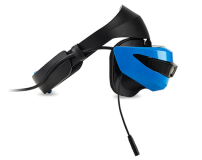 Acer Windows Mixed Reality headset with its visor raised.
 -
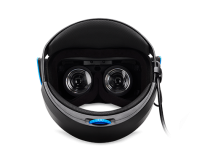 Rear view of the Acer Windows Mixed Reality headset.


See also
References
- ↑ 1.0 1.1 1.2 Mollie Ruiz-Hopper (2017-10-17). "What’s new in the Windows 10 Fall Creators Update". Windows Experience Blog. https://blogs.windows.com/windowsexperience/2017/10/17/whats-new-windows-10-fall-creators-update/. Retrieved 2026-10-15.
- ↑ 2.00 2.01 2.02 2.03 2.04 2.05 2.06 2.07 2.08 2.09 2.10 2.11 2.12 2.13 2.14 "Acer’s Windows Mixed Reality Headset and Motion Controllers Available for Pre-Order by Consumers in the United States". Acer. 2017-10-04. https://news.acer.com/acers-windows-mixed-reality-headset-and-motion-controllers-available-for-pre-order-by-consumers-in-the-united-states-225912. Retrieved 2026-10-15.
- ↑ 3.0 3.1 3.2 "Features removed in the Windows client". Microsoft Learn. https://learn.microsoft.com/en-us/windows/whats-new/removed-features. Retrieved 2026-10-15.
- ↑ 4.00 4.01 4.02 4.03 4.04 4.05 4.06 4.07 4.08 4.09 4.10 4.11 4.12 4.13 4.14 4.15 4.16 4.17 4.18 4.19 "AH101". Acer Japan. https://www.acer.com/ns/ja/JP/smart/ah101/. Retrieved 2026-10-15.
- ↑ 5.0 5.1 5.2 Devindra Hardawar (2017-04-12). "Acer's $300 Windows headset bodes well for the future of cheap VR". Engadget. https://www.engadget.com/2017/04/12/acer-microsoft-vr-mixed-reality/. Retrieved 2026-10-15.
- ↑ 6.0 6.1 6.2 6.3 Yasunori-Acer (2017-11-20). "[ヘッドマウントディスプレイ]AH100 と AH101についてのよくある質問". Acer Answers. https://community.acer.com/ja/kb/articles/10156-%E3%83%98%E3%83%83%E3%83%89%E3%83%9E%E3%82%A6%E3%83%B3%E3%83%88%E3%83%87%E3%82%A3%E3%82%B9%E3%83%97%E3%83%AC%E3%82%A4-ah100-%E3%81%A8-ah101%E3%81%AB%E3%81%A4%E3%81%84%E3%81%A6%E3%81%AE%E3%82%88%E3%81%8F%E3%81%82%E3%82%8B%E8%B3%AA%E5%95%8F. Retrieved 2026-10-15.
- ↑ 7.0 7.1 7.2 7.3 7.4 7.5 7.6 7.7 7.8 Ben Lang (2017-10-19). "Acer Windows VR Headset Review". Road to VR. https://www.roadtovr.com/acer-windows-mixed-reality-vr-headset-review-ah101/. Retrieved 2026-10-15.
- ↑ 8.0 8.1 8.2 Acer (2019-04-23). "Acer Windows Mixed Reality Headset Setup Instructions". Acer Answers. https://community.acer.com/en/kb/articles/10119-acer-windows-mixed-reality-headset-setup-instructions. Retrieved 2026-10-15.
- ↑ 9.0 9.1 Shawn Whiting (2017-05-14). "Hands-on: Acer VR Headset for Microsoft’s Mixed Reality Platform". Road to VR. https://www.roadtovr.com/acer-vr-headset-microsoft-mixed-reality-hands-on/2/. Retrieved 2026-10-15.
- ↑ 10.0 10.1 10.2 10.3 10.4 Windows Apps Team (2017-05-11). "Windows Mixed Reality Dev Kits available for pre-order". Windows Developer Blog. https://blogs.windows.com/windowsdeveloper/2017/05/11/windows-mixed-reality-dev-kits-available-pre-order/. Retrieved 2026-10-15.
- ↑ Shawn Whiting (2017-05-14). "Hands-on: Acer VR Headset for Microsoft’s Mixed Reality Platform". Road to VR. https://www.roadtovr.com/acer-vr-headset-microsoft-mixed-reality-hands-on/. Retrieved 2026-10-15.
- ↑ Acer (2019-04-23). "Can I wear glasses or contacts while using the Acer Windows Mixed Reality headset?". Acer Answers. https://community.acer.com/en/kb/articles/10163-can-i-wear-glasses-or-contacts-while-using-the-acer-windows-mixed-reality-headset. Retrieved 2026-10-15.
- ↑ 13.0 13.1 13.2 13.3 Alex Kipman (2017-03-01). "Windows Mixed Reality dev kits shipping this month". Windows Experience Blog. https://blogs.windows.com/windowsexperience/2017/03/01/windows-mixed-reality-dev-kits-shipping-month/. Retrieved 2026-10-15.
- ↑ 14.0 14.1 14.2 14.3 14.4 14.5 14.6 Ben Lang (2017-10-19). "Acer Windows VR Headset Review". Road to VR. https://www.roadtovr.com/acer-windows-mixed-reality-vr-headset-review-ah101/3/. Retrieved 2026-10-15.
- ↑ 15.0 15.1 15.2 15.3 15.4 15.5 Hugh Langley (2017-11-04). "Acer Mixed Reality headset review". Wareable. https://www.wareable.com/acer/acer-windows-mixed-reality-hmd-headset-review. Retrieved 2026-10-15.
- ↑ 16.0 16.1 16.2 16.3 Ben Lang (2017-10-19). "Acer Windows VR Headset Review". Road to VR. https://www.roadtovr.com/acer-windows-mixed-reality-vr-headset-review-ah101/2/. Retrieved 2026-10-15.
- ↑ 17.0 17.1 17.2 Husain Sumra (2017-08-01). "Microsoft's Mixed Reality headsets are now available to everyone". Wareable. https://www.wareable.com/vr/acer-hp-windows-mixed-reality-headsets-on-sale-1332. Retrieved 2026-10-15.
- ↑ "Minimum PC hardware guidelines". Microsoft Learn. https://learn.microsoft.com/en-us/windows/mixed-reality/enthusiast-guide/windows-mixed-reality-minimum-pc-hardware-compatibility-guidelines. Retrieved 2026-10-15.
- ↑ 19.0 19.1 Scott Stein (2017-11-08). "You’ll be able to play Steam games in Windows VR next week". CNET. https://www.cnet.com/news/youll-be-able-to-play-steam-games-in-windows-vr-next-week/. Retrieved 2026-10-15.
- ↑ 20.0 20.1 Microsoft Studios. "Windows Mixed Reality for SteamVR". Steam. https://store.steampowered.com/app/719950/Windows_Mixed_Reality_for_SteamVR/. Retrieved 2026-10-15.
- ↑ "Using SteamVR with Windows Mixed Reality". Microsoft Learn. https://learn.microsoft.com/en-us/windows/mixed-reality/enthusiast-guide/using-steamvr-with-windows-mixed-reality. Retrieved 2026-10-15.
- ↑ Tianshu Xu; Shinobu Hasegawa (2020). "A Study on Virtual Reality Work-Space to Improve Work Efficiency". ACHI 2020: The Thirteenth International Conference on Advances in Computer-Human Interactions: 304-309. Retrieved 2026-10-15.
- ↑ 23.0 23.1 Robert Gruen; Eyal Ofek; Anthony Steed; Ran Gal; Mike Sinclair; Mar Gonzalez-Franco (2020). "Measuring System Visual Latency through Cognitive Latency on Video See-Through AR devices". 2020 IEEE Conference on Virtual Reality and 3D User Interfaces (VR): 791-799. Retrieved 2026-10-15.
- ↑ Terry Myerson (2016-10-26). "Empowering a new wave of creativity with the Windows 10 Creators Update and Surface Studio". Windows Experience Blog. https://blogs.windows.com/windowsexperience/2016/10/26/empowering-a-new-wave-of-creativity-with-the-windows-10-creators-update-and-surface-studio/. Retrieved 2026-10-15.
- ↑ Sophie Charara (2017-01-06). "Windows VR headsets are here - HP, Dell, Acer and Lenovo's affordable headgear". Wareable. https://www.wareable.com/vr/best-windows-vr-headsets-hp-dell-acer-lenovo-888. Retrieved 2026-10-15.
- ↑ Nick Statt (2017-03-01). "Acer’s Windows Holographic headset will ship to developers this month". The Verge. https://www.theverge.com/2017/3/1/14779706/microsoft-acer-windows-holographic-mixed-reality-headset. Retrieved 2026-10-15.
- ↑ Agam Shah (2017-05-05). "PC makers will ship Windows 10 mixed reality headsets in Q4". PCWorld. http://www.pcworld.com/article/3194877/virtual-reality/pc-makers-will-ship-windows-10-mixed-reality-headsets-in-q4.html. Retrieved 2026-10-15.
- ↑ Jamie Feltham (2017-05-11). "Full Specs Revealed For HP And Acer Developer Headsets, Releasing In August". UploadVR. https://uploadvr.com/full-specs-revealed-hp-acer-windows-10-headsets-releasing-august/. Retrieved 2026-10-15.