

Epson Moverio BT-45C
More actions
| Epson Moverio BT-45C | |
|---|---|

| |
| Basic Info | |
| VR/AR | Augmented Reality |
| Type | Smart glasses |
| Subtype | Enterprise AR, Tethered AR |
| Platform | Android and Windows host devices with compatible USB-C video, data and power[1] |
| Creator | Epson |
| Developer | Epson |
| Manufacturer | Epson |
| Announcement Date | September 30, 2022 (Japan); October 11, 2022 (US)[2][3] |
| Release Date | November 2022 (Japan); earlier June 8, 2022 entry in English technical archive[4][5] |
| Price | ¥207,900 including tax (Japan direct-shop reference price, September 2022)[2] |
| Website | https://epson.com/moverio |
| Versions | BT-45C headset; BT-45CS bundle adds BO-IC400N controller[1] |
| Requires | Compatible USB-C DisplayPort Alternate Mode host, with sufficient power and application support[1][6] |
| Predecessor | Epson Moverio BT-40 (earlier Moverio model)[7] |
| System | |
| Operating System | Host-dependent; BT-45CS controller shipped with Android 10[8] |
| Chipset | Host-dependent application processing[9] |
| CPU | Host-dependent application processing |
| GPU | Host-dependent application processing |
| Storage | |
| Storage | Application storage provided by connected host[9] |
| Memory | Provided by connected host |
| Display | |
| Display | Binocular see-through Si-OLED, 0.453-inch panels[10] |
| Peak Brightness | 1,000 cd/m² maximum (manufacturer specification)[10] |
| Resolution | 1920 × 1080 pixels per eye[10] |
| Refresh Rate | 60 Hz[10] |
| Image | |
| Field of View | Approximately 34° diagonal[1] |
| Optics | |
| Optics | Epson proprietary see-through optical engine[3] |
| Ocularity | Binocular |
| Passthrough | Optical see-through[1] |
| Tracking | |
| Tracking | Motion and orientation sensors; AR behavior supplied by host application[11] |
| Rotational Tracking | Rotation-vector sensor data through SDK[11] |
| Audio | |
| Audio | Built-in speakers; CTIA earphone-microphone output[1] |
| Microphone | Built-in microphones with noise reduction[10] |
| 3.5mm Audio Jack | Yes, CTIA four-pole jack on interface box[1] |
| Camera | 8 MP autofocus; capture modes depend on format and host software[11] |
| Connectivity | |
| Connectivity | USB-C DisplayPort 1.2 video, USB 2.0 data and host power[10] |
| Ports | USB-C connector and 3.5 mm audio jack |
| Wired Video | 1920 × 1080 at 60 Hz via USB-C DisplayPort Alternate Mode[1] |
| Power | USB Power Delivery, rated 5.0 V / 1.5 A, 7.5 W[1] |
| Battery Capacity | Powered from connected device[1] |
| Battery Life | Depends on connected device and use |
| Device | |
| Dimensions | See configuration-specific dimensions below |
| Weight | Approx. 185 g optical headset without shade/cables (2022 guide); published figures vary[1] |
| Headstrap | Adjustable padded headband and overhead strap; helmet mounting bracket[1] |
| Sensors | Geomagnetic sensor, accelerometer, gyroscope and ambient light sensor[1] |
| Input | Connected host controls; application-dependent sensor and camera input[11] |
| Compliance | IP52 excluding connector ports; specified MIL-STD-810H drop test; ANSI Z87.1 shade when correctly fitted[1] |
The Epson Moverio BT-45C is an enterprise binocular augmented reality headset developed by Epson for remote assistance and work instructions. Its Si-OLED displays show a Full HD image through transparent optics, while a centered 8 MP autofocus camera shares the wearer's view with software running on a connected device. The headset is powered and driven through USB-C; the BT-45CS package adds an Android intelligent controller. Both packages use the same headset, with computing supplied externally.[3][1]
Epson announced the Japanese models in September 2022 and the US models in October, with November availability planned in both markets. Epson's Japanese support record confirms a November 2022 release; its English technical archive separately lists a June 8, 2022 release without identifying a market. The US product page was marked discontinued when checked on October 14, 2026. The sales and repair records described below apply to their identified markets.[2][3][4][5][12]
History and development
Moverio family
The BT-45C belongs to the Moverio line, whose earlier products include the BT-100 (2011), BT-200 (2014), BT-300 (2016) and BT-350 (2017) in Epson Taiwan's product-history timeline. That timeline places the BT-40 in 2020; Epson's English technical archive dates the BT-40/BT-40S release to December 21, 2020. The BT-45C retains binocular see-through display technology but uses a headband or helmet attachment for industrial work.[7][5]
Regional announcements and availability
| Record | Documented date and scope |
|---|---|
| English developer archive | Lists BT-45C and BT-45CS as released on June 8, 2022; no sales territory is specified.[5] |
| Japan announcement | September 30, 2022; planned release in late November 2022. Direct-shop reference prices, including tax, were ¥207,900 for BT-45C and ¥273,900 for BT-45CS. Prices were explicitly dated and were not mandatory dealer prices.[2] |
| Japan support record | Lists November 2022 as the release month.[4] |
| US announcement | October 11, 2022; planned November sales through channel partners and Epson.com. Epson also announced a demonstration at the October 18-20 Augmented Enterprise Summit.[3] |
| US sales status | US SKU V11H970020 was marked discontinued at the October 2026 source check.[12] |
The Japanese support page lists March 31, 2034 as the repair-service acceptance deadline. The repair deadline applies to the Japanese service record. The European product page identifies a different regional SKU, V11H970040.[4][9]
Physical design
Headband and helmet mounting
The adjustable headband supports the assembly with front and rear pads and an optional overhead strap. The rear interface box holds the USB-C connection and earphone jack. Epson's design account describes placing this box behind the head to balance the front optical unit and suspending the optics from a front hinge to reduce load on the nose.[1][13]
The two-axis hinge changes the viewing angle and lets the display flip upward. A separate bracket attaches to a compatible helmet brim and provides a slider and angle adjustment. The manual warns that attachment depends on helmet shape and excludes MP-type helmets. Rubber bumpers run along the sides of the optical unit.[1][13]
The headset can be worn over prescription spectacles. Epson cautions that some frame shapes do not fit, particularly glasses wider than approximately 144 mm. The instructions describe adjusting the hinge and mounting position until all four corners of the image are visible.[1]
Dimensions and mass
Epson's July 2022 English guide lists the following configuration-specific dimensions and masses. The exclusions matter when comparing a bare optical unit with a complete headband assembly.[1]
| Configuration in the guide | Dimensions (width × depth × height) | Approximate mass | Excluded items |
|---|---|---|---|
| Optical headset | The guide's appearance drawing lists 202 × 110 × 34 mm | 185 g | Shade and cables |
| Headset with headband | Specification table: 200 × 290 × 57 mm; appearance drawing: 202 × 290 × 111 mm | 445 g | Shade, cables and overhead strap |
| Headset with helmet bracket | 194 × 190 × 57 mm | 270 g | Shade, cables, interface-box holder and helmet |
The guide's specification table and appearance drawing give different dimensions for the headband configuration; those figures are reproduced with their original scope. Other Epson documents also list different masses: the US September 2022 sheet gives approximately 545 g for a headset/headband combination including shade, top strap, harness and interface box, while Epson China's page gives approximately 207 g for the optical headset, 477 g with headband and 291 g with helmet attachment under its stated exclusions. These manufacturer figures are not interchangeable, and the documents do not establish a hardware revision that explains every difference.[10][14]
Display technology
The display uses two 0.453-inch Si-OLED panels, with 1920 × 1080 pixels per eye, 24-bit color and a 60 Hz refresh rate. Epson specifies approximately 34° diagonal field of view and illustrates the virtual screen as equivalent to a 120-inch screen viewed from 5 m. The screen-size analogy describes angular presentation. Epson's US specification lists maximum brightness of 1,000 cd/m².[10][1]
Digital imagery overlays the direct view through the optics. Clear and dark shades attach magnetically and can be flipped up or removed; the dark shade reduces outside light.[1]
The SDK supports 2D and side-by-side stereoscopic 3D display modes. Its display-distance control horizontally shifts the left and right images to change their binocular disparity, with the guide warning that image edges can be clipped.[11]
The ambient-light sensor supports automatic brightness adjustment. On Android, MOVERIO Link provides brightness, power-saving, display-distance and audio-output settings; the controller bundle uses MOVERIO Link Pro. Available functions depend on the app version. Epson also describes OLED image retention and luminance decline, and recommends avoiding prolonged static imagery and unnecessary brightness.[1]
Sensors and AR software
The headset's documented sensor set consists of a geomagnetic sensor, accelerometer, gyroscope and ambient-light sensor. Epson describes the first three as nine-axis sensing. The Basic Function SDK exposes raw readings and software-derived data such as gravity, linear acceleration and rotation vectors for application use. Its sensor chapter describes movement, orientation and head tracking.[1][11][10]
Camera data can also be used by an application for marker recognition. Spatial registration, gesture interaction and other AR functions depend on the software and host integration. Epson's developer guide distinguishes Android development using its Basic Function SDK from Windows development using the platform's standard environment.[11][15]
The Android SDK also controls camera properties, switches audio between the speakers and jack, and obtains headset information and connection-status changes. The guide contains host- and Android-version-specific camera restrictions, so an app's camera operation must be checked separately from whether a host can display video.[11]
Camera system
The centered 8 MP autofocus camera is intended to capture the direction in which the wearer is looking for remote collaboration. Epson's European product account says it can continue sharing that view when the display is flipped up. The US sheet specifies a depth of field from 110 mm to infinity, USB Video Class 1.1 transport and H.264, MJPG and YUV video formats, with JPEG still-image support.[3][9][10]
The Android developer guide gives format-specific BT-45C camera modes. Selected examples are listed below; these are documented acquisition settings, not measured frame rates on every host.[11]
| Camera output size | RGB565 / ARGB8888 | YUY2 | H.264 |
|---|---|---|---|
| 3264 × 2448 | 10 fps | 1 fps | 30 fps |
| 2560 × 1440 | 20 fps | 2 fps | 30 fps |
| 1920 × 1080 | 30 fps | 5 fps | 30 fps |
| 1280 × 720 | 60 or 30 fps | 10 fps | 60 or 30 fps |
| 640 × 480 | 60 or 30 fps | 30 fps | 60 or 30 fps |
Epson warns that camera frame rate can decrease with host processing performance and exposure settings. The SDK's H.264 data mode does not support its still-image/video-recording methods, although camera data can be acquired in that format. Applications therefore need to distinguish acquisition format from the SDK recording functions.[11][10]
Connectivity and power
USB-C host requirements
The headset takes a 1920 × 1080, 60 Hz video signal through DisplayPort Alternate Mode over USB-C, alongside USB 2.0 data and power. The US sheet specifies DisplayPort 1.2, EDID and HDCP support. A USB-C socket by itself does not establish compatibility: the host must supply the required video output and power, and software must support the camera or sensors when those are needed.[10][1]
Epson's current European compatibility FAQ warns that phones compatible with BT-40 may fail with BT-45C because of different power requirements. Its results identify particular device, operating-system and headset-firmware combinations, and Epson explicitly does not guarantee their performance. The original headset guide documents Windows 10 and Android 8.0 or later for sensors and camera; its specification table says Windows 10 or later. Epson advises checking the connected device's compatibility.[6][1]
The connected device supplies power; the guide rates headset consumption at 7.5 W and lists 5.0 V / 1.5 A. Runtime depends on the connected device's power supply. The headset also relies on the host for application processing and storage, while the physical interface box provides the USB-C and audio connections.[1][9]
Audio
Built-in speakers and noise-reduction microphones support hands-free communication. A 3.5 mm four-pole CTIA earphone-microphone jack sits on the interface box. Audio normally uses the headset speakers; MOVERIO Link or Link Pro selects the output destination. Epson lists 80 dBA speaker output, or 92 dBA when its volume-amplification feature is used. Its safety instructions warn against prolonged amplified listening.[1][10]
Versions and controller
The BT-45C package provides the headset, headband, helmet attachment, shades, case and related accessories, without a dedicated computing controller. The BT-45CS includes the same headset and the BO-IC400N intelligent controller. The controller remains an external device joined by cable, even when it provides the complete application platform.[1]
| Feature | BT-45C headset | BO-IC400N controller supplied with BT-45CS |
|---|---|---|
| Application platform | Supplied by connected host | Android 10 and Qualcomm Snapdragon XR1 in the original guide |
| User interface | Host controls, with headset device functions accessible to software | 2.95-inch, 480 × 854 multitouch screen, hardware keys and trackpad mode |
| Memory / storage | Host-dependent application resources | 4 GB RAM and 64 GB storage |
| Removable storage | Headset guide lists USB-C and audio connections | Controller microSD up to 2 GB, microSDHC up to 32 GB and microSDXC up to 2 TB |
| Wireless networking | Supplied by host | Dual-band 2 × 2 IEEE 802.11 a/b/g/n/ac Wi-Fi and Bluetooth 5.0 |
| Power | USB-C from host | 3,400 mAh, 13 Wh lithium-polymer battery |
| Camera | Centered 8 MP autofocus camera | Separate approximately 13 MP autofocus camera with flash LED |
| Navigation | Headset motion and ambient-light sensors | GPS, GLONASS, Galileo, QZSS and BDS listed in controller guide |
The controller values above come from its original guide and the US bundle specification sheet. The storage, wireless networking and battery figures apply to the external controller.[16][8]
The BO-IC400N supports mirroring, in which both displays show the same screen, and a trackpad mode, in which the controller touchscreen moves a pointer while imagery appears in the headset. Its guide describes APK installation, and Epson's Japanese launch announcement says the controller does not support Google Mobile services such as Google Play and Gmail. A bundled Android controller therefore should not be assumed to have the same app distribution as an ordinary Android phone.[16][2]
Published updates
Epson's headset firmware release note lists version 1.2.1, dated October 27, 2022, as improving interoperability with some PCs and smartphones. The technical archive also records Basic Function SDK 1.2.1 on November 14, 2022 and 1.2.2 on September 25, 2025. Headset firmware, controller system software and developer SDK versions are separate records.[17][5]
Durability and use limits
Epson specifies IP52 dust/water resistance excluding connector ports. Its MIL-STD-810H claim is limited to a drop test: the guide describes drops from 122 cm onto lauan plywood in 26 directions and explicitly says this does not guarantee survival of every drop or freedom from damage. It does not document compliance with every environmental test in that standard.[1]
ANSI Z87.1 compliance applies to the shade when attached correctly to the headset. Epson says the shade must be installed securely and warns that conformance does not protect against all foreign objects or injuries. This qualification matters alongside the industrial marketing claims and helmet attachment options.[1]
The guide specifies operation at 5-35°C and 20-80% relative humidity without condensation. It also cautions against dangerous tasks and locations where the cable can catch on machinery. Its cleaning instructions require care with the lenses and dry cleaning of connector ports; the included carrying case is not waterproof.[1]
Enterprise applications
Epson positions the BT-45C for troubleshooting, maintenance, inspection and training in manufacturing, automotive, field service, IT, logistics and construction. The camera and audio devices support communication with a remote expert, while the display presents documents or instructions without holding a screen. These describe intended workflows; actual remote annotation, recording and guidance functions depend on the chosen software.[3]
In an April 2024 announcement for MAINTEC, Epson specifically described pairing BT-45C with partner remote-assistance and digital-workflow software for two-way instructions and employee training. It also reported using Moverio in its own remote assistance and overseas industrial installations.[18]
Research
A 2026 study by Arndt Guentsch and Shengtong Han used the BT-45C as an additional USB-C display for a Straumann Falcon dynamic dental-navigation computer. The system's bull's-eye navigation view appeared in the headset; tracking cameras were attached to the surgical handpiece, not supplied by the headset as a spatial-tracking system. One experienced operator carried out 40 simulated procedures on a standardized jaw model with polyurethane blocks, with five osteotomies per procedure, totaling 200. Twenty procedures used the computer screen and twenty used the glasses, in alternating blocks of five procedures.[19]
Postoperative cone-beam CT measurements compared the planned and prepared osteotomies. Mean three-dimensional deviation at the crest was 0.32 ± 0.17 mm with screen guidance and 0.27 ± 0.16 mm with the headset (reported p = 0.02). Angular deviation was 0.40 ± 0.31° and 0.34 ± 0.35°, respectively, without a statistically significant difference in that comparison. These are measurements of the combined navigation workflow under the experiment's conditions, not headset tracking accuracy.[19]
The authors note that the model omitted clinical constraints such as soft tissue, saliva, restricted mouth opening and real surgical lighting. The study evaluated osteotomy preparation, not final implant placement or patient outcomes, and used one operator and one navigation system. Straumann funded the work and supplied equipment; Guentsch disclosed speaking honoraria from Straumann and Versah.[19]
Image clarity study identifying BT-45CS
A 2025 pilot study by Poyuan Hsueh and colleagues identifies its hardware as BT-45CS in the methods, although its reference list links to the BT-45C product page. It assessed 15 dentists aged 24-40 using Landolt-ring visual-acuity charts connected to an X-Guide dental-navigation system. The four randomized conditions compared a monitor 2 m away without the glasses, that monitor viewed through the optics, a headset image minified to the monitor's apparent size, and an unminified headset image. Dark shades were fitted for the last two conditions because of room lighting.[20]
The mean LogMAR values were -0.010, 0.020, 0.117 and -0.300 for conditions 1-4, respectively; lower values indicate better discernibility. The minified headset image was worse than the control, while all 15 participants recognized the smallest optotypes in the unminified condition. Viewing the monitor through the optics did not yield a significant difference from the control in the reported comparison. The authors explain the unminified result through image enlargement, rather than an intrinsic improvement in every kind of displayed information.[20]
The shade blocked the simultaneous overlay on the operative field, so the authors explicitly state that the AR function was not tested under those conditions. This was a short visual-acuity experiment with an insufficient sample for the authors' desired statistical power, not a trial of surgical accuracy, long-term comfort or patient benefit.[20]
Epson's headset guide says the product is not certified as a medical device and is not certified to IEC 60601-1. It permits use as an auxiliary monitor but cautions against surgery or diagnosis requiring high reliability. The research reports above do not establish manufacturer-approved medical use.[1]
Technical specifications summary
| Specification | Documented headset value and scope |
|---|---|
| Display | Binocular Si-OLED, 1920 × 1080 pixels per eye, 60 Hz; 34° diagonal field of view (manufacturer specifications).[10] |
| Viewing | Optical see-through; detachable clear/dark shades, flip-up display and over-glasses fit subject to frame shape.[1] |
| Video input | 1920 × 1080 at 60 Hz, DisplayPort 1.2 Alternate Mode over USB-C.[10] |
| Data / power | USB 2.0; host power, 5.0 V / 1.5 A and rated 7.5 W.[1] |
| Sensors | Geomagnetic sensor, accelerometer, gyroscope and ambient-light sensor; SDK data and application use.[1][11] |
| Camera / audio | 8 MP autofocus camera; speakers, noise-reduction microphones and CTIA 3.5 mm jack.[10] |
| Durability | IP52 except connector ports; specified MIL-STD-810H drop test; ANSI Z87.1 shade when correctly fitted.[1] |
| Package distinction | BT-45C uses a separately provided host; BT-45CS includes BO-IC400N computing controller.[1] |
See also
- Epson
- Moverio family
- Enterprise AR
- Si-OLED
- RealWear Navigator 500
- Vuzix M400
- Microsoft HoloLens 2
- Remote assistance
- Smart Glasses
Gallery
-
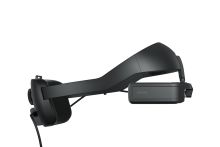 Moverio BT-45C from the right side.
 -
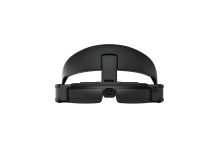 Moverio BT-45C with headband and tinted shields.


References
- ↑ 1.00 1.01 1.02 1.03 1.04 1.05 1.06 1.07 1.08 1.09 1.10 1.11 1.12 1.13 1.14 1.15 1.16 1.17 1.18 1.19 1.20 1.21 1.22 1.23 1.24 1.25 1.26 1.27 1.28 1.29 1.30 1.31 1.32 1.33 1.34 1.35 1.36 "BT-45C / BT-45CS User's Guide, 414280000 EN". Seiko Epson. 2022-07. https://files.support.epson.com/docid/other/414280000_en.pdf. Retrieved 2026-10-14.
- ↑ 2.0 2.1 2.2 2.3 2.4 "作業現場での遠隔支援・作業支援に適した両眼シースルー・スマートグラス「BT-45CS/45C」2機種新発売". Epson Japan. 2022-09-30. https://www.epson.jp/osirase/2022/220930.htm. Retrieved 2026-10-14.
- ↑ 3.0 3.1 3.2 3.3 3.4 3.5 3.6 "Epson Advances Immersive Workforce Collaboration with New Generation of Moverio AR Smart Glasses". Epson America. 2022-10-11. https://news.epson.com/news/moverio-bt-45c-45cs-ar-smart-glasses. Retrieved 2026-10-14.
- ↑ 4.0 4.1 4.2 4.3 "BT-45C: マニュアル / サポート&ダウンロード". Epson Japan. https://www.epson.jp/support/portal/used/bt-45c.htm. Retrieved 2026-10-14.
- ↑ 5.0 5.1 5.2 5.3 5.4 "List of news (Archives)". Seiko Epson. https://tech.moverio.epson.com/en/whats_new.html. Retrieved 2026-10-14.
- ↑ 6.0 6.1 "Which USB Type-C devices are compatible with my BT-45C?". Epson Europe. https://www.epson.eu/en_EU/faq/KA-01820. Retrieved 2026-10-14.
- ↑ 7.0 7.1 "MOVERIO AR 智慧眼鏡". Epson Taiwan. https://www.epson.com.tw/Moverio. Retrieved 2026-10-14.
- ↑ 8.0 8.1 "Moverio BT-45CS AR Smart Glasses: Specification Sheet, CPD-62588". Epson America. 2022-09. https://mediaserver.goepson.com/ImConvServlet/imconv/95722853c9c3483de51d04a1c6efca5159f8b53d/original?assetDescr=Moverio-BT-45CS-Smart-Glasses-Specification-Sheet_CPD-62588-Final.pdf. Retrieved 2026-10-14.
- ↑ 9.0 9.1 9.2 9.3 9.4 "Moverio BT-45C Smart glasses (V11H970040)". Epson Europe. https://www.epson.eu/en_EU/products/smart-glasses/see-through-mobile-viewer/moverio-bt-45c-smart-glasses/p/36977. Retrieved 2026-10-14.
- ↑ 10.00 10.01 10.02 10.03 10.04 10.05 10.06 10.07 10.08 10.09 10.10 10.11 10.12 10.13 10.14 10.15 "Moverio BT-45C AR Smart Glasses: Specification Sheet, CPD-62587". Epson America. 2022-09. https://mediaserver.goepson.com/ImConvServlet/imconv/6ebac924875302db6e05190598883e68c6691584/original?assetDescr=Moverio-BT-45C-Smart-Glasses-Specification-Sheet-CPD-62587-Final.pdf. Retrieved 2026-10-14.
- ↑ 11.00 11.01 11.02 11.03 11.04 11.05 11.06 11.07 11.08 11.09 11.10 "Developing Android Apps: Developer's Guide for Android & Windows, Moverio Basic Function SDK". Seiko Epson. https://tech.moverio.epson.com/en/basic_function_sdk/developers_guide/developing_android_apps.html. Retrieved 2026-10-14.
- ↑ 12.0 12.1 "Moverio BT-45C AR Smart Glasses (V11H970020)". Epson US. https://epson.com/For-Work/Wearables/Smart-Glasses/Moverio-BT-45C-AR-Smart-Glasses/p/V11H970020. Retrieved 2026-10-14.
- ↑ 13.0 13.1 "BT-45CS / 45C: Design Works". Seiko Epson. https://corporate.epson/en/technology/design/works/works-bt-45c.html. Retrieved 2026-10-14.
- ↑ "Epson BT-45C 增强现实智能眼镜". Epson China. https://www.epson.com.cn/products/hmd/bt-45c/. Retrieved 2026-10-14.
- ↑ "Introduction: Developer's Guide for Android & Windows, Moverio Basic Function SDK". Seiko Epson. https://tech.moverio.epson.com/en/basic_function_sdk/developers_guide/introduction.html. Retrieved 2026-10-14.
- ↑ 16.0 16.1 "BO-IC400N Intelligent Controller User's Guide, 414373900 EN". Seiko Epson. 2022-10. https://files.support.epson.com/docid/other/414373900_en.pdf. Retrieved 2026-10-14.
- ↑ "BT-45C and the Headset of BT-45CS Firmware update tool Release Note (Ver1.2.1)". Seiko Epson. 2022-10-27. https://tech.moverio.epson.com/en/software_updates/bt-45c_headset/release_note/. Retrieved 2026-10-14.
- ↑ "Epson urges other manufacturers to ‘put their glasses on’". Epson Europe. 2024-04-23. https://press.epson.eu/en_GB/news/epson-urges-other-manufacturers-to-put-their-glasses-on/. Retrieved 2026-10-14.
- ↑ 19.0 19.1 19.2 Arndt Guentsch; Shengtong Han (2026-04-22). "Augmented Reality Improves Accuracy of Dynamic Computer-Assisted Implant Surgery: An In Vitro Analysis". Clinical Oral Implants Research 37 (7): 896-904. doi:10.1111/clr.70134. Retrieved 2026-10-14.
- ↑ 20.0 20.1 20.2 Poyuan Hsueh; Yoko Yamaguchi; Yiwen Wang; Takao Kasahara; Daisuke Higuchi; Yasutomo Yajima (2025-04-03). "Evaluation of Image Clarity in Smartglass-Supported Dynamic Computer-Assisted Implant Surgery: A Clinical Pilot Trial". Clinical Oral Implants Research 36 (8): 955-964. doi:10.1111/clr.14442. Retrieved 2026-10-14.