

Google Cardboard
More actions
| Google Cardboard | |
|---|---|

| |
| Basic Info | |
| VR/AR | Virtual Reality |
| Type | Head-mounted display |
| Subtype | Mobile VR |
| Creator | |
| Developer | |
| Manufacturer | Google reference design and third-party viewer manufacturers |
| Release Date | 25 June 2014 |
| Website | https://arvr.google.com/cardboard/ |
| Versions | Original I/O 2014 viewer; revised I/O 2015 viewer; third-party designs |
| Requires | Compatible smartphone, viewer and application; requirements depend on SDK version |
| System | |
| Operating System | Android and iOS applications |
| Display | |
| Display | Smartphone display |
| Resolution | Smartphone and application dependent |
| Image | |
| Field of View | 80 degrees circular design field for the I/O 2015 reference lenses; other viewers vary |
| Optics | |
| Optics | Two lenses; I/O 2015 reference design uses 34 mm aspherical singlets |
| Tracking | |
| Tracking | Phone accelerometer and gyroscope; orientation tracking with a modeled neck offset |
| Device | |
| Material | Cardboard reference enclosure; third-party materials vary |
| Input | Original magnetic trigger; revised conductive touchscreen button; viewer-specific alternatives |
Google Cardboard is Google's smartphone-based virtual reality platform, combining a viewer with lenses and software for Android and iOS. The phone supplies the display and computation, while the viewer positions its screen in front of the eyes. Google's open-source software development kit provides head tracking, stereoscopic rendering and viewer-button interaction.[1][2]
Cardboard includes Google's reference viewers, third-party designs and compatible applications. The reference specifications and manufacturer guidance are available for building viewers, including designs made from materials other than cardboard.[3] Google Store viewer sales ended in March 2021, while the separate open-source SDK continued to receive releases. Version 1.35.0 was published on 31 August 2026.[4][5]
History and development
Cardboard debuted at I/O on 25 June 2014.[6] David Coz and Damien Henry developed the project as Google engineers using the company's "20 percent" project arrangement. Contemporary reporting described a viewer distributed to keynote attendees, with construction instructions and a developer toolkit available online.[2]
At I/O 2015, Google announced iOS support for developers and introduced Google Expeditions, alongside an existing collection of Cardboard applications for film, games, tours and learning.[7] The revised I/O 2015 viewer used a conductive touchscreen button and different lenses and mechanical parts. Its technical specification describes the reference design and manufacturing tolerances, rather than a single specification for all Cardboard-compatible viewers.[8]
| Reference design | Input and construction |
|---|---|
| Original I/O 2014 viewer | A cardboard enclosure, lenses and magnets; the moving magnet interacted with the phone's magnetometer to act as a selection button. An optional NFC tag could launch the original application.[2][3] |
| I/O 2015 viewer | A chassis, front "t-shirt" part and button, with conductive fabric and a foam pillow on the touchscreen input mechanism. It used custom aspherical lenses.[8] |
| Third-party viewers | Manufacturers can vary the enclosure material, lenses and input, supplying a QR viewer profile for their design.[9] |
Distribution and reported adoption
Google reported more than 10 million viewers shipped worldwide and 160 million downloads of Cardboard applications on Google Play in February 2017. Those were different measures, rather than a count of active users.[10] Its November 2019 open-source announcement reported more than 15 million units worldwide, while acknowledging declining overall usage.[11]
The published manufacturing materials supported both reference-design production and compatible custom viewers. Their guidance covers lens and mechanical tolerances, assembly inspection, artwork and viewer profiles.[3] Viewer specifications therefore need to identify the particular design; phone processing capability, screen resolution and application requirements remain separate from the enclosure.[8][1]
Construction
Original do-it-yourself design
Google's original-style build list includes corrugated cardboard, two lenses, a neodymium ring magnet and ceramic disk magnet, hook-and-loop fasteners and a rubber band. It lists an NFC tag as optional. The published DIY guidance suggests lenses with a 45 mm focal distance and thin, sturdy cardboard; these are construction recommendations, rather than specifications for every commercial viewer.[3]
I/O 2015 reference design
The I/O 2015 kit provides mechanical drawings and material specifications for the three cardboard body parts, sleeve, lenses and touchscreen button. The button's conductive strip and pillow transfer the touch interaction through the enclosure; the pillow uses a soft urethane foam core. Hook-and-loop fasteners close the flaps, and a rubber band increases friction to reduce phone slippage.[8]
| Item | Published value and meaning |
|---|---|
| Enclosure board | E-flute corrugated cardboard, 1.7 mm thick with a tolerance of +/-0.1 mm.[8] |
| Lenses | Custom 34 mm diameter aspherical singlets; the optical specification lists PMMA as the lens material.[8][9] |
| Design field of view | 80 degrees, described as circular total field of view.[8] |
| Designed eye relief | 18 mm from the designed eye pupil to the lens surface vertex.[8] |
| Lens-holder spacing | 64 mm between holder centers, with an assembly tolerance of +/-0.5 mm.[8] |
These values describe Google's reference design. They do not establish a universal weight, field of view, refresh rate or user-adjustment range for all compatible products. The manufacturer guidance allows custom lenses and enclosures, with the corresponding optical parameters supplied through a viewer profile.[9]
Optical system and viewer profiles
The lenses and screen geometry determine how an application should render its two eye views. A viewer profile records parameters for that physical design. Google's profile generator includes screen-to-lens distance, inter-lens distance, vertical alignment, tray-to-lens-center distance, distortion coefficients and four field-of-view angles. It also identifies the viewer and its primary button type.[12]
The profile is encoded in a QR code that can be printed on the viewer or packaging. Scanning it supplies the parameters used by the application for that viewer.[13] In the Android HelloCardboard sample, saved profile data and screen dimensions create the lens-distortion object. The application obtains eye-specific view and projection matrices, draws the scene for each eye, and applies the corresponding distortion mesh when displaying it.[14]
Profile calibration changes software projection and distortion correction. A profile's inter-lens distance describes the viewer geometry; it is not a measurement of the user's anatomy or a physical adjustment mechanism.[12] The reference design has fixed lens-holder spacing, and Google's manufacturer guidance recommends a forgiving eyebox when designing custom lenses.[8][9]
Input methods
The original magnetic trigger used a change in magnetic field detected by the smartphone. Its behavior depended on the phone's magnetometer. Google's later manufacturer guidelines stopped recommending magnetic input because of variation between phones.[2][9]
The I/O 2015 mechanism instead used a conductive strip and pillow attached to a cardboard lever to produce a touchscreen interaction.[8] The broader design guidelines describe single-input alternatives, including direct screen touch, conductive or capacitive inputs and Bluetooth buttons. Those describe viewer designs, rather than an assurance that every application supports an arbitrary external controller.[9]
Head direction and button input can work together. In HelloCardboard, the user looks at an object and presses the viewer button to collect it. This is an example application interaction, rather than tracked hand or controller position.[14]
Software platform
Open-source SDK
On 6 November 2019, Google released the Cardboard open-source project, including Android and iOS libraries for head tracking, distortion rendering and input handling. Its announcement said that the older Google VR SDK was no longer being actively developed and that the new project would let the community continue Cardboard development. An Android QR library allowed viewer pairing without depending on the separate Cardboard application.[11]
Google documents native Android NDK, iOS and Unity development paths.[15] The native HelloCardboard samples demonstrate stereoscopic rendering and viewer pairing, while the Unity XR plug-in integrates those capabilities into Unity's project and XR settings.[16][17]
Head tracking
The SDK's head tracker uses the smartphone's accelerometer and gyroscope with a Kalman filter to calculate a predicted head pose for a supplied timestamp. Its raw sensor pose contains orientation, represented by a quaternion. The exposed head pose adds recentering and a neck model; that model supplies a positional offset derived from rotation.[18]
This provides rotational tracking with three degrees of freedom. A returned three-component position from the neck model is not a measured room-scale translation. Positional tracking of physical movement requires another source of position information.[18]
The API separates creation, pausing, resuming, recentering and destruction of the tracker. Pausing also pauses its underlying sensors. Recentering aligns the orientation to zero yaw. Pose requests use a specified clock and timestamp, so applications need to use the documented timing convention when asking for a prediction.[18]
Development and version requirements
Requirements vary with SDK and integration versions. The documentation and release notes checked on 13 October 2026 show the following distinctions:
| Development path | Documented requirements or version change |
|---|---|
| Android native sample | The quickstart lists Android 8.0/API 26 or later and notes that a lower minimum can be possible with different rendering API compatibility.[14] |
| Native iOS SDK | The older quickstart still lists iOS 12.0, but the 1.34.0 release of 28 May 2026 raises the minimum supported iOS version to 15.0.[16][19] |
| Unity integration | The quickstart specifies Unity 6000.0.23f1 or later with the relevant mobile build support. Its graphics-API notes direct newer Unity versions to OpenGL ES 3.0 or Vulkan, rather than OpenGL ES 2.0.[17] |
| Continued SDK development | Release 1.35.0, dated 31 August 2026, updates Android build tooling and the iOS SDK/sample C++ language standard. That is a software release, separate from physical viewer sales.[5] |
These are versioned development requirements. A viewer fitting a phone physically does not establish that the phone, application and selected SDK version are compatible.[14][19]
Licensing and QR data handling
The SDK's license file lists third_party/unity_plugin_api/ under the Unity Companion License and assigns Apache License 2.0 to the remaining files. The repository's brand guidance distinguishes the Google Cardboard trademark from the licensed software assets.[20][21]
The repository states that the Cardboard libraries do not collect data. It also explains that scanning a viewer QR code can make web requests to obtain device parameters, following redirects until a recognized configuration URL is reached. That statement concerns the libraries; an application's own data handling depends on its implementation.[21] Google's Unity guide requires a camera-usage explanation for QR scanning on iOS, and the 1.34.0 native release describes its camera-permission-denial dialog.[17][19]
Third-party viewers
Manufacturers can use enclosure materials such as cardboard, plastic, foam or aluminum, and can design custom lenses. Google's guidance emphasizes matching the optical profile to the actual viewer and securing the phone in its enclosure.[9] A brand or shell material alone does not identify the screen, processor or optical parameters used by a particular app and phone.[3][12]
Works with Google Cardboard program
The historical "Works with Google Cardboard" program used viewer profiles and a badge for accepted manufacturers. Its 2016 guidelines described the application and sample-submission process.[13] The November 2019 design guide explicitly states that Google discontinued this program with the open-source project's release and no longer certifies third-party viewers. It places compatibility responsibility on the manufacturers.[9]
The design materials remain useful reference documents. The current availability of the profile generator or old badge artwork does not establish new certification of a viewer.[12][9]
Applications and use cases
Historical demonstrations and media
The original Cardboard application included Google Earth flyover and Street View demonstrations. These were part of its early phone-based experience.[2] The later Google Earth VR application launched on Steam for the HTC Vive in November 2016; it has a separate product and platform history.[22]
Google introduced Cardboard Camera for Android on 3 December 2015. It captured panoramas with slightly different views for the two eyes and could record accompanying sound. This is a dated description of that application, rather than a current compatibility list for every Cardboard viewer.[23]
360-degree video
YouTube's support documentation describes watching VR180 and 360-degree videos in Cardboard mode through its Android application, which splits the screen into two views. The documentation checked in October 2026 states that this mode is not supported on iPhone or iPad and that VR180/360-degree playback is not supported through mobile browsers. These are YouTube-specific restrictions, alongside the Cardboard SDK's separate iOS development path.[24][16]
Education and Expeditions
Expeditions was introduced at I/O 2015 for virtual field trips using Cardboard.[7] In November 2020, Google announced the withdrawal of the Expeditions app and set an end to downloads after 30 June 2021. It described migrating most of the 360-degree tours to Google Arts & Culture, with viewing through the web and the Android/iOS application.[25]
Cardboard has also served as a delivery platform for research applications. Studies need to be interpreted according to their participants, tasks and comparison conditions:
| Original study | Setup | Findings and limits |
|---|---|---|
| Smith and colleagues, 2017 | The electric-field portion of a larger 627-student project involved 301 introductory physics students, randomly assigned to smartphone VR, video or static-image treatments. VR used Nexus 5X phones and inexpensive cardboard viewers, with a treatment lasting 3 minutes and 20 seconds.[26] | Overall pre/post gains did not differ significantly between treatment types on the reported question comparisons. VR received higher enjoyment and perceived-helpfulness ratings. The findings concern a short instructional episode in one course.[26] |
| Banerjee and colleagues, 2023 | Twelve medical student volunteers were allocated six each to an Android/Cardboard aneurysm-training application and a review-article control. The report does not state that assignment was randomized. Two sets of eight CT cases, each containing four normal examinations and four aneurysm cases, tested identification before and after training.[27] | The difference in performance change was not statistically significant (p = 0.06), despite positive participant feedback. The authors identified small sample size and inexperienced trainees as limitations.[27] |
The examples show how specific teaching applications used Cardboard. Positive experience ratings and improved task scores are different outcomes; the studies do not establish that using a viewer alone improves learning in every subject.[26][27]
Games and interaction demonstrations
Cardboard applications can render interactive scenes as well as panoramic media. The documented HelloCardboard game combines head direction, a visual target and the viewer button to demonstrate object collection. Its tracking and input model differs from physically tracked hand-controller interaction.[14][18]
Limitations and design guidance
Cardboard's phone-based rendering and sensor tracking make the particular phone and application part of the VR system. The neck model supplies an estimated offset during rotation, while the native tracker does not observe a user's translation through the room.[18] Matching the viewer's profile to its optics and physical dimensions is needed for the appropriate image projection and distortion correction.[12][14]
Google's November 2019 manufacturer guidance recommends handheld viewers without a head strap, a forgiving lens eyebox and secure phone retention. It also notes the material limits of cardboard, including limited lifespan and lack of water resistance. Those are manufacturer's design recommendations, rather than independently measured guarantees about comfort.[9]
Impact and later platforms
Google's published adoption figures document the scale of Cardboard distribution during its early years. They do not measure sustained use or learning outcomes.[10][11] In 2017, Google described Google Daydream as drawing on lessons from Cardboard. The two platforms have separate device requirements, software and product histories.[10]
Google Store withdrawal and open-source continuation
Contemporary reporting on 4 March 2021 observed that Google had removed the official viewer listings from its store. That retail change followed the 2019 SDK open-source release.[4][11] The original manufacturing materials, current developer documentation and 2026 SDK releases describe continuing software and reference-design availability. Third-party hardware availability and individual applications need their own dated checks.[3][1][5]
See also
Gallery
-
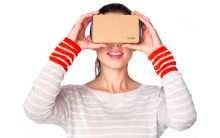 A Google Cardboard viewer held to the face.

References
- ↑ 1.0 1.1 1.2 "Open source Cardboard SDK". Google for Developers. Google. https://developers.google.com/cardboard. Retrieved 2026-10-12.
- ↑ 2.0 2.1 2.2 2.3 2.4 Neil McAllister (2014-06-26). "Google's Oculus-defying VR headset is made of CARDBOARD – no joke". The Register. https://www.theregister.com/on-prem/2014/06/26/googles-oculus-defying-vr-headset-is-made-of-cardboard-no-joke/419903. Retrieved 2026-10-12.
- ↑ 3.0 3.1 3.2 3.3 3.4 3.5 "It's your turn to make it". Google for Developers. Google. https://developers.google.com/cardboard/manufacturers. Retrieved 2026-10-12.
- ↑ 4.0 4.1 Harry Baker (2021-03-04). "Google Ends Cardboard VR Sales". UploadVR. https://www.uploadvr.com/google-ends-cardboard-vr-sales/. Retrieved 2026-10-12.
- ↑ 5.0 5.1 5.2 "Cardboard SDK v1.35.0 (2026-08-31)". GitHub. Google. 2026-08-31. https://github.com/googlevr/cardboard/releases/tag/v1.35.0. Retrieved 2026-10-12.
- ↑ Greg Kumparak (2014-06-25). "Hands On With Google’s Incredibly Clever Cardboard Virtual Reality Headset". TechCrunch. https://techcrunch.com/2014/06/25/hands-on-with-googles-incredibly-clever-cardboard-virtual-reality-headset/. Retrieved 2026-10-12.
- ↑ 7.0 7.1 Sundar Pichai (2015-05-28). "You say you want a mobile revolution...". The Keyword. Google. https://blog.google/products-and-platforms/platforms/android/io-2015-mobile-revolution/. Retrieved 2026-10-12.
- ↑ 8.00 8.01 8.02 8.03 8.04 8.05 8.06 8.07 8.08 8.09 8.10 "Google Cardboard (I/O 2015) Technical Specification, in the Cardboard Manufacturer Kit". Google Cardboard. Google. 2015. https://www.gstatic.com/cardboard_assets/cardboard_manufacturers_kit.zip. Retrieved 2026-10-12.
- ↑ 9.00 9.01 9.02 9.03 9.04 9.05 9.06 9.07 9.08 9.09 "Cardboard Design Guidelines and Best Practices, version 2.2, in the Cardboard Manufacturer Kit". Google Cardboard. Google. 2019-11. https://www.gstatic.com/cardboard_assets/cardboard_manufacturers_kit.zip. Retrieved 2026-10-12.
- ↑ 10.0 10.1 10.2 Amit Singh (2017-02-28). "More ways to watch and play with AR and VR". The Keyword. Google. https://blog.google/products-and-platforms/products/google-ar-vr/more-ways-watch-and-play-ar-and-vr/. Retrieved 2026-10-12.
- ↑ 11.0 11.1 11.2 11.3 Jeffrey Chen (2019-11-06). "Open sourcing Google Cardboard". Google Developers Blog. Google. https://developers.googleblog.com/en/open-sourcing-google-cardboard/. Retrieved 2026-10-12.
- ↑ 12.0 12.1 12.2 12.3 12.4 "Cardboard viewer profile generator". Google Cardboard. Google. https://wwgc.firebaseapp.com/. Retrieved 2026-10-12.
- ↑ 13.0 13.1 "Viewer Profile and Badge Guidelines, version 1.2, in the Cardboard Manufacturer Kit". Google Cardboard. Google. 2016-02. https://www.gstatic.com/cardboard_assets/cardboard_manufacturers_kit.zip. Retrieved 2026-10-12.
- ↑ 14.0 14.1 14.2 14.3 14.4 14.5 "Quickstart for Google Cardboard for Android NDK". Google for Developers. Google. https://developers.google.com/cardboard/develop/c/quickstart. Retrieved 2026-10-12.
- ↑ "Cardboard SDK API Reference". Google for Developers. Google. https://developers.google.com/cardboard/reference. Retrieved 2026-10-12.
- ↑ 16.0 16.1 16.2 "Quickstart for Google Cardboard for iOS". Google for Developers. Google. https://developers.google.com/cardboard/develop/ios/quickstart. Retrieved 2026-10-12.
- ↑ 17.0 17.1 17.2 "Quickstart for Google Cardboard for Unity". Google for Developers. Google. https://developers.google.com/cardboard/develop/unity/quickstart. Retrieved 2026-10-12.
- ↑ 18.0 18.1 18.2 18.3 18.4 "Head Tracker". Google for Developers. Google. https://developers.google.com/cardboard/reference/c/group/head-tracker. Retrieved 2026-10-12.
- ↑ 19.0 19.1 19.2 "Cardboard SDK v1.34.0 (2026-05-28)". GitHub. Google. 2026-05-28. https://github.com/googlevr/cardboard/releases/tag/v1.34.0. Retrieved 2026-10-12.
- ↑ "Cardboard SDK LICENSE". GitHub. Google. https://github.com/googlevr/cardboard/blob/master/LICENSE. Retrieved 2026-10-12.
- ↑ 21.0 21.1 "Open source Cardboard SDK and samples". GitHub. Google. https://github.com/googlevr/cardboard. Retrieved 2026-10-12.
- ↑ Mike Podwal (2016-11-16). "Google Earth VR — Bringing the whole wide world to virtual reality". The Keyword. Google. https://blog.google/products-and-platforms/products/google-ar-vr/google-earth-vr-bringing-whole-wide-world-virtual-reality/. Retrieved 2026-10-12.
- ↑ Carlos Hernandez (2015-12-03). "Step inside your photos with Cardboard Camera". The Keyword. Google. https://blog.google/products-and-platforms/products/google-ar-vr/step-inside-your-photos-with-cardboard/. Retrieved 2026-10-12.
- ↑ "Watch VR180 and 360-degree videos with Cardboard". YouTube Help. Google. https://support.google.com/youtube/answer/6239930?hl=en. Retrieved 2026-10-12.
- ↑ Jennifer Holland (2020-11-13). "Expanding Google Arts & Culture with Expeditions". The Keyword. Google. https://blog.google/products-and-platforms/products/education/expanding-google-arts-and-culture-expeditions/. Retrieved 2026-10-12.
- ↑ 26.0 26.1 26.2 J. R. Smith and colleagues (2017). "A controlled study of stereoscopic virtual reality in freshman electrostatics". pp. 376-379. doi:10.1119/perc.2017.pr.089. https://www.per-central.org/items/perc/4827.pdf. Retrieved 2026-10-12.
- ↑ 27.0 27.1 27.2 Soham Banerjee and colleagues (2023). "The Use of Virtual Reality in Teaching Three-Dimensional Anatomy and Pathology on CT". Journal of Digital Imaging 36 (3): 1279-1284. doi:10.1007/s10278-023-00784-2. Retrieved 2026-10-12.