

HTC Vive Cosmos Elite
More actions
| HTC Vive Cosmos Elite | |
|---|---|

| |
| Basic Info | |
| VR/AR | Virtual Reality |
| Type | Head-mounted display |
| Subtype | PC VR |
| Platform | SteamVR, Viveport |
| Creator | HTC |
| Developer | HTC |
| Manufacturer | HTC |
| Announcement Date | February 20, 2020[1] |
| Release Date | March 18, 2020 (full kit)[2] |
| Price | US$899 (2020 full kit); US$549 (2020 headset only)[3] |
| Website | https://www.vive.com/us/support/cosmos-elite/ |
| Versions | Full kit; headset-only package[3][4] |
| Requires | VR-ready PC and compatible SteamVR base station(s)[5] |
| System | |
| Operating System | Windows 10/11 (host PC; see requirements)[5] |
| CPU | Host PC[5] |
| GPU | Host PC[5] |
| Display | |
| Display | Dual 3.4-inch LCD panels[6] |
| Subpixel Layout | RGB subpixels (contemporary review)[7] |
| Resolution | 1440 × 1700 per eye (2880 × 1700 combined)[6] |
| Refresh Rate | 90 Hz[6] |
| Image | |
| Field of View | Maximum 110° (manufacturer; axis not specified)[6] |
| Optics | |
| Optics | Fresnel lenses[8] |
| Ocularity | Binocular[6] |
| IPD Range | 61-73 mm (2020 review specification; mechanical adjustment)[7] |
| Passthrough | VIVE Console 2.0.17.2 or later; enabled through headset-button setting[9] |
| Tracking | |
| Tracking | 6DoF SteamVR Tracking with External Tracking Faceplate[1] |
| Base Stations | 1.0 or 2.0 supported; 1.0 included in original kit[10][6] |
| Eye Tracking | Third-party module required for Eye Tracking SDK[11] |
| Hand Tracking | VIVE Hand Tracking SDK support (application-dependent)[11] |
| Body Tracking | Optional compatible Vive Tracker devices[3] |
| Rotational Tracking | Yes[1] |
| Positional Tracking | Yes[1] |
| Tracking Volume | Depends on base-station generation/count and setup[12] |
| Play Space | Room-scale, standing or seated[13] |
| Audio | |
| Audio | Integrated detachable on-ear stereo headphones[14][15] |
| Microphone | Integrated[14] |
| 3.5mm Audio Jack | 3.5 mm audio cable connector; replacement kit for personal earphones[15] |
| Camera | Two front cameras and two side cameras retained with external faceplate[14][7] |
| Connectivity | |
| Connectivity | Host DisplayPort 1.2 and USB 3.0[5] |
| Ports | Converter: headset cable/power/DP/USB; headset USB-C accessory port and 3.5 mm audio connector[16][17][15] |
| Wired Video | DisplayPort via converter[18] |
| Wireless Video | Optional HTC Vive Wireless Adapter (60 GHz Intel WiGig)[12] |
| Bluetooth | Base-station firmware updates via SteamVR[19] |
| Power | Mains-powered converter when tethered[18] |
| Device | |
| Headstrap | Adjustable halo band, top strap and flip-up visor[20] |
| Color | Black[8] |
| Sensors | G-sensor, gyroscope and external-tracking sensors[6][14] |
| Input | VIVE controllers; compatible Valve Index Controllers; headset button[3][6] |
The HTC Vive Cosmos Elite is a PC-powered virtual reality head-mounted display developed by HTC. Announced on February 20, 2020, it launched globally on March 18, 2020 at US$899 for the full kit.[1][2] It uses the HTC Vive Cosmos headset platform with a pre-installed External Tracking Faceplate, replacing the original model's six-camera inside-out tracking configuration with SteamVR base-station tracking. The original full kit includes two Base Station 1.0 units and two original VIVE wand controllers.[6][21]
The Elite retains the Cosmos platform's dual LCD displays at 1440 × 1700 pixels per eye (2880 × 1700 combined), 90 Hz refresh rate, flip-up visor, integrated audio and interchangeable front cover. HTC specifies a maximum field of view of 110 degrees without identifying its measurement axis.[6] The headset-only package and the separate faceplate provide upgrade paths for owners of compatible controllers and base stations.[3]
History and development
The original Cosmos went on sale in October 2019. Its camera-based tracking was a source of criticism in contemporary reviews. The Elite offered a separate tracking configuration for the same headset platform: external infrared base stations and a sensor-equipped faceplate. This changed the tracking hardware while retaining the displays, lenses and head-mount design.[21]
HTC introduced Cosmos Elite alongside Cosmos Play and Cosmos XR on February 20, 2020, with Elite pre-orders scheduled for February 24. The announcement priced the full kit at US$899 and the stand-alone External Tracking Faceplate at US$199, with the latter scheduled for the second quarter. These were announcement and order dates, preceding the full kit's March 18 launch.[1][2]
| Package | Documented 2020 US price | Hardware and availability |
|---|---|---|
| Full kit | US$899 | Headset with External Tracking Faceplate, two Base Station 1.0 units and two original VIVE controllers; launched March 18.[2][6] |
| Headset only | US$549 | Headset with External Tracking Faceplate; compatible stations and controllers purchased separately or reused. HTC's May 1 announcement listed April 16 on-sale dates for China and Taiwan, April 27 for the EU and UK, and May 1 for the US and Canada.[3] |
| External Tracking Faceplate | US$199 | Upgrade accessory for a compatible Cosmos headset, requiring external stations and matching controllers. HTC listed separate regional availability during April-June 2020.[3] |
The launch package included a limited-time Half-Life: Alyx redemption code, with several excluded markets and a supplies limit. HTC later promoted the headset-only and faceplate packages with Alyx and six months of Viveport Infinity, also subject to regional and offer restrictions. These were historical bundle offers.[2][3]
In July 2023, Road to VR reported direct confirmation from an HTC service representative that VIVE Cosmos had been discontinued in the United States, while noting continued sales in other markets at that time. That report does not establish a worldwide Cosmos Elite support end date.[22] HTC's Cosmos Elite support pages remain accessible and specify configuration and compatibility requirements checked on October 14, 2026.[5][23]
Design and modular faceplates
The headset uses a halo-style band, rear adjustment dial and top strap. Its visor flips upward to expose the wearer's real surroundings without removing the whole band. HTC's fit guidance explains how band height, visor position and strap tension affect image alignment and light leakage. HTC says most prescription glasses fit inside and warns against scratching the headset lenses.[20][24]
The front cover attaches with tabs and a locking mechanism released from inside the visor. The External Tracking Faceplate is the Elite's default configuration. Replacing it with the original Cosmos six-camera faceplate changes the tracking arrangement; compatible Cosmos camera-tracked controllers are also needed. VIVE Cosmos controllers cannot be used with the external-tracking Elite configuration.[25][1][12] John Yan's 2020 review tested switching between the two front covers with their corresponding controllers, showing a documented use of the modular system.[8]
HTC's product sheet advertised a Cool Gasket face-cushion accessory for the Cosmos platform.[6]
Modularity does not imply that every proposed Cosmos accessory shipped. HTC's product material also advertised future Motion and XR faceplates. Their advertised functions and availability are separate from the equipment included in the Elite kit.[12]
Display and optical system
The two 3.4-inch LCD panels each display 1440 × 1700 pixels at 90 Hz. Contemporary Tom's Hardware coverage identifies RGB subpixels. HTC advertised 88% more pixels than the original VIVE and reduced gaps between pixels to lessen screen-door effect. The 88% figure describes pixel count, rather than an independently measured gain in perceived clarity.[6][7]
John Yan reported legible text and Fresnel glare artifacts, while preferring the black levels of OLED headsets he had used.[8]
The headset uses Fresnel lenses and mechanical IPD adjustment. Turning the knob changes lens spacing, with the current spacing shown in the headset. The manufacturer explains that the optical centers and the physical fit must align with the wearer's eyes. Tom's Hardware listed a 61-73 mm range in its March 2020 specifications; the cited HTC adjustment guide describes the mechanism without giving numerical endpoints.[8][26][7]
HTC's maximum 110-degree field-of-view figure does not give separate horizontal and vertical measurements. It also does not establish the visible field for a particular wearer or an angular pixel-density measurement.[6] Contemporary reviewers reported a small optical sweet spot and the need to readjust the headset to maintain a clear view, alongside reduced screen-door visibility. These are attributed observations rather than uniform outcomes for every wearer.[21][8]
Tracking system and base stations
The External Tracking Faceplate's sensors receive infrared signals from Lighthouse base stations for positional and rotational tracking. The cameras retained on the headset do not replace these external stations in the default Elite configuration.[14][21]
Compatibility depends on each tracked device, not only the headset. The Cosmos Elite headset and External Tracking Faceplate support both Base Station 1.0 and SteamVR Base Station 2.0. HTC lists original VIVE controllers for version 1.0 only, whereas VIVE controllers (2018), VIVE Tracker (2018) and VIVE Tracker (3.0) appear in both compatibility groups. Different generations of base station must not be used together.[10]
HTC gives the following maximum play areas for the headset-only product, with the required stations sold separately. These are manufacturer limits tied to the listed configuration.[12]
| Base-station configuration | Manufacturer-listed play area |
|---|---|
| Two Base Station 1.0 units | Up to 3.5 m × 3.5 m |
| Two SteamVR Base Station 2.0 units | Up to 5 m × 5 m |
| Four SteamVR Base Station 2.0 units | Up to 10 m × 10 m |
The setup guide requires at least 2 m × 1.5 m for room-scale use; stationary experiences have different space requirements. The supplied stations should be mounted securely at opposite diagonal corners, facing the play area, and each connected to power. Version 1.0 uses optical synchronization or an optional sync cable; moving a station after setup disrupts the calibrated arrangement.[13][27]
Tracking still depends on visibility between the sensors and stations. Kevin Carbotte's review noted that obstructing that line of sight or facing away during seated play could cause problems. The system therefore does not justify an unconditional claim of freedom from occlusion, or an exact sub-millimeter tracking or motion-to-photon figure without a defined test.[7]
Controllers and other input
The original full kit includes two original VIVE controllers, with a multifunction trackpad, dual-stage trigger, grip buttons, menu and system buttons, and Micro-USB charging connections. They use base-station tracking. They are distinct from both the original Cosmos camera-tracked controllers and the VIVE controllers (2018) listed for compatibility with version 2.0 stations.[6][28][10]
Valve Index Controllers are a documented alternative. Compatible Vive Tracker devices can add tracked objects or body points, with application support and the needed receivers. Carbotte tested Index controller pairing and four Tracker devices alongside the controllers; this is a particular review configuration rather than a promise that every game supports every accessory.[3][7]
HTC's developer compatibility matrix lists the Cosmos Elite as supported by its Hand Tracking SDK and lists Eye Tracking SDK support only with a third-party eye-tracking module. These software and accessory options should be distinguished from the controllers supplied in the kit and from built-in eye-tracking hardware.[11]
Audio and physical details
The headset has integrated stereo on-ear headphones and a microphone. Their position can be adjusted, and the supplied headphones can be detached. HTC specifies a replacement kit and cable guides for personal earphones, connecting through the 3.5 mm audio cable connector on the right of the band.[14][15][8]
John Yan found the microphone adequate for in-game conversation in his 2020 review, while describing weaker low-frequency response in the headphones than their high-frequency output.[8]
Contemporary reviews differ in their listed weight: Tom's Hardware gives 702 g in its March 2020 specification table, while Gaming Nexus gives 645 g in its April review. The two reviews give different figures.[7][8] Ben Lang reported front-heavy weight distribution and difficulty maintaining lens alignment on his head, while praising the audio quality. Comfort and fit were reviewer-specific findings.[21]
Connectivity and wireless operation
For tethered use, the headset connects to a powered converter with a headset-cable socket, power input, DisplayPort cable and USB 3.0 cable. The DisplayPort connection must go to the PC's graphics card. The kit includes a Mini DisplayPort adapter; Yan's review describes a 5 m headset cable.[16][18][4][8]
A USB Type-C accessory port is accessible beneath the face-cushion frame. HTC states that this port is disabled when the headset uses the Wireless Adapter. The audio connector and this accessory port are distinct from the converter's host connections.[17][15]
The optional VIVE Wireless Adapter uses 60 GHz Intel WiGig for the PC link. It needs a desktop PCIe card, wireless link box, appropriate Cosmos mounting/cable equipment and a separate power bank. It removes the tether to the computer while retaining PC rendering, external tracking and battery-powered adapter equipment.[12][29][30]
HTC also documents Bluetooth updates of the base-station firmware through SteamVR while the headset is connected to the PC. That function does not specify general-purpose Bluetooth audio pairing or a built-in Wi-Fi streaming mode.[19]
Software and PC requirements
VIVE Console manages headset settings and firmware updates. SteamVR supplies tracking-device pairing and room setup, and the headset supports Viveport content. The launch bundles' Infinity subscriptions were historical promotional access rather than a continuing entitlement for every second-hand unit.[23][7][3]
HTC's support table gives the following host requirements, checked October 14, 2026. Requirements of a particular VR application can differ; the wireless option has its own requirements.[5][30]
| Component | Minimum | Recommended |
|---|---|---|
| Processor | Intel Core i5-4590 / AMD FX 8350 equivalent or better | Same |
| Graphics | NVIDIA GeForce GTX 970 4 GB / AMD Radeon R9 290 4 GB equivalent or better | NVIDIA GeForce GTX 1070 / Quadro P5000 or AMD Radeon Vega 56 equivalent or better |
| Memory | 4 GB RAM or more | 8 GB RAM or more |
| Video output | DisplayPort 1.2 or newer | Same |
| USB | One USB 3.0 port or newer | Same |
| Operating system | Windows 10 | Windows 10 or Windows 11 |
Passthrough changes
The headset retains two front cameras and two side cameras with the External Tracking Faceplate installed. At launch, reviewers found that camera passthrough was unavailable with that faceplate.[14][7] HTC's archived beta notes record Elite passthrough support in version 1.0.14.1 on February 5, 2021, followed by exposure improvements in 1.0.14.3 on April 23.[31]
The current dedicated support page requires VIVE Console version 2.0.17.2 or later and enabling Pass-through for the headset button in Advanced settings. HTC distinguishes this function from SteamVR's Camera option. This versioned guidance is more specific than the general headset introduction's older statement that a different front cover is needed for passthrough.[9][14]
Comparison with Cosmos
The Elite shares the original Cosmos display and physical headset platform but changes the tracking front cover, included controllers and installation requirements. The prices below are the announced 2020 US prices.[1][6]
| Feature | Cosmos Elite | Cosmos (standard) |
|---|---|---|
| Announced US price in February 2020 | US$899 full kit | US$699 |
| Default tracking | SteamVR external base stations | Six-camera inside-out tracking |
| Included controllers | Original VIVE wand controllers | Cosmos camera-tracked controllers |
| External base stations | Required; two 1.0 units in full kit | Not required in default configuration |
| Per-eye resolution and refresh rate | 1440 × 1700, 90 Hz | Same |
| Flip-up visor and modular front cover | Yes | Yes |
| Setup and moving the play area | Mount and power stations, then calibrate space | Camera-based setup without external stations |
Use in research
Fine motor interaction
A 2023 IEEE VR paper by Xin Yi and colleagues used Cosmos Elite with an attached Leap Motion sensor and a custom Unity application. Its first study recruited 24 right-handed campus participants aged 18-26, who drew 5, 10, 20 and 30 cm lines along three axes using either a VIVE controller or their index finger, with visible or hidden trails. The within-subject experiment recorded 3,456 strokes. Visible trails reduced relative length and directional errors while slowing drawing; mean directional error was 6.83 degrees with a controller and 9.46 degrees with finger input (p < .001). The apparatus's added Leap Motion provided finger tracking, distinct from HTC's own SDK. The authors limited the work to one headset, right-handed participants and precision-focused tasks with relatively few repetitions; it was not a hardware tracking-accuracy benchmark.[32]
Supervised exercise experiments
A January 2023 randomized crossover study used Cosmos Elite, Kinect V1 and a custom Unity canyon environment with 24 healthy men aged 20-29. Each participant completed a five-minute VR exercise and an offline exercise in random order, with staff supervision. Video analysis found larger aggregate movement angles and lengths in the VR condition. Three participants reported motion sickness and eight reported sweating. The small male-only sample, video-measurement limits and lack of a standardized motion-sickness questionnaire restrict interpretation. The journal also disclosed retrospective trial registration. These findings concern the complete experimental setup and short exercises rather than general clinical efficacy or intrinsic headset performance.[33]
An October 2023 Pilates study enrolled 18 healthy male physical-education university students in total, divided into two equal groups. Each received an 11-minute VR session and a conventional session, separated by a two-day washout. It used Cosmos Elite with scenic VR, resistance bands and expert supervision; posture durations were measured from video with Dartfish and flow through a questionnaire. The authors reported longer posture maintenance and higher flow in the VR sessions. They identified the small sample and short intervention as limits. The results do not establish long-term benefit or performance superiority over other headsets.[34]
Technical specifications summary
The following distinguishes documented hardware specifications from review-listed figures.
| Specification | Details |
|---|---|
| Display | Dual 3.4-inch LCD panels; 1440 × 1700 pixels per eye[6] |
| Combined resolution | 2880 × 1700 pixels[6] |
| Refresh rate | 90 Hz[6] |
| Field of view | Manufacturer maximum 110 degrees; axis unspecified[6] |
| IPD adjustment | Mechanical; 61-73 mm listed by a 2020 review[26][7] |
| Tracking | SteamVR external tracking; headset supports 1.0 and 2.0 stations[10] |
| Audio | Integrated on-ear stereo headphones and microphone[14][6] |
| Weight | Tom's Hardware listed 702 g; Gaming Nexus listed 645 g in 2020 reviews[7][8] |
| Full-kit launch price | US$899, March 2020[2] |
Reception and practical limitations
Launch reviewers generally described the faceplate as improving the original Cosmos tracking, while retaining concerns about fit, optical sweet spot, bundled wand-controller design and price. Road to VR tested an original Cosmos upgraded with HTC-provided Elite faceplate and kit peripherals, and found better tracking in differing lighting conditions but continuing front-heavy fit and lens-alignment problems.[21] Tom's Hardware similarly tested the external faceplate on an existing Cosmos, paired Index controllers and Trackers, and emphasized the remaining need for a clear line of sight to base stations.[7]
The flip-up visor, interchangeable faceplate, integrated audio and wireless option remain documented features. The required external tracking setup, controller/base-station compatibility rules, accessory cost and wearer-dependent optical fit are practical qualifications to those features, rather than a universal assessment of comfort or professional suitability.[6][10][21]
See Also
Gallery
-
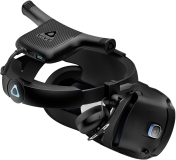 HTC Vive Cosmos Elite with a VIVE Wireless Adapter.

References
- ↑ 1.0 1.1 1.2 1.3 1.4 1.5 1.6 1.7 "HTC VIVE Unveils Complete VIVE Cosmos Series". HTC VIVE. 2020-02-20. https://www.vive.com/us/newsroom/2020-02-20/. Retrieved 2026-10-14.
- ↑ 2.0 2.1 2.2 2.3 2.4 2.5 "VIVE Cosmos Elite Now Bundled With Upcoming Half-Life®: Alyx™". HTC VIVE. 2020-03-18. https://www.vive.com/us/newsroom/2020-03-18/. Retrieved 2026-10-14.
- ↑ 3.00 3.01 3.02 3.03 3.04 3.05 3.06 3.07 3.08 3.09 "On Sale Details: Cosmos Elite Headset (HMD Only) and External Tracking Faceplate, both with Half-Life: Alyx". HTC VIVE. 2020-05-01. https://blog.vive.com/us/cosmoselite/. Retrieved 2026-10-14.
- ↑ 4.0 4.1 "What's inside the box?". HTC VIVE Support. https://www.vive.com/us/support/cosmos-elite/category_howto/inside-the-box.html. Retrieved 2026-10-14.
- ↑ 5.0 5.1 5.2 5.3 5.4 5.5 5.6 "What are the system requirements?". HTC VIVE Support. https://www.vive.com/us/support/cosmos-elite/category_howto/what-are-the-system-requirements.html. Retrieved 2026-10-14.
- ↑ 6.00 6.01 6.02 6.03 6.04 6.05 6.06 6.07 6.08 6.09 6.10 6.11 6.12 6.13 6.14 6.15 6.16 6.17 6.18 6.19 6.20 6.21 "VIVE Cosmos Elite: Technical Specs". HTC VIVE (original product sheet hosted by Senetic). https://gfx3.senetic.com/akeneo-catalog/f/6/6/e/f66e8d13d0331911186a0964e16a04fcf4024687_1652220_99HART002_00_icecat_multimedia_leaflet_1_en_GB.pdf. Retrieved 2026-10-14.
- ↑ 7.00 7.01 7.02 7.03 7.04 7.05 7.06 7.07 7.08 7.09 7.10 7.11 7.12 Kevin Carbotte (2020-03-18). "HTC Vive Cosmos Elite VR Headset Review: External Tracking Faceplate Delivers". Tom's Hardware. https://www.tomshardware.com/reviews/htc-vive-cosmos-elite-external-tracking-faceplate. Retrieved 2026-10-14.
- ↑ 8.00 8.01 8.02 8.03 8.04 8.05 8.06 8.07 8.08 8.09 8.10 John Yan (2020-04-19). "HTC VIVE Cosmos Elite Review". Gaming Nexus. https://www.gamingnexus.com/Article/6101/HTC-VIVE-Cosmos-Elite/. Retrieved 2026-10-14.
- ↑ 9.0 9.1 "Seeing real surroundings". HTC VIVE Support. https://www.vive.com/us/support/cosmos-elite/category_howto/seeing-real-surroundings-not-supported.html. Retrieved 2026-10-14.
- ↑ 10.0 10.1 10.2 10.3 10.4 "Which VIVE hardware is compatible with my base stations?". HTC VIVE Support. https://www.vive.com/us/support/vive-pro-hmd/category_howto/which-vive-hardware-are-compatible-with-base-stations.html. Retrieved 2026-10-14.
- ↑ 11.0 11.1 11.2 "SDK Compatibility Overview". HTC VIVE Developer Resources. https://developer.vive.com/resources/hardware-guides/sdk-compatibility-overview/. Retrieved 2026-10-14.
- ↑ 12.0 12.1 12.2 12.3 12.4 12.5 "VIVE Cosmos Elite Headset Features". HTC VIVE New Zealand. https://www.vive.com/nz/product/vive-cosmos-elite-headset/features/. Retrieved 2026-10-14.
- ↑ 13.0 13.1 "Planning your play area". HTC VIVE Support. https://www.vive.com/us/support/cosmos-elite/category_howto/planning-your-play-area.html. Retrieved 2026-10-14.
- ↑ 14.0 14.1 14.2 14.3 14.4 14.5 14.6 14.7 14.8 "About the VIVE Cosmos Elite headset". HTC VIVE Support. https://www.vive.com/us/support/cosmos-elite/category_howto/about-the-headset.html. Retrieved 2026-10-14.
- ↑ 15.0 15.1 15.2 15.3 15.4 "Plugging in your earphones". HTC VIVE Support. https://www.vive.com/us/support/cosmos-elite/category_howto/plugging-in-earphones.html. Retrieved 2026-10-14.
- ↑ 16.0 16.1 "About the converter for VIVE Cosmos Elite". HTC VIVE Support. https://www.vive.com/us/support/cosmos-elite/category_howto/about-the-converter.html. Retrieved 2026-10-14.
- ↑ 17.0 17.1 "Connecting a USB device to VIVE Cosmos Elite". HTC VIVE Support. https://www.vive.com/us/support/cosmos-elite/category_howto/connecting-a-usb-device.html. Retrieved 2026-10-14.
- ↑ 18.0 18.1 18.2 "Connecting the headset to your computer via the converter". HTC VIVE Support. https://www.vive.com/us/support/cosmos-elite/category_howto/connecting-the-headset-to-your-computer-via-the-converter.html. Retrieved 2026-10-14.
- ↑ 19.0 19.1 "Updating base station firmware via Bluetooth". HTC VIVE Support. https://www.vive.com/us/support/cosmos-elite/category_howto/updating-the-base-stations-via-bluetooth.html. Retrieved 2026-10-14.
- ↑ 20.0 20.1 "Putting on the VIVE Cosmos Elite headset". HTC VIVE Support. https://www.vive.com/us/support/cosmos-elite/category_howto/putting-the-headset-on.html. Retrieved 2026-10-14.
- ↑ 21.0 21.1 21.2 21.3 21.4 21.5 21.6 Ben Lang (2020-03-16). "Cosmos Elite & External Tracking Faceplate Review – Better Tracking, Same Core Issue". Road to VR. https://www.roadtovr.com/vive-cosmos-elite-external-tracking-faceplate-review/. Retrieved 2026-10-14.
- ↑ Scott Hayden (2023-07-06). "HTC Quietly Retires Vive Cosmos in the US". Road to VR. https://roadtovr.com/htc-discontinues-cosmos-elite-us/. Retrieved 2026-10-14.
- ↑ 23.0 23.1 "Updating the firmware". HTC VIVE Support. https://www.vive.com/us/support/cosmos-elite/category_howto/updating-the-firmware.html. Retrieved 2026-10-14.
- ↑ "Can I wear prescription glasses while using the headset?". HTC VIVE Support. https://www.vive.com/us/support/cosmos-elite/category_howto/can-i-wear-my-glasses-while-using-vive.html. Retrieved 2026-10-14.
- ↑ "Replacing the front cover". HTC VIVE Support. https://www.vive.com/us/support/cosmos-elite/category_howto/replacing-the-front-cover.html. Retrieved 2026-10-14.
- ↑ 26.0 26.1 "Adjusting the IPD on the headset". HTC VIVE Support. https://www.vive.com/us/support/cosmos-elite/category_howto/adjusting-the-ipd-on-the-headset.html. Retrieved 2026-10-14.
- ↑ "Installing the base stations". HTC VIVE Support. https://www.vive.com/us/support/cosmos-elite/category_howto/installing-the-base-stations.html. Retrieved 2026-10-14.
- ↑ "About the VIVE controllers". HTC VIVE Support. https://www.vive.com/us/support/cosmos-elite/category_howto/about-the-controllers.html. Retrieved 2026-10-14.
- ↑ "Setting up VIVE Wireless Adapter with the VIVE Cosmos series". HTC VIVE Support. https://www.vive.com/us/support/wireless-adapter/category_howto/vive-cosmos-wireless-setup-overview.html. Retrieved 2026-10-14.
- ↑ 30.0 30.1 "System requirements: VIVE Wireless Adapter". HTC VIVE Support. https://www.vive.com/us/support/wireless-adapter/category_howto/wireless-adapter-full-pack-system-requirements.html. Retrieved 2026-10-14.
- ↑ "VIVE Software – Release Notes on beta-archive". HTC VIVE Developer Resources. https://developer.vive.com/resources/vive-sense/vive-cosmos-software-release-notes-beta-archive/?site=uk. Retrieved 2026-10-14.
- ↑ Xin Yi; Xueyang Wang; Jiaqi Li; Hewu Li (2023). "Examining the Fine Motor Control Ability of Linear Hand Movement in Virtual Reality". 2023 IEEE Conference Virtual Reality and 3D User Interfaces (VR): 427-437. Retrieved 2026-10-14.
- ↑ Hee Jin Kim; Jea Woog Lee; Gangta Choi; Junghoon Huh; Doug Hyun Han (2023-01-05). "Differences in Brain Activity and Body Movements Between Virtual Reality and Offline Exercise: Randomized Crossover Trial". JMIR Serious Games 11: e40421. Retrieved 2026-10-14.
- ↑ Sung Je Park; Jea Woog Lee (2023-10-19). "Effects of Virtual Reality Pilates Training on Duration of Posture Maintenance and Flow in Young, Healthy Individuals: Randomized Crossover Trial". JMIR Serious Games 11: e49080. Retrieved 2026-10-14.