

Epson Moverio BT-300
More actions
| Epson Moverio BT-300 | |
|---|---|

| |
| Basic Info | |
| VR/AR | Augmented Reality |
| Type | Smart Glasses |
| Subtype | Consumer AR |
| Platform | Android 5.1 |
| Creator | Epson |
| Developer | Epson |
| Manufacturer | Epson |
| Announcement Date | February 22, 2016 (Mobile World Congress)[1] |
| Release Date | November 30, 2016 (Japan); January 4, 2017 (US Developer Edition availability)[2][3] |
| Price | US launch MSRP: $779 (Developer Edition); $799 (Drone Edition)[3] |
| Website | https://epson.com/Support/Wearables/Moverio/Epson-Moverio-BT-300/s/SPT_V11H756020 |
| Versions | Developer Edition; Drone Edition (same hardware platform)[3] |
| Requires | Supplied BT-300 Android controller connected by headset cable[4] |
| Predecessor | Epson Moverio BT-200[1] |
| System | |
| Operating System | Android 5.1 at launch; listed as Moverio OS in Epson specifications[1][5] |
| Chipset | Intel Atom x5[1] |
| CPU | Intel Atom x5, 1.44 GHz quad-core (Epson specification)[5] |
| Storage | |
| Storage | 16 GB internal storage[4] |
| Memory | 2 GB[4] |
| SD Card Slot | microSD up to 2 GB; microSDHC up to 32 GB[4] |
| Display | |
| Display | Binocular Si-OLED, 0.43-inch 16:9 panels[5] |
| Resolution | 1280 × 720 (HD panel resolution)[4] |
| Refresh Rate | 30 Hz (listed by Epson Europe)[5] |
| Image | |
| Field of View | Approximately 23° diagonal[4] |
| Optics | |
| Optics | Optical see-through light guide with reflective combiner[6] |
| Ocularity | Binocular[5] |
| Passthrough | Optical see-through[5] |
| Tracking | |
| Tracking | Motion sensors; application-dependent camera tracking[5][7] |
| Audio | |
| Audio | Earphones connected to socket on headset cable[4] |
| Microphone | Supplied earphone microphone[4] |
| 3.5mm Audio Jack | 3.5 mm 4-pole CTIA-compatible mini jack[8] |
| Camera | 5 MP front-facing camera on headset[4] |
| Connectivity | |
| Connectivity | Wi-Fi, Bluetooth, USB[5] |
| Ports | micro-USB, headset connector, microSD slot; audio socket on headset cable[4] |
| Wireless Video | Miracast source/sink, with compatible devices[4] |
| WiFi | IEEE 802.11a/b/g/n/ac[4] |
| Bluetooth | 4.1 (Bluetooth Smart Ready Class 2)[4] |
| Power | Rechargeable battery in controller[4] |
| Battery Capacity | 2950 mAh lithium polymer[4] |
| Battery Life | Approximately 6 hours under Epson evaluation conditions[4] |
| Charge Time | Approximately 5 hours for initial charging[4] |
| Device | |
| Dimensions | Headset: 191 × 178 × 25 mm; controller: 56 × 116 × 23 mm (W × D × H; exclusions in article)[9] |
| Weight | Headset: 69 g without shade/cables; controller: 129 g[4] |
| Headstrap | Glasses temples with optional supplied temple grips[4] |
| Haptics | Controller vibration during some operations[4] |
| Sensors | GPS, geomagnetic sensor, accelerometer, gyroscope, ambient light sensor[4] |
| Input | Controller trackpad, cross-key, Enter and system keys; headset tap sensing[4] |
| Compliance | Manufacturer's FCC Class B declaration and EU declaration of conformity (CE) for H756A[4][10] |
The Epson Moverio BT-300 is a binocular smart glasses device developed by Epson. It combines an optical see-through headset with a wired Android controller that supplies computing, input and battery power. Its silicon-based Si-OLED displays overlay images on the wearer's direct view of the surroundings, and support side-by-side stereoscopic content.[1][4]
Epson announced the BT-300 at Mobile World Congress in February 2016. Sales began in Japan on November 30, 2016; Epson announced immediate US availability of the Developer Edition in January 2017 and a Drone Edition for later that month. The product is discontinued, while manuals and regional support information remain available.[2][3][5][11]
History and development
The BT-300 was the third generation of the Moverio line, following the BT-100 (2011) and BT-200 (2014).[12] The February 22, 2016 announcement described a change from the earlier LCD backlit projection system to Si-OLED. Epson said the glasses were more than 20% lighter than the BT-200. Its claim to be the lightest binocular see-through OLED smart glasses was based on a comparison with competing manufacturers' published information as of January 2016.[1][13]
The initial announcement projected availability in late 2016. Epson's Japanese support record lists November 2016, and its Miracast software supplier sMedio subsequently identified November 30 as the start of Japanese sales. At CES on January 4, 2017, Epson announced that the US Developer Edition was immediately available at a suggested retail price of $779. It announced the Drone Edition at $799, with availability planned for later January.[1][11][2][3]
Editions
Both US editions used the same hardware platform. The Drone Edition added preinstalled DJI GO software, clip-on dark shades and fasteners for mounting the Moverio controller on a DJI remote controller's phone mount. Those launch bundles and prices describe the 2017 US offering.[3]
| Edition | Documented US launch offering |
|---|---|
| Developer Edition | Suggested retail price $779; announced as immediately available on January 4, 2017.[3] |
| Drone Edition | Suggested retail price $799; announced for later January 2017, with DJI GO and drone-oriented accessories.[3] |
Discontinuation and support
In a March 2021 notice, Epson identified the BT-300 as discontinued. It set March 31, 2021 as the end of technical-information provision for the BT-300 and several other older models, and June 30, 2021 as the cutoff for new app submissions to MOVERIO Apps Market. The notice said updates to already published apps would continue to be processed, and directed development toward newer models including BT-40 and BT-40S. Epson's European product page also identifies the BT-300 as discontinued.[14][5]
Epson Japan's support page, checked on October 14, 2026, lists February 28, 2027 as the end of its Japanese repair-acceptance period for the model.[11]
Display technology and optical system
The BT-300 uses 0.43-inch Si-OLED panels with a 16:9 aspect ratio and an HD panel resolution of 1280 × 720. Epson lists 24-bit color, approximately 23° diagonal field of view, and side-by-side 3D support. Its European specification lists a 30 Hz refresh rate. The diagonal display angle describes the projected image, rather than the entire view through the glasses.[4][5]
The headset is optical see-through: the wearer looks through the optics at the real environment while the projected image shares that view. A 2024 optical measurement paper describes the BT-300's micro-OLED source, light guide and curved reflective combiner. Epson's brochure advertises a 100,000:1 contrast ratio and describes unused display areas as transparent; these are manufacturer descriptions of its display system.[6][13]
The controller can switch between 2D and side-by-side 3D modes. An ambient light sensor supports automatic image-brightness adjustment, which can also be disabled for manual control. A removable shade reduces incoming exterior light when the image is difficult to see. The manual also notes that Si-OLED panels can develop burn-in or decreasing luminance, and describes reducing static image exposure and brightness.[4]
Epson describes apparent screen sizes at specified virtual viewing distances, such as a 40-inch screen at 2.5 m in the user's guide. This is a virtual-image comparison.[4]
Processing and controller
The controller contains an Intel Atom x5 quad-core processor, listed by Epson at 1.44 GHz, with 2 GB of memory and 16 GB of internal storage. The launch platform used Android 5.1. Epson's product specification names the operating system Moverio OS.[1][5][4]
The headset connects to the controller through its dedicated cable and connector. The controller has a capacitive trackpad, directional cross-key and Enter key, along with Home, Back, History, volume, power and display-switch controls. Trackpad gestures include tap, drag, flick and pinch. The controller can vibrate during some operations, and its switch key can lock the controls.[4]
The controller's micro-USB port serves charging and data connections. A computer can copy media files to the internal storage or a card for local playback; the manual specifies microSD cards up to 2 GB and microSDHC cards up to 32 GB. This USB file-transfer workflow does not establish a generic wired video-input mode. Epson's support FAQ explicitly states that the BT-300 has no HDMI inputs.[4][15]
Camera, sensors and audio
A 5 MP camera and its indicator sit on the headset. The built-in camera application records video to internal storage. Applications can also use the camera for AR content and object tracking. For example, original calibration research used the camera to track markers attached to a handheld object; Epson's 2018 Wikitude announcement described image and object tracking through application software.[4][7][16]
Epson lists gyroscopes and accelerometers in both the headset and controller, a compass, an ambient light sensor and GPS in the controller. Its sample software exposes motion and rotation data, controller inputs and headset tap events. Camera-based registration depends on the application and its tracking method.[5][17][7]
The audio connection is a 3.5 mm 4-pole CTIA-compatible mini jack.[8] The user's guide diagram places this socket on the headset cable. The supplied earphones include a microphone; the manual directs the user to use that microphone to record audio with video or input sound. Bluetooth audio is also among the supported connection profiles.[4]
Battery and physical design
The BT-300 is a two-part system. Epson specifies 69 g for the headset without its cable or shade and 129 g for the controller. The headset's dimensions are 191 × 178 × 25 mm (width × depth × height), excluding the shade; the controller is 56 × 116 × 23 mm in the same order, excluding protrusions. The glasses' 69 g figure does not describe the whole system carried by the wearer.[9][4]
The controller contains a rechargeable 2950 mAh lithium polymer battery. Epson rates operating time at approximately six hours under its evaluation conditions; the European specification describes video operation at 25°C. The manual gives approximately five hours for initial charging with the supplied AC adapter and USB cable. Actual operating time depends on the application and environment.[4][5]
The headset has folding temples and supplied temple grips for fit. Replacing the nose pad allows it to be worn over suitable prescription glasses, but the manual limits this to glasses approximately 147 mm wide and notes that frame shape can prevent fitting. Alternatively, an optician can fit prescription lenses to the supplied lens holder. These are separate fitting options.[4]
Software and development
The user's guide documents a browser, Gallery media viewer, camera application and MOVERIO Apps Market. Supported local media formats in the manual include MP4 (MPEG-4/H.264 with AAC), MPEG-2 (H.264 with AAC), VP8, JPEG, PNG, BMP, GIF, WAV, MP3 and AAC. Epson's support documentation states that the product is not Google-certified and cannot use Google Play or Google Mobile Services.[4][18]
The system supports IEEE 802.11a/b/g/n/ac Wi-Fi and Bluetooth 4.1. Miracast can receive images from a compatible device or cast the BT-300's screen to a compatible receiver. The manual does not guarantee connections with all devices, and states that Wi-Fi access-point connectivity is unavailable during Miracast use. It also notes that communication conditions can delay or disturb the image.[4]
A BT-300/BT-350 sample repository demonstrates Unity access to accelerometers, gyroscopes, magnetic-field data, illumination, controller inputs and headset tap events. Its documented configuration is Android 5.1/API level 22 and Unity Editor 5.X or later, with an APK copied to the device for installation. These are the sample's development instructions.[17]
On February 6, 2018, Epson announced Wikitude SDK 7.1 support for the BT-300 and BT-350, including object recognition, image tracking, location-based AR and markerless SLAM. Those capabilities belonged to applications using that SDK. Current Moverio Basic Function SDK documentation directs older models to their dedicated SDKs and describes the newer SDK as supporting BT-35E and later hardware.[16][19]
Documented applications
Drone FPV
The Drone Edition presented the drone camera's first-person video alongside the wearer's direct view of the aircraft and surroundings. Epson's connection instructions specify a USB cable from the drone remote controller's Type-A port to the BT-300 controller's micro-B port, followed by DJI GO or DJI GO 4. Its legacy GO 4 FAQ requires BT-300 firmware R1.1.0 or higher.[3][20][21]
Epson's retained compatibility list names DJI Inspire 1 and 2, Matrice 600, Mavic Pro, Phantom 3 Advanced and Professional, Phantom 4 and Spark. The FAQ list describes older software and explicitly does not certify other manufacturers' drones. Epson also notes that GO and GO 4 support different drone models. These records describe the documented BT-300 workflow and require matching drone, application and firmware versions.[22][23]
Tours, entertainment and enterprise displays
Local media playback and stereoscopic viewing were documented consumer uses. In June 2018, Epson demonstrated Crestec's PORECT group-tour system with BT-300 or BT-350 glasses, a tablet and a portable Wi-Fi router. A docent could control the content displayed across participants' glasses. The system's software licensing was separate from its hardware.[4][24]
The hardware also served as an application platform for information overlays and camera-based AR. The BT-300's Android controller, display, camera and sensors provided the components; application software determined the workflow. Epson's contemporary Wikitude announcement identified uses in visitor attractions, education, repair, maintenance and healthcare.[16]
Research using the BT-300
Display calibration
Azimi, Qian, Navab and Kazanzides tested the BT-300 in an original calibration study reported in the March 2019 version of an arXiv manuscript. Their BT-300 application used the front-facing camera to track markers on a handheld cube and asked the wearer to align a virtual cube corner with a real corner. Two users experienced with headset calibration each performed ten trials. Each trial used 20 calibration alignments and eight additional test alignments.[7]
For the BT-300, the affine transformation produced a mean test reprojection error of 4.60 mm with a standard deviation of 1.55 mm. The starting display projection and interpupillary-distance settings were deliberately inaccurate to test the calibration method. The experiment covered a restricted working volume with a 12 cm depth range; errors along the depth axis were larger than along the other axes. This result describes that camera, marker, calibration and user-alignment setup. The manuscript's world-anchored tracking and multipoint tests used HoloLens.[7]
Optical measurements
Zhao and colleagues included the BT-300 in a 2024 study of veiling glare, light spreading from bright image regions into darker regions. They loaded white-ring patterns through the BT-300's Gallery application and measured the resulting luminance with an LMK6 imaging photometer in a dark environment. The four tested devices were BT-300, HoloLens 2, Vive Pro and Vive Pro 2.[6]
The tested AR displays showed more long-range glare at the center of the display field than the tested VR displays. The BT-300 measurements were limited to the central view: the researchers did not perform tilted-angle tests on it because its small display field restricted the rotation range. The experiment measured glare from the digital display and excluded glare from the surrounding physical scene and misalignment between the eye and headset. It was an optical bench study, without human participants or a clinical outcome comparison.[6]
Capabilities and limits
The optical see-through design supports digital overlays while retaining a direct view of the real environment. Its approximately 23° diagonal image field confines the area available for those overlays. The headset requires its wired controller, and fitting over prescription glasses depends on frame width and shape. Display calibration and tracking behavior depend on the application, as the marker-tracking research illustrates.[4][7]
The original Android 5.1 software and model-specific development resources are historical. The 2021 service notice and the newer SDK compatibility boundary matter when interpreting older app, Unity and drone instructions.[1][14][19]
Technical specifications summary
| Specification | Documented value |
|---|---|
| Display | Binocular 0.43-inch Si-OLED panels; 1280 × 720 HD panel resolution, 16:9, side-by-side 3D.[4] |
| Image field | Approximately 23° diagonal.[4] |
| Refresh rate | 30 Hz in the Epson European specification.[5] |
| Advertised contrast | 100,000:1 in the Epson brochure.[13] |
| Processor | Intel Atom x5, 1.44 GHz quad-core in the Epson specification.[5] |
| Memory and storage | 2 GB main memory; 16 GB user memory; microSD up to 2 GB or microSDHC up to 32 GB.[4] |
| Camera | 5 MP front-facing camera.[4] |
| Battery | 2950 mAh lithium polymer; approximately six hours under Epson evaluation conditions.[4] |
| Component masses | Headset 69 g without shade and cables; controller 129 g.[4] |
| Radio interfaces | IEEE 802.11a/b/g/n/ac; Miracast source/sink; Bluetooth 4.1 Smart Ready Class 2.[4] |
| Operating conditions | 5-35°C, 20-80% relative humidity, without condensation.[4] |
| Original software platform | Android 5.1 at launch; also identified as Moverio OS in Epson specifications.[1][5] |
See Also
Gallery
-
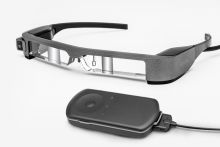 Moverio BT-300 with its controller.
 -
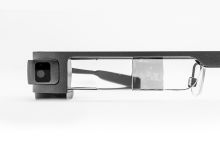 Close view of the BT-300 lens and camera.


References
- ↑ 1.00 1.01 1.02 1.03 1.04 1.05 1.06 1.07 1.08 1.09 "Epson Announces the Moverio® BT-300, the World’s Lightest Binocular, See-Through Smart Glasses with Breakthrough Display Technology". Epson Newsroom. 2016-02-22. https://news.epson.com/news/epson-announces-the-moverioR-bt-300-the-worlds-lightest-binocular-see-through-smart-glasses-with-breakthrough-display-technology. Retrieved 2026-10-14.
- ↑ 2.0 2.1 2.2 "エプソンの新型ARスマートグラス 「MOVERIO BT-300」がsMedioのMiracast® ワイヤレスディスプレイ技術を搭載". sMedio. 2017-01-10. https://www.smedio.co.jp/news/2017/01/2017011001.html. Retrieved 2026-10-14.
- ↑ 3.0 3.1 3.2 3.3 3.4 3.5 3.6 3.7 3.8 "Epson Announces Availability of Developer and Drone Editions of Moverio BT-300 AR Smart Glasses". Epson Newsroom. 2017-01-04. https://news.epson.com/news/epson-announces-availability-of-developer-and-drone-editions-of-moverio-bt-300-ar-smart-glasses. Retrieved 2026-10-14.
- ↑ 4.00 4.01 4.02 4.03 4.04 4.05 4.06 4.07 4.08 4.09 4.10 4.11 4.12 4.13 4.14 4.15 4.16 4.17 4.18 4.19 4.20 4.21 4.22 4.23 4.24 4.25 4.26 4.27 4.28 4.29 4.30 4.31 4.32 4.33 4.34 4.35 4.36 4.37 4.38 4.39 4.40 4.41 4.42 4.43 4.44 4.45 4.46 "BT-300 User's Guide". Seiko Epson Corporation. 2019-12. https://download.epson-europe.com/pub/download/6342/epson634244eu.pdf. Retrieved 2026-10-14.
- ↑ 5.00 5.01 5.02 5.03 5.04 5.05 5.06 5.07 5.08 5.09 5.10 5.11 5.12 5.13 5.14 5.15 5.16 "Moverio BT-300". Epson Europe. https://www.epson.eu/en_EU/products/smart-glasses/see-through-mobile-viewer/moverio-bt-300/p/20178. Retrieved 2026-10-14.
- ↑ 6.0 6.1 6.2 6.3 Chumin Zhao; Ryan Beams; Eshan Dahal; Aldo Badano (2024-01-05). "Spatially dependent veiling glare degrades image quality in medical extended reality". Virtual Reality 28: Article 11. doi:10.1007/s10055-023-00893-x. Retrieved 2026-10-14.
- ↑ 7.0 7.1 7.2 7.3 7.4 7.5 Ehsan Azimi; Long Qian; Nassir Navab; Peter Kazanzides (2019-03-27). "Alignment of the Virtual Scene to the Tracking Space of a Mixed Reality Head-Mounted Display". arXiv. https://arxiv.org/pdf/1703.05834. Retrieved 2026-10-14.
- ↑ 8.0 8.1 "MOVERIO BT-300/BT-350/BT2000/BT-2200". Epson India. 2019-11. https://mediaserver.goepson.com/ImConvServlet/imconv/e1766d084a827441acf06d737d1d33f169cea1b4/original%3FassetDescr%3DMOVERIO%2520BT-300-BT-350. Retrieved 2026-10-14.
- ↑ 9.0 9.1 "BT-300 製品スペック情報(販売終了品)". Epson Japan. https://www.epson.jp/products/back/moverio/bt300/spec.htm?imgsize=0. Retrieved 2026-10-14.
- ↑ "Declaration of Conformity: H756A (BT-300), E0914-08". Seiko Epson Corporation. 2021-01-25. https://epsonemear.a.bigcontent.io/v1/static/e0914-bt-300-rev_08. Retrieved 2026-10-14.
- ↑ 11.0 11.1 11.2 "BT-300 サポートメニュー一覧". Epson Japan. https://www.epson.jp/support/portal/support_menu/bt-300.htm. Retrieved 2026-10-14.
- ↑ "OPIE'18 併設セミナー・併催イベント: ARを実現するスマートグラス". The Optronics Co., Ltd.. 2018. https://www.optronics.co.jp/ex-seminar/projects/semi/52/72. Retrieved 2026-10-14.
- ↑ 13.0 13.1 13.2 "Moverio BT-300: Datasheet / Brochure". Epson Europe. https://neon.epson-europe.com/content/open/datasheet.php?id=20178&cc=XE&lc=en. Retrieved 2026-10-14.
- ↑ 14.0 14.1 "[Important Notice Partial termination of Technical information and deadline of new Apps application"]. Epson Moverio Technical Information. 2021-03-05. https://tech.moverio.epson.com/en/news/20210305.html. Retrieved 2026-10-14.
- ↑ "Does my product have HDMI inputs?". Epson Support. 2017-02-22. https://epson.com/faq/SPT_V11H756020~faq-0000627-bt300_bt300fpv?faq_cat=faq-8796158699596. Retrieved 2026-10-14.
- ↑ 16.0 16.1 16.2 "Epson Moverio Smart Glasses Reveal New Augmented Horizons with Optimized Wikitude AR SDK". Epson Newsroom. 2018-02-06. https://news.epson.com/news/wikitude-optimized-for-Moverio-Smart-Glasses. Retrieved 2026-10-14.
- ↑ 17.0 17.1 "BT-300 / BT-350 Sample Unity App Readme". Moverio on GitHub. https://github.com/moverio/bt300_350-unity-sample-app/blob/master/README.md. Retrieved 2026-10-14.
- ↑ "Does the product support Google Play?". Epson Support. 2017-02-22. https://epson.com/faq/SPT_V11H756020~faq-0000629-bt300_bt300fpv?faq_cat=faq-8796158994508. Retrieved 2026-10-14.
- ↑ 19.0 19.1 "Introduction: Moverio Basic Function SDK Developer's Guide for Android & Windows". Epson Moverio Technical Information. https://tech.moverio.epson.com/en/basic_function_sdk/developers_guide/introduction.html. Retrieved 2026-10-14.
- ↑ "How do I connect the product to a DJI drone?". Epson Support. 2017-09-28. https://epson.com/faq/SPT_V11H756020~faq-000065b-bt300_bt300fpv?faq_cat=faq-8796158928972. Retrieved 2026-10-14.
- ↑ "Can I use the DJI GO 4 app with my product?". Epson Support. 2017-02-22. https://epson.com/faq/SPT_V11H756020~faq-0000628-bt300_bt300fpv?faq_cat=faq-topFaqs. Retrieved 2026-10-14.
- ↑ "Which drones are compatible with the drone edition of the product?". Epson Support. 2016-12-15. https://epson.com/faq/SPT_V11H756020~faq-00005E9-bt300_bt300fpv?faq_cat=faq-8796158830668. Retrieved 2026-10-14.
- ↑ "I'm experiencing latency or pixelation issues when using the DJI GO or DJI GO 4 app. What should I do?". Epson Support. 2017-02-22. https://epson.com/faq/SPT_V11H756020~faq-0000626-bt300_bt300fpv?faq_cat=faq-8796158928972. Retrieved 2026-10-14.
- ↑ "Epson Announces Collaboration with Crestec to Deliver Versatile Group Augmented Reality Tours". Epson Newsroom. 2018-06-05. https://news.epson.com/news/epson-crestec-collaboration-group-augmented-reality-tours. Retrieved 2026-10-14.