

Microsoft HoloLens 1
More actions
| Microsoft HoloLens (1st Generation) | |
|---|---|

| |
| Basic Info | |
| VR/AR | Mixed Reality |
| Type | Head-mounted display |
| Subtype | Standalone AR |
| Platform | Windows Mixed Reality[1] |
| Creator | Microsoft |
| Developer | Microsoft |
| Manufacturer | Microsoft |
| Announcement Date | January 21, 2015[2] |
| Release Date | March 30, 2016 (Development Edition; US and Canada)[3] |
| Price | US$3,000 (Development Edition); US$5,000 (Commercial Suite; historical US prices)[4][5] |
| Website | https://learn.microsoft.com/en-us/previous-versions/mixed-reality/hololens-1/hololens1-hardware |
| Versions | Development Edition; Commercial Suite (same headset hardware)[6] |
| Requires | Self-contained; no host PC or phone for operation[4] |
| Successor | Microsoft HoloLens 2 |
| System | |
| Operating System | Windows 10 Holographic, version 1809 (last feature release)[7] |
| Chipset | Intel Atom x5-Z8100; Microsoft HPU 1.0[8][9] |
| CPU | Intel Atom x5-Z8100; 1.04 GHz, four logical processors (2016 inspection)[8] |
| GPU | Intel graphics identified as HoloLens Graphics (2016 inspection)[8] |
| HPU | Microsoft Holographic Processing Unit 1.0[9] |
| Storage | |
| Storage | 64 GB flash; 54.09 GB available in a 2016 inspection[9][8] |
| Memory | 2 GB RAM[9] |
| Display | |
| Display | Two HD 16:9 light engines; see-through waveguides[9] |
| Resolution | 1268 × 720 per eye (maximum rendering viewport)[10] |
| Pixel Density | >2.5k radiants (manufacturer term: light points per radian)[9] |
| Refresh Rate | 60 full-color images/s; 240 color fields/s[11] |
| Image | |
| Field of View | 30° horizontal × 17° vertical (described in research apparatus)[12] |
| Horizontal FoV | 30° (research apparatus description)[12] |
| Vertical FoV | 17° (research apparatus description)[12] |
| Optics | |
| Optics | See-through holographic lenses (waveguides)[9] |
| Ocularity | Binocular[9] |
| IPD Range | Software IPD calibration[13] |
| Passthrough | Optical see-through[10] |
| Tracking | |
| Tracking | Six degrees of freedom; inside-out localization and spatial mapping[14] |
| Base Stations | No external tracking cameras required[4] |
| Eye Tracking | No eye-gaze tracking; head-directed gaze[15][12] |
| Hand Tracking | Gesture-based input; articulated direct hand manipulation unsupported[16][17] |
| Rotational Tracking | Yes[14] |
| Positional Tracking | Yes[14] |
| Tracking Volume | Environment-dependent[18] |
| Play Space | Indoor environments with suitable lighting and visual features[18] |
| Audio | |
| Audio | Built-in spatial speakers[9] |
| Microphone | Four microphones[9] |
| 3.5mm Audio Jack | Yes[9] |
| Camera | 2 MP photo / HD video camera (manufacturer designation)[9] |
| Connectivity | |
| Connectivity | Wi-Fi 802.11ac; Bluetooth 4.1 LE; Micro USB 2.0[9] |
| Ports | Micro USB 2.0; 3.5-mm audio[9] |
| Wireless Video | Miracast projection of headset content (output)[7] |
| WiFi | 802.11ac[9] |
| Bluetooth | 4.1 LE[9] |
| Power | Internal battery; operates while charging[9] |
| Battery Capacity | 16,500 mWh (16.5 Wh; 2016 device inspection)[8] |
| Battery Life | Manufacturer estimate: 2-3 hours active; up to two weeks standby[9] |
| Charge Time | About two hours (2016 hands-on report)[5] |
| Device | |
| Weight | 579 g (manufacturer specification)[9] |
| Headstrap | Adjustable headband, forehead support, nose pads and overhead strap[19][9] |
| Sensors | IMU; four environment cameras; depth camera; ambient light sensor[9] |
| Input | Head-directed gaze; air tap/bloom/tap-and-hold; voice; included Clicker[16][20] |
| Compliance | Manufacturer-reported basic impact protection: ANSI Z87.1, CSA Z94.3, EN 166[9] |
The Microsoft HoloLens (1st Generation) is a self-contained mixed reality head-mounted display developed by Microsoft, announced on January 21, 2015, at a Windows 10 event, and released as the Development Edition on March 30, 2016, for $3,000.[2][4][3] Its processor, sensors and battery are built into the headset. See-through waveguide optics add digital images to the wearer's view of the physical environment, while spatial mapping, gestures and voice commands support interaction with content placed in that environment.[9][15][10]
Microsoft marketed HoloLens as the first fully untethered "holographic computer". Its early editions targeted developers and commercial deployments, with examples in equipment servicing, design review and medical education.[2][6][21][22][23] Microsoft ended first-generation security updates and technical support after December 10, 2024; the devices continue to function.[7]
History and development
Research origins and announcement
An original January 2015 interview and prototype demonstration by WIRED identified Alex Kipman as the project's inventor and described five years of development under the name Project Baraboo, drawing on his earlier Kinect work. The prototype account predates the shipping Development Edition.[24] Microsoft introduced HoloLens and the Windows Holographic platform at its January 21, 2015 Windows 10 event. The platform extended Windows universal applications into a spatial interface.[2]
Development Edition and international availability
| Date | Event and scope |
|---|---|
| February 29, 2016 | Microsoft began sending developer applicants invitations to purchase the US$3,000 Development Edition, announcing shipment in the US and Canada from March 30.[4] |
| March 30, 2016 | First Development Edition shipments in the US and Canada. Microsoft confirmed the actual shipment date in its October 2016 rollout account and March 2017 anniversary account.[3][1] |
| August 2, 2016 | US and Canadian developers and businesses could order up to five devices without an application. Microsoft introduced Commercial Suite alongside the Windows 10 Anniversary Update.[6] |
| October 12, 2016 | Preorders opened in Australia, Ireland, France, Germany, New Zealand and the United Kingdom. This was the preorder announcement, rather than confirmation that all six countries received devices that day.[3] |
| January 18, 2017 | Microsoft began delivering Japanese preorders for Development Edition and Commercial Suite.[25] |
Commercial Suite
Commercial Suite used the same Development Edition headset hardware. Its business features included kiosk mode, mobile device management, Azure Active Directory identity, Windows Update for Business, BitLocker and secure boot, corporate network access and private app distribution. These describe the 2016 offering, rather than the present availability of each connected service.[6] Contemporary US review pricing listed Development Edition at US$3,000 and Commercial Suite at US$5,000.[5] In Japan, the January 2017 offering included a one-year hardware warranty for Commercial Suite, while Development Edition had no hardware warranty.[25]
Design philosophy and physical fit
Self-contained mixed reality
HoloLens performs its ordinary processing on the headset, without a tethered PC or phone. Its built-in sensors support local tracking and mapping without external tracking cameras.[4] The optical view leaves the physical environment visible, while applications add digital objects and sound. App windows and launchers can remain in a placed location until removed, and users can move or resize them.[16] This spatial placement depends on the headset recognizing its surroundings; it is not a guarantee that a hologram will retain exact alignment through every environmental change.[18]
Headband, visor and weight
Microsoft lists the headset's weight as 579 g. The adjustable band fits over glasses, with nose-pad options and an overhead strap. The fit procedure places the band at the top of the forehead, tightens its rear wheel and slides the visor so that the lenses sit over the eyes and the speakers above the ears.[9][19] The first-generation instructions include rotating the headband upward by about 20-30 degrees during fitting. The hardware guide also describes rotating the visor upward while worn; this should not be reduced to an unconditional claim that the original visor cannot move.[19][9]
The headset has separate brightness and volume buttons, a power button and battery-status lights. Its compute, displays, sensors and battery are carried on the head; an external unit is not required for ordinary operation.[9] Microsoft advises initially brief sessions and breaks if discomfort occurs. Its basic impact-protection statement for ANSI Z87.1, CSA Z94.3 and EN 166 does not replace the separate instruction to use the headset in safe surroundings with adequate attention to hazards.[19][9]
Display technology
Holographic waveguides and image rendering
The binocular optical system uses see-through waveguides and two HD 16:9 light engines. Microsoft's specifications describe 2.3 million total light points and a holographic density greater than 2.5k radiants, defined as light points per radian.[9] The first-generation maximum application viewport is 1268 × 720 per eye. The viewport can be reduced to 634 × 360, although Microsoft discourages sizes below 540p because of image degradation. These rendering dimensions describe the application image, separately from the light-engine specification.[10]
Optical see-through rendering adds light to the real scene: black pixels are transparent, and even bright white virtual objects remain translucent. Stereoscopic disparity and spatial sound provide depth cues, while the real environment remains visible through and around the displayed content.[10] The display's optical focal distance is approximately 2 m. Virtual objects can be rendered at other distances, but the resulting difference between accommodation and convergence can cause discomfort; Microsoft's design guidance favors placing important content near the focal plane.[11]
Field of view and light engines
Device-specific research describes the original holographic field of view as about 30 degrees horizontally and 17 degrees vertically. These are two separate axes of the displayed image, rather than a 30-degree diagonal field of view. Digital objects outside the display frame are not visible even though the real environment remains visible.[12][16] The first-generation calibration app sets the rendering interpupillary distance by asking the wearer to align a finger with six targets for each eye. This is a rendering calibration procedure, rather than eye-gaze input or a documented mechanical lens-spacing adjustment.[13][15]
HoloLens presents 60 full-color images per second using a red-green-blue-green sequence of 240 individual color fields per second. The color-field rate does not mean that an application renders 240 complete frames per second. Microsoft's developer guidance calls for a consistent 60 FPS and describes color separation at moving edges, judder from low rendering rates and reprojection to stabilize imagery as the head moves.[11]
Processing architecture
The shipping specifications identify an Intel 32-bit architecture with TPM 2.0 support, together with Microsoft's custom Holographic Processing Unit (HPU 1.0), 2 GB of RAM and 64 GB of flash storage.[9] The HPU processes information from the sensors for environmental understanding and input, alongside the main processor.[4]
In May 2016, Windows Central inspected a Development Edition with AIDA64 Mobile. It identified an Intel Atom x5-Z8100 at 1.04 GHz with four logical processors, a 64-bit-capable CPU running a 32-bit Windows build, and Intel graphics reported as "HoloLens Graphics". The inspected installation had 54.09 GB of available storage. That free-space figure describes the tested installation, rather than guaranteed space on every headset.[8] Passive cooling is specified by Microsoft; the device has no fans.[9]
Tracking and sensors
Spatial mapping and localization
The sensor array includes an inertial measurement unit, four environment-understanding cameras, a depth camera and an ambient light sensor, alongside the photo/video camera and microphone array.[9] The first-generation system combines six-degree-of-freedom localization with spatial mapping of the nearby environment. Its built-in mapping exposes a triangle mesh that applications can use when positioning content relative to physical surfaces.[14]
The 2020 first-generation sensor study distinguishes four grayscale tracking cameras from the color photo/video camera. It describes a time-of-flight depth camera with short-throw data used for gesture recognition and long-throw data used for mapping. Researchers can access additional camera data through Research Mode; that research interface is distinct from the processed spatial mesh available to ordinary applications.[14]
Environment and alignment
Tracking relies on visible environmental features. Microsoft's guidance identifies poor or uneven lighting, repetitive spaces, moving objects and reflective surfaces as possible causes of tracking problems. Previously mapped objects can remain in the map after they move until the area is observed again. The guidance favors indoor use and shade, with direct sunlight avoided.[18] Mapping and tracking accuracy therefore depend on the environment and movement, rather than a universal latency or positioning specification.
Input methods
| Method | First-generation behavior |
|---|---|
| Head-directed gaze | The cursor follows head orientation. The system raycasts from the device toward content; this provides a target for a subsequent gesture or spoken action. It does not track the wearer's eye-gaze direction.[15][16] |
| Gestures | Air tap selects the targeted object. Tap-and-hold moves or resizes content, while bloom brings up the Start interface. The hand must remain inside the sensor's gesture frame.[16] Direct hand manipulation using a fully articulated hand model is not supported on the first generation.[17] |
| Voice | The system "Select" command can activate the head-targeted element. Documented software also supports spoken manipulation commands and keyboard dictation. Original Cortana commands included launching apps, taking pictures, recording and checking the battery; these are historical software features, not a promise that a remote Cortana service remains available.[26][19] |
| Clicker | The Bluetooth accessory was supplied with HoloLens in a separate box. It has a button and finger loop. Holding the button while rotating the wrist can scroll or zoom using the corresponding app tools; the loop is not a scroll ring. Clicker input can be recognized outside the hand gesture frame.[20] |
Microsoft's connection guide lists Bluetooth mouse, keyboard and Clicker support for HoloLens 1 and warns that a device appearing in the pairing list does not establish compatibility. It generally excludes gamepads, while the first-generation known-issues page separately documents Xbox Wireless Controller S use and reconnection limitations. Those specific instructions should not be read as support for every Bluetooth controller, audio device or HoloLens 2 USB-C accessory.[27][28]
Audio system
Built-in spatial speakers allow virtual sound sources to be positioned around the wearer while the physical environment remains audible. Four microphones capture speech, and a 3.5-mm audio jack provides a wired headphone connection.[9][4] The speech documentation describes separate microphone-processing categories for speech recognition, communication and ambient recording. The headphone jack provides another listening option; the specifications do not establish that every attached headphone has better sound quality.[26]
Battery and charging
Microsoft estimates 2-3 hours of active battery use and up to two weeks of standby, and specifies that HoloLens can operate while charging. The supplied charger provides 18 W at 9 V and 2 A through Micro USB; charging rate varies with the operating environment.[9][19] Windows Central's 2016 inspection reported a 16,500 mWh battery, equivalent to 16.5 Wh.[8] A contemporary hands-on review described approximately two hours to charge. That is a reported estimate rather than a universal measured charging guarantee.[5]
Software platform
Windows Holographic and development tools
HoloLens ran Windows 10 Holographic and supported Universal Windows Platform applications, including both placed 2D windows and immersive 3D applications.[4][16] Microsoft's launch program provided developer documentation and announced Visual Studio projects and a PC-based HoloLens Emulator alongside the March 2016 device shipment. The emulator allowed work on applications before a developer had physical hardware.[4]
Microsoft's first-generation release notes identify Windows 10 version 1809, Unity 2019 LTS, MRTK 2 and Windows Device Recovery Tool 3.17 as the last known good combinations. First-generation apps do not support the OpenXR API; the documented Unity pathway used the WinRT backend. These are historical compatibility limits, rather than a recommendation that the old toolchain still receives maintenance.[7] Microsoft's rendering guidance also describes displaying medical MRI or engineering volumes in 3D, allowing their inspection from different angles.[10] The device's local compute and limited RAM also differ from the resources available to a tethered PC; software behavior must be assessed in its own application and build.[9][8]
Support lifecycle
HoloLens 1 entered Long-Term Servicing on November 23, 2021, with feature parity maintained at Windows 10 Holographic version 1809. The December 2024 update was its last monthly servicing update. After December 10, 2024, Microsoft stopped first-generation security updates and technical support, while stating that devices would continue to function. Microsoft also states that there is no out-of-warranty support or inventory for device exchange.[7]
Enterprise applications
The first-generation developer and commercial program included business tools, visualization and training alongside experimental entertainment software. The following examples document particular applications or projects; they do not establish that the headset improved every user's productivity or clinical outcomes.[4][6]
| Area | Documented first-generation use |
|---|---|
| Equipment servicing and remote collaboration | In September 2016, Microsoft and thyssenkrupp demonstrated elevator maintenance with Skype calls to remote experts and holographic instructions. The account describes servicing tasks, rather than a controlled test of every technician or a guarantee of safety improvement.[21] |
| Architecture and construction | Trimble's SketchUp Viewer became available for HoloLens in November 2016. It displayed tabletop scale models and building models at full scale for design review. The announcement also describes architect Greg Lynn's 2016 Packard Plant redesign demonstration.[22] |
| Medical visualization and education | Case Western Reserve University and Cleveland Clinic released the HoloAnatomy demonstrator in 2016. Users could inspect body systems at human scale and navigate by gesture or voice. The university's June account explicitly described the full anatomy curriculum as still in development.[23] |
| Workplace instruction | Microsoft's February 2019 announcement made Dynamics 365 Guides available in preview and expressly said it would run on both the original HoloLens and HoloLens 2. It described step-by-step instructions and a PC authoring tool for photographs, videos and 3D models. This records historical first-generation support.[29] |
| Space exploration | NASA and Microsoft developed Sidekick for remote assistance and procedural illustrations aboard the International Space Station, and OnSight for working with Mars data. NASA's updated release records a HoloLens launch to the station on December 6, 2015. JPL led development and Johnson Space Center led Sidekick testing and certification.[30] |
Healthcare research also examined registration of medical-style overlays, but use in an experiment is different from validated surgical navigation. The first-generation marker study discussed below used a flat monitor and photographs, with accuracy varying by marker position and size.[31]
Windows Mixed Reality and capture
By March 2017, Microsoft described the HoloLens software platform as Windows Mixed Reality and discussed its coexistence with forthcoming immersive headsets.[1] The first-generation HoloLens retained its own Windows Holographic software and lifecycle; specifications or support notices for PC-connected immersive headsets cannot simply be transferred to it.[7]
Mixed reality capture combines photo/video-camera imagery with the rendered virtual content for pictures or video. It records a camera view of the experience, rather than an exact reproduction of everything the wearer sees through both eyes.[9][10] Microsoft's first-generation stabilization guidance notes that recording capture can throttle applications to 30 FPS, while the known-issues page warns that Device Portal Live Preview may introduce several seconds of latency.[11][28]
The version 1809 release notes document Miracast projection of HoloLens content to a compatible external display. This is outbound sharing of the headset view, rather than a wireless video-input specification for driving its displays from another computer. Micro USB also supports PC file transfer through MTP in the documented first-generation software.[7]
Research and limitations
Indoor tracking and depth mapping
Hübner and colleagues' 2020 study explicitly tested HoloLens version 1. Eight trajectories in an approximately 8 × 5 × 3 m laboratory were compared with an eight-camera OptiTrack Prime 17W system. The reported mean absolute trajectory error was 1.9 ± 0.4 cm. A separate 287 m loop across two building floors accumulated a 2.39 m positional offset before relocalization. The authors also compared office meshes with Leica HDS 6000 laser-scanner data, obtaining a mean nearest-ground-truth distance of 2.3 cm for the fixed-scale mesh. Furniture and floor points were removed for comparison. Depth noise varied with distance and surface angle. The researchers noted possible infrared interference between the depth sensor and motion-capture reference, and large-scale drift that the headset corrected locally. These results describe the tested routes, scenes and processing, rather than a universal room-scale accuracy specification.[14]
Image-marker registration
Pérez-Pachón and colleagues' 2021 experiment used first-generation HoloLens with Vuforia 6.2.10 and MRTK 1.5.8.0. A virtual hexagon was registered to a flat monitor using 4, 8 and 12 cm square markers at nine positions; 114 renderings were assessed from photographs. For 8 and 12 cm markers, Table 2 reports 30.2% of inclination errors within 2 degrees, 70.7% of vertex-position errors within 2 mm and 76% of centroid-position errors within 2 mm. These differ from the paper's broader abstract wording. Camera-image processing, headset repositioning, a single planar marker and the flat surface limit interpretation. Repeated measurements were not independent patient cases, and the experiment did not validate high-precision surgery.[31]
Field of view during standing and walking
Hoogendoorn and colleagues' 2024 counterbalanced experiment compared HoloLens 1 and 2 in 16 healthy adults aged 46-65. Participants viewed or negotiated real and holographic stepping targets and obstacles on a 6 m walkway; headset position and orientation were recorded at 30 Hz. HoloLens 1 required greater downward head orientation for the nearest holographic target and several walking interactions. Gait speed did not differ significantly between headset generations, although it was generally slower around holographic objects than real objects. The study measured head orientation and speed, without testing people with Parkinson's disease, foot-placement accuracy or clinical effectiveness. It supports a task-specific consequence of the narrow display window rather than a universal outcome for all AR applications.[12]
Comparison with HoloLens 2
The table compares the original model with the named successor. Prices describe the historical hardware offerings; displayed field-of-view figures are the axes described in the research apparatus, not diagonal measurements.[4][5][12][29]
| Feature | HoloLens 1 | HoloLens 2 |
|---|---|---|
| First shipment | March 30, 2016, US and Canada[3] | November 7, 2019[32] |
| Historical US price | US$3,000 Development Edition; US$5,000 Commercial Suite[4][5] | US$3,500 headset price announced in 2019[29] |
| Holographic field of view (horizontal × vertical) | Approximately 30° × 17°[12] | Approximately 43° × 29°[12] |
| Display specification | HD 16:9 light engines; maximum rendering viewport 1268 × 720 per eye[9][10] | Manufacturer's 2k 3:2 light-engine specification[33] |
| HPU | HPU 1.0[9] | Second-generation custom HPU[33] |
| Hand input | Symbolic gestures; no articulated direct hand manipulation[16][17] | Two-handed fully articulated tracking and direct manipulation[33] |
| Eye-gaze input | No; head-directed cursor[15][12] | Real-time eye tracking[33] |
| Manufacturer-listed weight | 579 g[9] | 566 g[33] |
| Visor movement | Adjustable headband/visor fitting; manufacturer also describes upward visor rotation[19][9] | Flip-up visor expressly described for switching out of mixed reality[29] |
Legacy and development
The original HoloLens established Microsoft's Windows Holographic developer program and supported work on spatial applications without an external computer. Its first-year examples included design tools, industrial collaboration, NASA projects and medical education.[2][4][1] Descriptions of it as the "first" holographic computer belong to Microsoft's product positioning, rather than proof that no earlier self-contained AR system existed.[2]
Its successor expanded hand and eye input and changed the fit system. Microsoft described HoloLens 2 as having a more balanced center of gravity than the original.[29] Microsoft confirmed HoloLens 2 shipment on November 7, 2019.[29][32] For the original headset, the documented limits include the small holographic window, application-dependent rendering stability and tracking drift under particular conditions. Comfort and fatigue depend on fit, session and task; original studies and manufacturer guidance provide more specific evidence than broad claims that it is invariably comfortable or difficult to wear.[19][11][12][14]
Technical specifications summary
| Specification | Details |
|---|---|
| Display | See-through waveguides; HD 16:9 light engines; maximum application viewport 1268 × 720 per eye[9][10] |
| Holographic field of view | Approximately 30° horizontal × 17° vertical, as described in research[12] |
| Image rate | 60 full-color images/s; four color fields per image[11] |
| Processor | Intel 32-bit architecture and HPU 1.0; 2016 inspection identified Atom x5-Z8100[9][8] |
| Memory and storage | 2 GB RAM; 64 GB flash[9] |
| Tracking | Six-degree-of-freedom inside-out localization with nearby spatial mapping[14] |
| Input | Head gaze, gesture, voice and included Bluetooth Clicker[15][16][20] |
| Audio | Built-in spatial speakers; four microphones; 3.5-mm jack[9] |
| Battery | Manufacturer estimate of 2-3 hours active use and up to two weeks standby[9] |
| Weight | Manufacturer-listed 579 g[9] |
| Historical US prices | US$3,000 Development Edition; US$5,000 Commercial Suite[4][5] |
| Support status | Security updates and technical support ended after December 10, 2024; devices continue to function[7] |
See Also
Gallery
-
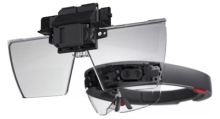 Exploded view of the first-generation HoloLens display assembly.
 -
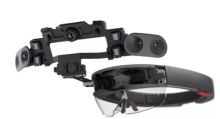 Exploded view of the first-generation HoloLens sensor assembly.


References
- ↑ 1.0 1.1 1.2 1.3 Alex Kipman (2017-03-30). "Happy birthday, HoloLens! A huge thank you to our community.". Microsoft Devices Blog. https://blogs.windows.com/devices/2017/03/30/happy-birthday-hololens-huge-thank-community/. Retrieved 2026-10-14.
- ↑ 2.0 2.1 2.2 2.3 2.4 2.5 Terry Myerson (2015-01-21). "The next generation of Windows: Windows 10". Windows Insider Blog. https://blogs.windows.com/windows-insider/2015/01/21/the-next-generation-of-windows-windows-10/. Retrieved 2026-10-14.
- ↑ 3.0 3.1 3.2 3.3 3.4 Alex Kipman (2016-10-12). "Microsoft HoloLens welcomes six new countries to the world of mixed reality". Microsoft Devices Blog. https://blogs.windows.com/devices/2016/10/12/microsoft-hololens-welcomes-six-new-countries-to-the-world-of-mixed-reality/. Retrieved 2026-10-14.
- ↑ 4.00 4.01 4.02 4.03 4.04 4.05 4.06 4.07 4.08 4.09 4.10 4.11 4.12 4.13 4.14 Alex Kipman (2016-02-29). "Announcing Microsoft HoloLens Development Edition open for pre-order, shipping March 30". Microsoft Devices Blog. https://blogs.windows.com/devices/2016/02/29/announcing-microsoft-hololens-development-edition-open-for-pre-order-shipping-march-30/. Retrieved 2026-10-14.
- ↑ 5.0 5.1 5.2 5.3 5.4 5.5 5.6 Neil Bennett (2016-10-25). "HoloLens review: Hands-on". Tech Advisor. https://www.techadvisor.com/article/717367/hololens-review-hands-on.html. Retrieved 2026-10-14.
- ↑ 6.0 6.1 6.2 6.3 6.4 Alex Kipman (2016-08-02). "HoloLens Development Edition Updates". Microsoft Devices Blog. https://blogs.windows.com/devices/2016/08/02/hololens-development-edition-updates-2/. Retrieved 2026-10-14.
- ↑ 7.0 7.1 7.2 7.3 7.4 7.5 7.6 7.7 "HoloLens 1st (gen) release notes". Microsoft Learn. 2024-06-27. https://learn.microsoft.com/en-us/previous-versions/mixed-reality/hololens-1/hololens1-release-notes. Retrieved 2026-10-14.
- ↑ 8.0 8.1 8.2 8.3 8.4 8.5 8.6 8.7 8.8 Daniel Rubino (2016-05-03). "Microsoft HoloLens - Here are the full processor, storage and RAM specs". Windows Central. https://www.windowscentral.com/microsoft-hololens-processor-storage-and-ram. Retrieved 2026-10-14.
- ↑ 9.00 9.01 9.02 9.03 9.04 9.05 9.06 9.07 9.08 9.09 9.10 9.11 9.12 9.13 9.14 9.15 9.16 9.17 9.18 9.19 9.20 9.21 9.22 9.23 9.24 9.25 9.26 9.27 9.28 9.29 9.30 9.31 9.32 9.33 9.34 9.35 9.36 9.37 9.38 9.39 9.40 9.41 9.42 9.43 9.44 "HoloLens (1st gen) hardware". Microsoft Learn. 2024-06-27. https://learn.microsoft.com/en-us/previous-versions/mixed-reality/hololens-1/hololens1-hardware. Retrieved 2026-10-14.
- ↑ 10.0 10.1 10.2 10.3 10.4 10.5 10.6 10.7 10.8 "Holographic Rendering overview". Microsoft Learn. 2022-02-02. https://learn.microsoft.com/en-us/windows/mixed-reality/develop/advanced-concepts/rendering-overview. Retrieved 2026-10-14.
- ↑ 11.0 11.1 11.2 11.3 11.4 11.5 "Hologram stability". Microsoft Learn. 2021-10-19. https://learn.microsoft.com/en-us/windows/mixed-reality/develop/advanced-concepts/hologram-stability. Retrieved 2026-10-14.
- ↑ 12.00 12.01 12.02 12.03 12.04 12.05 12.06 12.07 12.08 12.09 12.10 12.11 Eva M. Hoogendoorn; Daphne J. Geerse; Jip Helsloot; Bert Coolen; John F. Stins; Melvyn Roerdink (2024-10-21). "A larger augmented-reality field of view improves interaction with nearby holographic objects". PLOS ONE 19 (10): e0311804. Retrieved 2026-10-14.
- ↑ 13.0 13.1 "Improve visual quality and comfort". Microsoft Learn. 2022-09-28. https://learn.microsoft.com/en-us/hololens/hololens-calibration. Retrieved 2026-10-14.
- ↑ 14.0 14.1 14.2 14.3 14.4 14.5 14.6 14.7 Patrick Hübner; Kate Clintworth; Qingyi Liu; Martin Weinmann; Sven Wursthorn (2020-02-14). "Evaluation of HoloLens Tracking and Depth Sensing for Indoor Mapping Applications". Sensors 20 (4): 1021. Retrieved 2026-10-14.
- ↑ 15.0 15.1 15.2 15.3 15.4 15.5 Microsoft HoloLens Team (2016-01-21). "HoloLens Interaction Model". Windows Developer Blog. https://blogs.windows.com/windowsdeveloper/2016/01/21/hololens-interaction-model/. Retrieved 2026-10-14.
- ↑ 16.0 16.1 16.2 16.3 16.4 16.5 16.6 16.7 16.8 "Getting around HoloLens (1st gen)". Microsoft Learn. 2024-06-27. https://learn.microsoft.com/en-us/previous-versions/mixed-reality/hololens-1/hololens1-basic-usage. Retrieved 2026-10-14.
- ↑ 17.0 17.1 17.2 "Direct manipulation with hands". Microsoft Learn. 2022-09-22. https://learn.microsoft.com/en-us/windows/mixed-reality/design/direct-manipulation. Retrieved 2026-10-14.
- ↑ 18.0 18.1 18.2 18.3 "HoloLens environment considerations". Microsoft Learn. 2022-03-23. https://learn.microsoft.com/en-us/hololens/hololens-environment-considerations. Retrieved 2026-10-14.
- ↑ 19.0 19.1 19.2 19.3 19.4 19.5 19.6 19.7 "Get your HoloLens (1st gen) ready to use". Microsoft Learn. 2024-06-27. https://learn.microsoft.com/en-us/previous-versions/mixed-reality/hololens-1/hololens1-setup. Retrieved 2026-10-14.
- ↑ 20.0 20.1 20.2 "Use the HoloLens (1st gen) clicker". Microsoft Learn. 2024-06-27. https://learn.microsoft.com/en-us/previous-versions/mixed-reality/hololens-1/hololens1-clicker. Retrieved 2026-10-14.
- ↑ 21.0 21.1 Scott Erickson (2016-09-15). "Microsoft HoloLens enables thyssenkrupp to transform the global elevator industry". Microsoft Devices Blog. https://blogs.windows.com/devices/2016/09/15/microsoft-hololens-enables-thyssenkrupp-to-transform-the-global-elevator-industry/. Retrieved 2026-10-14.
- ↑ 22.0 22.1 Lorraine Bardeen (2016-11-07). "Trimble brings mixed reality to life for architecture and design". Microsoft Devices Blog. https://blogs.windows.com/devices/2016/11/07/trimble-brings-mixed-reality-to-life-for-architecture-and-design/. Retrieved 2026-10-14.
- ↑ 23.0 23.1 Editorial Staff (2016-06-02). "CWRU, Cleveland Clinic release first third-party app for Microsoft HoloLens". Case Western Reserve University. https://case.edu/news/cwru-cleveland-clinic-release-first-third-party-app-microsoft-hololens. Retrieved 2026-10-14.
- ↑ Jessi Hempel (2015-01-21). "Project HoloLens: Our Exclusive Hands-On With Microsoft's Holographic Goggles". WIRED. https://www.wired.com/2015/01/microsoft-hands-on/. Retrieved 2026-10-14.
- ↑ 25.0 25.1 "Microsoft HoloLens の国内での提供を本日より開始!". Windows Blog for Japan. 2017-01-18. https://blogs.windows.com/japan/2017/01/18/microsoft-hololens-ga/. Retrieved 2026-10-14.
- ↑ 26.0 26.1 "Voice input". Microsoft Learn. 2026-01-06. https://learn.microsoft.com/en-us/windows/mixed-reality/design/voice-input. Retrieved 2026-10-14.
- ↑ "Connect to Bluetooth and USB-C devices". Microsoft Learn. 2022-10-13. https://learn.microsoft.com/en-us/hololens/hololens-connect-devices. Retrieved 2026-10-14.
- ↑ 28.0 28.1 "Known issues for HoloLens (1st Gen)". Microsoft Learn. 2024-06-27. https://learn.microsoft.com/en-us/previous-versions/mixed-reality/hololens-1/hololens-known-issues. Retrieved 2026-10-14.
- ↑ 29.0 29.1 29.2 29.3 29.4 29.5 Julia White (2019-02-24). "Microsoft at MWC Barcelona: Introducing Microsoft HoloLens 2". The Official Microsoft Blog. https://blogs.microsoft.com/blog/2019/02/24/microsoft-at-mwc-barcelona-introducing-microsoft-hololens-2/. Retrieved 2026-10-14.
- ↑ "NASA, Microsoft Collaborate to Bring Science Fiction to Science Fact". NASA. 2015-06-25. https://www.nasa.gov/news-release/nasa-microsoft-collaborate-to-bring-science-fiction-to-science-fact/. Retrieved 2026-10-14.
- ↑ 31.0 31.1 Laura Pérez-Pachón; Parivrudh Sharma; Helena Brech; Jenny Gregory; Terry Lowe; Matthieu Poyade; Flora Gröning (2021-04-15). "Effect of marker position and size on the registration accuracy of HoloLens in a non-clinical setting with implications for high-precision surgical tasks". International Journal of Computer Assisted Radiology and Surgery 16 (6): 955-966. Retrieved 2026-10-14.
- ↑ 32.0 32.1 John Roach (2019-11-07). "The making of the HoloLens 2: How advanced AI built Microsoft’s vision for ubiquitous computing". Microsoft Source. https://news.microsoft.com/source/features/innovation/hololens-2-shipping-to-customers/. Retrieved 2026-10-14.
- ↑ 33.0 33.1 33.2 33.3 33.4 "About HoloLens 2". Microsoft Learn. 2023-03-13. https://learn.microsoft.com/en-us/hololens/hololens2-hardware. Retrieved 2026-10-14.